It is currently Thu Jul 30, 2026 4:52 am


All times are UTC - 5 hours [ DST ]


Post new topic Reply to topic  [ 47 posts ]  Go to page Previous  1, 2, 3
Author Message
 Post subject: Re: hi guys..yes it's me again
PostPosted: Fri Sep 23, 2011 6:58 pm  (#41) 
Offline
GimpChat Member
User avatar

Joined: May 27, 2011
Posts: 707
yes,Patriot is in there too,but not in gimp


Top
 Post subject: Re: hi guys..yes it's me again
PostPosted: Fri Sep 23, 2011 7:00 pm  (#42) 
Offline
GimpChat Member
User avatar

Joined: Apr 07, 2010
Posts: 14182
well, I can't understand that one. I will go make sure it is in my gimp.
Edit: yep it is. One of the guys/gals can probably figure it out for you. I am not sure if they can be in both places.

_________________
Image


Top
 Post subject: Re: hi guys..yes it's me again
PostPosted: Fri Sep 23, 2011 7:06 pm  (#43) 
Offline
GimpChat Member
User avatar

Joined: May 27, 2011
Posts: 707
ok,Thank you :)
I'll wait to see what happens


Top
 Post subject: Re: hi guys..yes it's me again
PostPosted: Fri Sep 23, 2011 8:27 pm  (#44) 
Offline
GimpChat Founder
User avatar

Joined: May 22, 2008
Posts: 5241
Location: Gimpville
pirate541 wrote:
GnuTux
I followed Your advice on moving the layers,and it worked fine until it was time to save the animation.i saved to gif,and got a message that Gimp needs to crop it because it was out of borders,so i let it(didn't have the choice,mind you) and when i replayed it,half the words were gone

Did you preview your animation using Filters/Animation/Playback?

If it's working properly in your preview, it should work when you save it. It's normal behavior for GIMP to crop the .gif when needed, as you save it.

The purpose of my suggestion was to get you familiar with how .gif animations work.

Once you get the layer moving, you can manually crop the image to give it the appearance of scrolling off an imaginary boundary (or you can fade it as you move it). Here is a small example for you to look at..

Scroll left/right

Image

Scroll left/right off edge
Image

It's a bit tedious to move objects by hand, which makes you appreciate GAP (or scripting). With GAP, you can more easily move an object between two points or along a path. I think doing a few animations manually is a probably a good exercise, prior to working with GAP.

_________________
“If you reach for the stars, you just might land on a decently sized hill.” - Stuart Hill


Top
 Post subject: Re: hi guys..yes it's me again
PostPosted: Fri Sep 23, 2011 8:33 pm  (#45) 
Offline
GimpChat Member
User avatar

Joined: May 27, 2011
Posts: 707
cool :)
Thank You for the advice and feedback,it is greatly appreciated


Top
 Post subject: Re: hi guys..yes it's me again
PostPosted: Fri Sep 23, 2011 8:51 pm  (#46) 
Offline
Global Moderator
User avatar

Joined: May 16, 2010
Posts: 16139
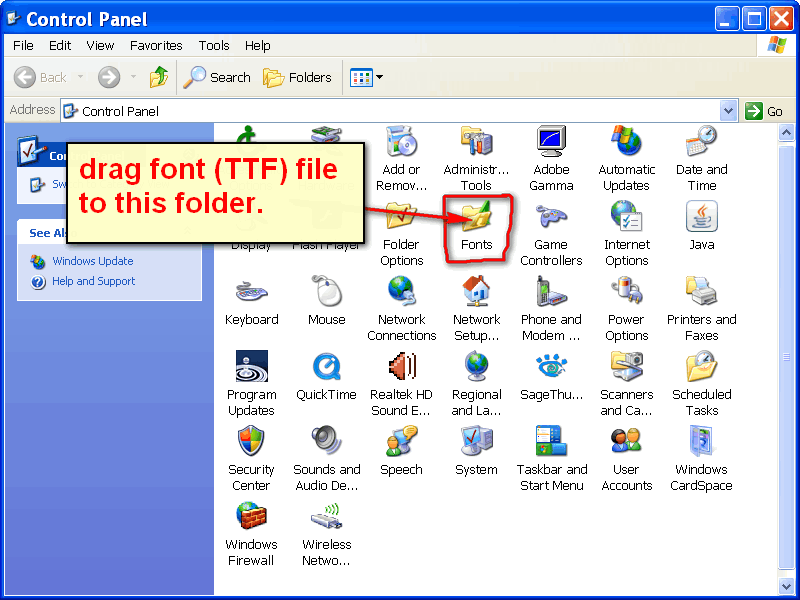
pirate i am not sure what you mean by the font isn't there.
What i always do is download the font and unzip it to another folder.Then Go to Start\Control Panel\ the Fonts folder is there.

Image

_________________
Image


Top
 Post subject: Re: hi guys..yes it's me again
PostPosted: Fri Sep 23, 2011 9:40 pm  (#47) 
Offline
GimpChat Member
User avatar

Joined: May 27, 2011
Posts: 707
Rod,
it's my fault,i apologize to You all,i saved the font under etc/fonts in gimp,i finally found it,deleted it and saved in fonts


Top
Post new topic Reply to topic  [ 47 posts ]  Go to page Previous  1, 2, 3

All times are UTC - 5 hours [ DST ]


* Login  


Powered by phpBB3 © phpBB Group