It is currently Sat Sep 26, 2026 7:32 pm


All times are UTC - 5 hours [ DST ]


Post new topic Reply to topic  [ 9 posts ] 
Author Message
 Post subject: Canvas Window Always On Top [SOLVED]
PostPosted: Sat Mar 29, 2014 1:44 pm  (#1) 
Offline
Administrator
User avatar

Joined: Aug 10, 2012
Posts: 14212
Location: Native to NYC living in Arizona, Gimp 2.8 - 3.0, Win 11 PC.
GIMP Version: 2.8.10
Operating System: Windows
GIMP Experience: Advanced Level

List any relevant plug-ins or scripts:
N\A

List any ERROR messages you received:
N\A


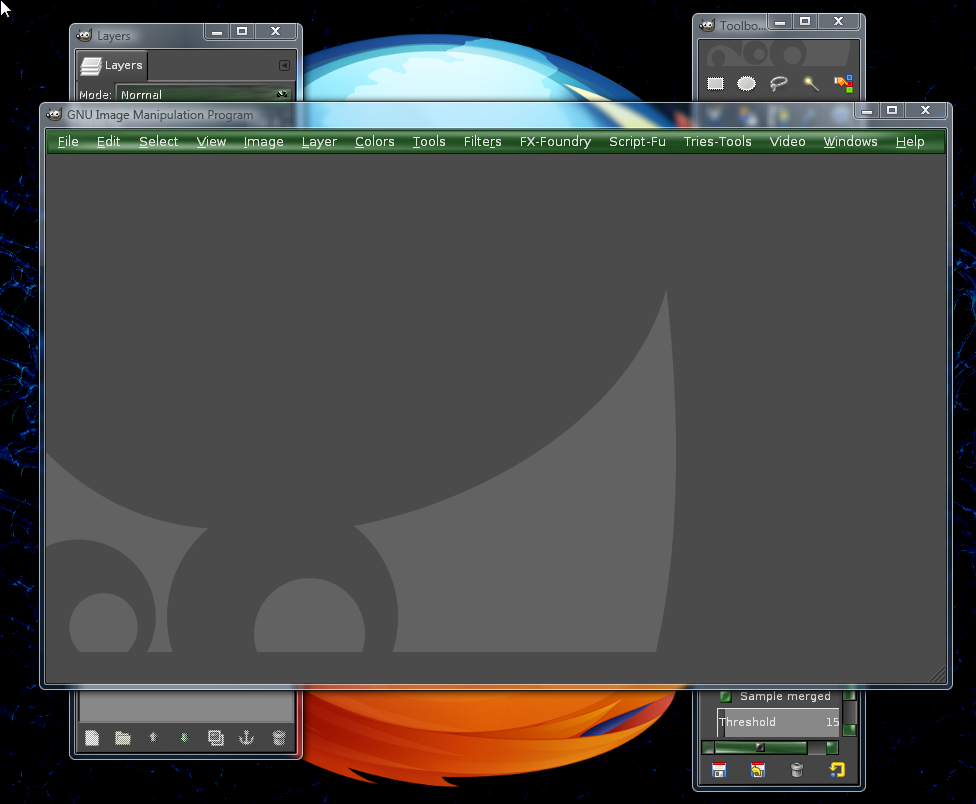
I'm using the "Classic" Gimp windows mode, as seen below. :mrgreen:
Image

I want to keep the main canvas window always on top. From the image below. You can see that when I move the main canvas window it remains under the other windows. :gaah
How can I change this preference to have the main canvas window always on top?
Image

_________________
Image
"A wise man learns more from a foolish question than a fool can learn from a wise answer"
Image


Last edited by Wallace on Sat Mar 29, 2014 2:08 pm, edited 1 time in total.

Share on Facebook Share on Twitter Share on Orkut Share on Digg Share on MySpace Share on Delicious Share on Technorati
Top
 Post subject: Re: Canvas Window Always On Top
PostPosted: Sat Mar 29, 2014 1:47 pm  (#2) 
Offline
GimpChat Member
User avatar

Joined: Jun 02, 2013
Posts: 2090
Not sure, but that is annoying, haha. :hehe

_________________
Image


Top
 Post subject: Re: Canvas Window Always On Top
PostPosted: Sat Mar 29, 2014 1:53 pm  (#3) 
Offline
GimpChat Member
User avatar

Joined: Jun 02, 2013
Posts: 2090
Found it. Go to Edit>Preferences>Window Management>Hints for docks and toolbox, and change "Utility", to normal window, okay, reboot.

_________________
Image


Last edited by The Warrior on Sat Mar 29, 2014 2:05 pm, edited 2 times in total.

Top
 Post subject: Re: Canvas Window Always On Top
PostPosted: Sat Mar 29, 2014 1:59 pm  (#4) 
Offline
GimpChat Member
User avatar

Joined: Jun 02, 2013
Posts: 2090
It also lets you reduce the tool box, or layers dialogue to the bottom. Or, perhaps it always did that, and I never noticed. :hehe

Image

_________________
Image


Top
 Post subject: Re: Canvas Window Always On Top
PostPosted: Sat Mar 29, 2014 2:02 pm  (#5) 
Offline
GimpChat Member
User avatar

Joined: Jun 02, 2013
Posts: 2090
I see that whatever you click on, will be on top:

Image

Image

_________________
Image


Top
 Post subject: Re: Canvas Window Always On Top
PostPosted: Sat Mar 29, 2014 2:02 pm  (#6) 
Offline
Administrator
User avatar

Joined: Aug 10, 2012
Posts: 14212
Location: Native to NYC living in Arizona, Gimp 2.8 - 3.0, Win 11 PC.
The Warrior wrote:
Found it. Go to Preferences>Window Management>Hints for docks and toolbox, and change Utility, to normal window, okay, reboot.

I don't know why I didn't do this from the beginning. I've always used "Normal Windows" mode in Gimp. It must have slipped my mind. I even looked for this and could not find it.
It's all good now.
Thanks Warrior :bigthup

_________________
Image
"A wise man learns more from a foolish question than a fool can learn from a wise answer"
Image


Top
 Post subject: Re: Canvas Window Always On Top
PostPosted: Sat Mar 29, 2014 2:04 pm  (#7) 
Offline
GimpChat Member
User avatar

Joined: Jun 02, 2013
Posts: 2090
No problem. You bringing it up lead me to find it. It always annoyed me too. :mrgreen:

_________________
Image


Top
 Post subject: Re: Canvas Window Always On Top
PostPosted: Sat Mar 29, 2014 2:05 pm  (#8) 
Offline
Administrator
User avatar

Joined: Aug 10, 2012
Posts: 14212
Location: Native to NYC living in Arizona, Gimp 2.8 - 3.0, Win 11 PC.
The Warrior wrote:
It also lets you reduce the tool box, or layers dialogue to the bottom. Or, perhaps it always did that, and I never noticed. :hehe

[ Image ]

Yes, that adds the Maximize/Minimize icons as well. Something I've always used.

_________________
Image
"A wise man learns more from a foolish question than a fool can learn from a wise answer"
Image


Top
 Post subject: Re: Canvas Window Always On Top
PostPosted: Sat Mar 29, 2014 2:07 pm  (#9) 
Offline
Administrator
User avatar

Joined: Aug 10, 2012
Posts: 14212
Location: Native to NYC living in Arizona, Gimp 2.8 - 3.0, Win 11 PC.
The Warrior wrote:
No problem. You bringing it up lead me to find it. It always annoyed me too. :mrgreen:

Yeah me too...
This is the way I've always liked to work with Gimp. I would've figured it out sooner or later on my own, but now there's no need for any figuring. :bigthup

_________________
Image
"A wise man learns more from a foolish question than a fool can learn from a wise answer"
Image


Top
Post new topic Reply to topic  [ 9 posts ] 

All times are UTC - 5 hours [ DST ]


* Login  


Powered by phpBB3 © phpBB Group