It is currently Wed Sep 30, 2026 4:48 am


All times are UTC - 5 hours [ DST ]


Post new topic Reply to topic  [ 8 posts ] 
Author Message
 Post subject: Repetitive tasks
PostPosted: Thu Apr 10, 2014 9:58 am  (#1) 
Offline
New Member

Joined: Mar 31, 2014
Posts: 2
GIMP Version: 2.8.10
Operating System: Windows
GIMP Experience: Beginner Level


I'm very new (3 weeks) to GIMP so I hope this isn't a dumb question. I've been able to follow most tutorials without any issues, so I think I am starting to understand how things work. My problem is that I want to make a large number of symbols that have the same background, color, texture etc. The only thing that changes is the symbol. What is the best way of doing this once I have 1 symbol the way I want it? Thank you


Share on Facebook Share on Twitter Share on Orkut Share on Digg Share on MySpace Share on Delicious Share on Technorati
Top
 Post subject: Re: Repetitive tasks
PostPosted: Thu Apr 10, 2014 10:14 am  (#2) 
Offline
Global Moderator
User avatar

Joined: May 16, 2010
Posts: 16175
RamsesII wrote:
GIMP Version: 2.8.10
Operating System: Windows
GIMP Experience: Beginner Level


I'm very new (3 weeks) to GIMP so I hope this isn't a dumb question. I've been able to follow most tutorials without any issues, so I think I am starting to understand how things work. My problem is that I want to make a large number of symbols that have the same background, color, texture etc. The only thing that changes is the symbol. What is the best way of doing this once I have 1 symbol the way I want it? Thank you


You can accomplish this very easily by just changing the symbol layer in your XCF work-space file. Then just re save as a new XCF or export as a new image format.Of course your background and textures would have to be on their own layer.


Top
 Post subject: Re: Repetitive tasks
PostPosted: Thu Apr 10, 2014 10:44 am  (#3) 
Offline
GimpChat Member
User avatar

Joined: Apr 07, 2010
Posts: 14182
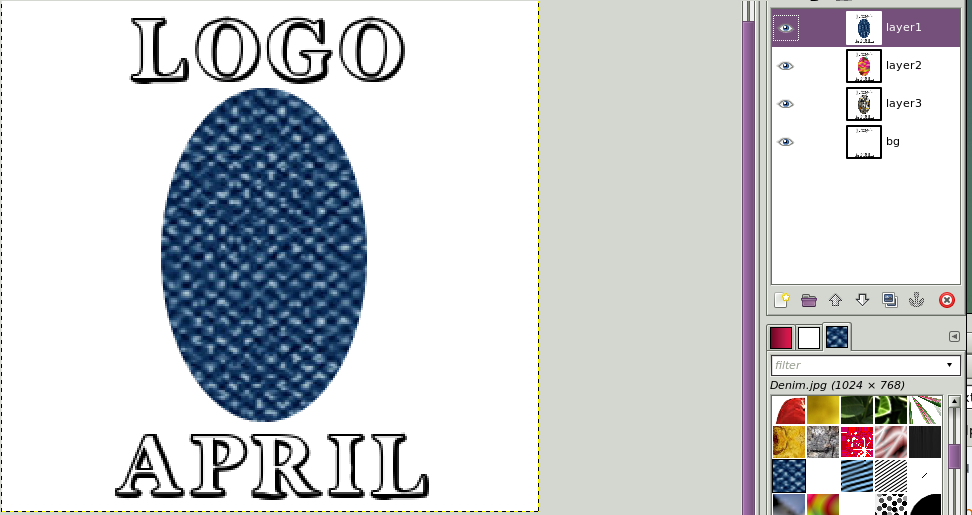
Here is what I do. I make my BG. Above that I make my transparent layers with the image in each layer..
When that is done, I go to Filters > animation > combine Background. This puts your background on every layer.
Then go to file > export as > Image tree names (layer1, layer2 eg.) and save to desktop or where ever you want.
Before and after combining background screen shots below

OR, you can make a folder on your desktop and save it to that folder.
Image

Image

_________________
Image


Top
 Post subject: Re: Repetitive tasks
PostPosted: Thu Apr 10, 2014 1:04 pm  (#4) 
Offline
GimpChat Member
User avatar

Joined: Mar 23, 2012
Posts: 7388
Location: Göteborg at last!
I agree with Molly http://gimpscripts.com/2011/10/combineo ... ackground/


Top
 Post subject: Re: Repetitive tasks
PostPosted: Thu Apr 10, 2014 1:24 pm  (#5) 
Offline
New Member

Joined: Mar 31, 2014
Posts: 2
many thanks! I will look into these options. This is very much appreciated everyone.


Top
 Post subject: Re: Repetitive tasks
PostPosted: Thu Apr 10, 2014 2:07 pm  (#6) 
Offline
GimpChat Member
User avatar

Joined: Apr 07, 2010
Posts: 14182
You are welcome, That combine background script by Saulgoode has been a very good script for me, it saves so many steps.
If you run into any problems, please post back to this thread. :paint

_________________
Image


Top
 Post subject: Re: Repetitive tasks
PostPosted: Thu Apr 10, 2014 2:09 pm  (#7) 
Offline
GimpChat Member
User avatar

Joined: Nov 16, 2011
Posts: 5127
Location: Metro Vancouver, BC
molly wrote:
..When that is done, I go to Filters > animation > combine Background. This puts your background on every layer.
Then go to file > export as > Image tree names (layer1, layer2 eg.) and save to desktop or where ever you want.
Excellent idea Molly!
Erisian wrote:
Nice one adding the script link Erisian. :bigthup
I often forget whether I'm using a script that came with Gimp or not without checking the Plug-in Browser.

_________________
Image
Gimp 2.8.18, Linux, median user
Gimp Chat Tutorials Index
Spirit Bear (Kermode)


Top
 Post subject: Re: Repetitive tasks
PostPosted: Thu Apr 10, 2014 2:13 pm  (#8) 
Offline
GimpChat Member
User avatar

Joined: Mar 23, 2012
Posts: 7388
Location: Göteborg at last!
Odinbc wrote:
I often forget whether I'm using a script that came with Gimp or not without checking the Plug-in Browser.

:hehe It's easily done.


Top
Post new topic Reply to topic  [ 8 posts ] 

All times are UTC - 5 hours [ DST ]


* Login  


Powered by phpBB3 © phpBB Group