It is currently Wed Sep 30, 2026 7:24 am


All times are UTC - 5 hours [ DST ]


Post new topic Reply to topic  [ 16 posts ] 
Author Message
 Post subject: missing text and images
PostPosted: Fri Apr 11, 2014 6:49 am  (#1) 
Offline
GimpChat Member
User avatar

Joined: Apr 07, 2010
Posts: 14182
GIMP Version: 2.8.10
Operating System: Linux
GIMP Experience: Intermediate Level


I am having problems with missing text and images. I opened Gimp with terminal and these are the results but I don't know how to decypher the problems.
When I pasted my dot pattern into a new layer, part of them were missing. I don't know if the problem is with Gimp or my OS.
Help would be appreciated. thanks
[molly@localhost ~]$ gimp
Fontconfig warning: "/etc/fonts/conf.d/50-user.conf", line 14: reading configurations from ~/.fonts.conf is deprecated.

(gimp:2951): Gimp-Widgets-CRITICAL **: gimp_device_info_set_device: assertion `(info->device == NULL && GDK_IS_DEVICE (device)) || (GDK_IS_DEVICE (info->device) && device == NULL)' failed
Skipping duplicate plug-in: '/usr/lib64/gimp/2.0/plug-ins/script-fu'

(script-fu:2959): GLib-WARNING **: (gerror.c:390):g_error_new_valist: runtime check failed: (domain != 0)
script-fu-Warning: Error while loading /home/molly/.gimp-2.8/scripts/Pattern-from-Image.scm:

Error: (/home/molly/.gimp-2.8/scripts/Pattern-from-Image.scm : 188) eval: unbound variable: image


fp-script-fu-anim-path-stroke: image-type contains unrecognizable parts:'RGB* GRAYSCALE*'
Image pixel data corrupt


_________________
Image


Share on Facebook Share on Twitter Share on Orkut Share on Digg Share on MySpace Share on Delicious Share on Technorati
Top
 Post subject: Re: missing text and images
PostPosted: Fri Apr 11, 2014 6:53 pm  (#2) 
Offline
GimpChat Member
User avatar

Joined: Apr 07, 2010
Posts: 14182
:bump

_________________
Image


Top
 Post subject: Re: missing text and images
PostPosted: Fri Apr 11, 2014 8:07 pm  (#3) 
Offline
GimpChat Member
User avatar

Joined: Nov 16, 2011
Posts: 5127
Location: Metro Vancouver, BC
Do you recall if these were all at Gimp start-up.
Fontconfig warning: "/etc/fonts/conf.d/50-user.conf", line 14: reading configurations from ~/.fonts.conf is deprecated.

(gimp:2951): Gimp-Widgets-CRITICAL **: gimp_device_info_set_device: assertion `(info->device == NULL && GDK_IS_DEVICE (device)) || (GDK_IS_DEVICE (info->device) && device == NULL)' failed
Skipping duplicate plug-in: '/usr/lib64/gimp/2.0/plug-ins/script-fu'

(script-fu:2959): GLib-WARNING **: (gerror.c:390):g_error_new_valist: runtime check failed: (domain != 0)

And these errors when you were working?
script-fu-Warning: Error while loading /home/molly/.gimp-2.8/scripts/Pattern-from-Image.scm:

Error: (/home/molly/.gimp-2.8/scripts/Pattern-from-Image.scm : 188) eval: unbound variable: image

fp-script-fu-anim-path-stroke: image-type contains unrecognizable parts:'RGB* GRAYSCALE*'
Image pixel data corrupt


My meagre input. :smiley2
You don't have to worry about these ones at the beginning.
Fontconfig warning: "/etc/fonts/conf.d/50-user.conf", line 14: reading configurations from ~/.fonts.conf is deprecated.

This one is a worry, I'm not sure what's up with it. It could be a key.
(gimp:2951): Gimp-Widgets-CRITICAL **: gimp_device_info_set_device: assertion `(info->device == NULL && GDK_IS_DEVICE (device)) || (GDK_IS_DEVICE (info->device) && device == NULL)' failed

This one is a normal message.
Quote:
Skipping duplicate plug-in: '/usr/lib64/gimp/2.0/plug-ins/script-fu'

The rest I believe are script errors while you were working, can you replicate any or all of them from Gimp start-up?

_________________
Image
Gimp 2.8.18, Linux, median user
Gimp Chat Tutorials Index
Spirit Bear (Kermode)


Top
 Post subject: Re: missing text and images
PostPosted: Sat Apr 12, 2014 5:24 am  (#4) 
Offline
GimpChat Member
User avatar

Joined: Apr 07, 2010
Posts: 14182
I will try Odin, The one you said was worrysome is an error that happens often to people, even if you google that one it will come up but haven't been able to get a fix for it. That particular error has been there for a long time.

_________________
Image


Top
 Post subject: Re: missing text and images
PostPosted: Sun Apr 13, 2014 9:57 am  (#5) 
Offline
GimpChat Founder
User avatar

Joined: May 22, 2008
Posts: 5241
Location: Gimpville
molly wrote:
The one you said was worrysome is an error that happens often to people, even if you google that one it will come up but haven't been able to get a fix for it. That particular error has been there for a long time.

You should be able to determine if that error is caused by an "addon" by renaming your .gimp-2.8 folder, then starting GIMP and letting it recreate from scratch. This does assume you haven't added anything to GIMP's global folders.

If after doing that, GIMP doesn't generate an error, you know that it's some added script/plug-in or other resource that's causing the message and you'll need to use the process of elimination to figure out what it is. I can confirm that the error message does not occur with the default GIMP installation in Fedora.

The font warning message is generated due to the fact that default location for: fonts.conf has been changed. It's nothing critical, just a warning. Same with the "Skipping Duplicate Plug-in" warning which can be ignored, as well.

There is a coding error in your version of: Pattern-from-Image.scm. I believe Graechan just updated that script.

Also, the script: fp-script-fu-path-suite.scm needs to be updated, as well. You can fix this yourself by changing line 1008 from..

'RGB* GRAYSCALE*'
to
"RGB* GRAY*"

_________________
“If you reach for the stars, you just might land on a decently sized hill.” - Stuart Hill


Top
 Post subject: Re: missing text and images
PostPosted: Sun Apr 13, 2014 12:05 pm  (#6) 
Offline
GimpChat Member
User avatar

Joined: Apr 07, 2010
Posts: 14182
Thank you tux, I will look after it.
Edit: I fixed the FP script. I downloaded Graechans script pattern again so it is fine now, I changed my .gimp-2.8 to .gimp-2.10(old). I then opened gimp with terminal and here are the results now.
Quote:
[molly@localhost ~]$ gimp
Fontconfig warning: "/etc/fonts/conf.d/50-user.conf", line 14: reading configurations from ~/.fonts.conf is deprecated.

(gimp:4730): Gimp-Widgets-CRITICAL **: gimp_device_info_set_device: assertion `(info->device == NULL && GDK_IS_DEVICE (device)) || (GDK_IS_DEVICE (info->device) && device == NULL)' failed


The down side is when I opened Gimp with terminal, it made a completely new Gimp and I lost everything I had in it, scripts, plugins, My font manger etc. Is there a way to get all that back. I went back to the gimp I renamed and it didn't bring my files back.

_________________
Image


Top
 Post subject: Re: missing text and images
PostPosted: Sun Apr 13, 2014 1:11 pm  (#7) 
Offline
Script Coder
User avatar

Joined: Apr 23, 2010
Posts: 1553
Location: not from Guildford after all
molly wrote:
... I changed my .gimp-2.8 to .gimp-2.10(old) ...

The down side is when I opened Gimp with terminal, it made a completely new Gimp and I lost everything I had in it, scripts, plugins, My font manger etc. Is there a way to get all that back. I went back to the gimp I renamed and it didn't bring my files back.

All of your old stuff will still be there in the ~/.gimp-2.10/ folder.

Note that the version of GIMP you are using is 2.8.10, so your .gimp-2.10 folder is not really appropriately named. I would suggest naming it as gimp-2.8-backup or somesuch (or place it in a backup folder).

_________________
Any sufficiently primitive technology is indistinguishable from a rock.


Top
 Post subject: Re: missing text and images
PostPosted: Sun Apr 13, 2014 1:17 pm  (#8) 
Offline
GimpChat Member
User avatar

Joined: Apr 07, 2010
Posts: 14182
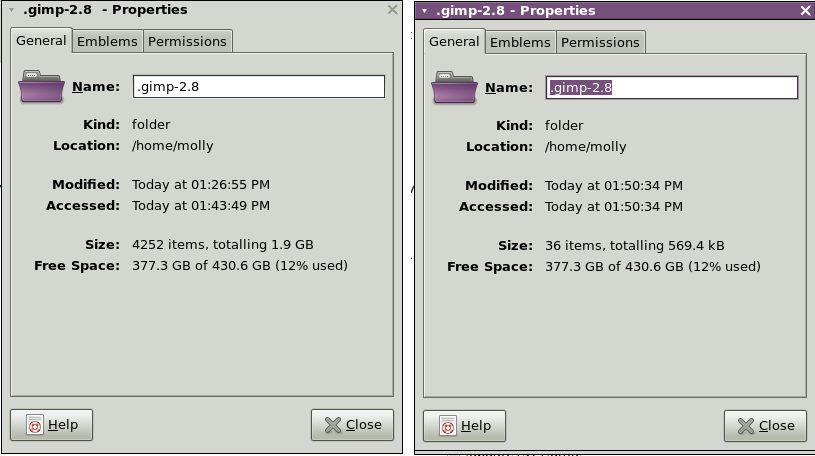
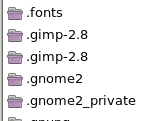
Sorry, I typed that last post wrong, I should have said 2.8(old) not 2.10(old) Now this is what I have and both of them come up as brand new empty gimp without my stuff. This is what I now have and I try to delete the top one with the 37 items and it keeps coming back. :roll:
Image

Image

_________________
Image


Top
 Post subject: Re: missing text and images
PostPosted: Sun Apr 13, 2014 2:03 pm  (#9) 
Offline
Script Coder
User avatar

Joined: Apr 23, 2010
Posts: 1553
Location: not from Guildford after all
It appears (based on the title bars) that there is a trailing space in one of the two filenames.

I would recommend using the command line to rename one of the folders to "folder1" or somesuch; then use the command line with TAB completion to rename the remaining .gimp-2.8 folder to "folder2".

After you sort out which is which, delete one of them and rename the other back to .gimp-2.8

_________________
Any sufficiently primitive technology is indistinguishable from a rock.


Top
 Post subject: Re: missing text and images
PostPosted: Sun Apr 13, 2014 2:08 pm  (#10) 
Offline
GimpChat Founder
User avatar

Joined: May 22, 2008
Posts: 5241
Location: Gimpville
:ninja Image

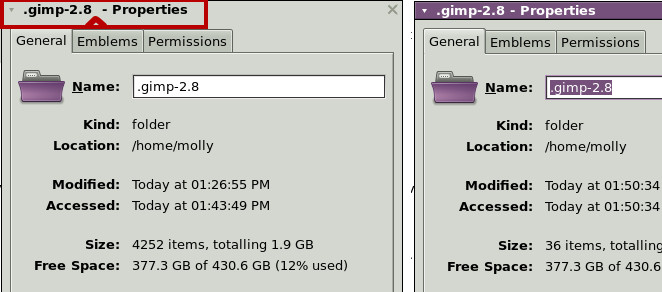
You are right Saul. You can see trailing space (or hidden character) in the title bar of the original folder with all of her data in it.

Image

She can just close GIMP, delete the new folder with 36 items in it, remove that trailing character in the original folder's filename, restart GIMP and all should be well.

_________________
“If you reach for the stars, you just might land on a decently sized hill.” - Stuart Hill


Top
 Post subject: Re: missing text and images
PostPosted: Sun Apr 13, 2014 2:51 pm  (#11) 
Offline
GimpChat Member
User avatar

Joined: Apr 07, 2010
Posts: 14182
I don't know what to say to you two guys but it is fixed, thanks to both of you
looked and looked at my two screen shots and they both look identical. I do not see the space you are talking about. I looked at the post Tux made with the screen shot showing the space.
I am so bewildered and baffled right now, I could sit down and either taking up drinking and smoking or just cry about my frustrations.
I ended up right clicking on the good one and retyped it, it still looked the same, but it worked.
What I would like to know, is how you saw that space. I renamed the other one, I guess I can send it to the garbage bucket.

_________________
Image


Top
 Post subject: Re: missing text and images
PostPosted: Sun Apr 13, 2014 3:17 pm  (#12) 
Offline
GimpChat Founder
User avatar

Joined: May 22, 2008
Posts: 5241
Location: Gimpville
In the one on the left, you can see where the extra space is in the image I posted (red box outline with arrow pointing to the space). In the one on the right, you can see there is no extra space.

You still have that GTK error, which to me suggests that you've probably installed something that was compiled with different GTK libs than what GIMP was compiled with. The fact that renaming the .gimp-2.8 folder and allowing GIMP to create a new one, still produced the same message, suggests something was installed into the system folders, perhaps an old MathMap, GAP or some other GIMP binary plug-in. That's my guess, but that's all it is, just a guess.

_________________
“If you reach for the stars, you just might land on a decently sized hill.” - Stuart Hill


Top
 Post subject: Re: missing text and images
PostPosted: Sun Apr 13, 2014 3:41 pm  (#13) 
Offline
GimpChat Member
User avatar

Joined: Nov 16, 2011
Posts: 5127
Location: Metro Vancouver, BC
Molly, when you start-up Gimp from the command line what is the latest output in the console before you do anything, like open a new image?

_________________
Image
Gimp 2.8.18, Linux, median user
Gimp Chat Tutorials Index
Spirit Bear (Kermode)


Top
 Post subject: Re: missing text and images
PostPosted: Sun Apr 13, 2014 4:13 pm  (#14) 
Offline
GimpChat Member
User avatar

Joined: Apr 07, 2010
Posts: 14182
[molly@localhost ~]$ gimp
Fontconfig warning: "/etc/fonts/conf.d/50-user.conf", line 14: reading configurations from ~/.fonts.conf is deprecated.

(gimp:7013): Gimp-Widgets-CRITICAL **: gimp_device_info_set_device: assertion `(info->device == NULL && GDK_IS_DEVICE (device)) || (GDK_IS_DEVICE (info->device) && device == NULL)' failed
Skipping duplicate plug-in: '/usr/lib64/gimp/2.0/plug-ins/script-fu'
Image pixel data corrupt

_________________
Image


Top
 Post subject: Re: missing text and images
PostPosted: Sun Apr 13, 2014 4:21 pm  (#15) 
Offline
GimpChat Member
User avatar

Joined: Apr 07, 2010
Posts: 14182
GnuTux wrote:
In the one on the left, you can see where the extra space is in the image I posted (red box outline with arrow pointing to the space). In the one on the right, you can see there is no extra space.

You still have that GTK error, which to me suggests that you've probably installed something that was compiled with different GTK libs than what GIMP was compiled with. The fact that renaming the .gimp-2.8 folder and allowing GIMP to create a new one, still produced the same message, suggests something was installed into the system folders, perhaps an old MathMap, GAP or some other GIMP binary plug-in. That's my guess, but that's all it is, just a guess.

The only mathmap I installed is the one you gave me the dll for and instruc. The Gap is the one you helped me with. Must be something else.
This error[(gimp:7013): Gimp-Widgets-CRITICAL **: gimp_device_info_set_device: assertion `(info->device == NULL && GDK_IS_DEVICE (device)) || (GDK_IS_DEVICE (info->device) && device == NULL)' failed] is the same error we went through two versions ago and we ended up that it really means nothing to be concerned about since it comes up when you google it and very common.
I opened gimp with terminal again and posted results below Odins post.

https://bbs.archlinux.org/viewtopic.php?id=163563

_________________
Image


Top
 Post subject: Re: missing text and images
PostPosted: Sun Apr 13, 2014 5:25 pm  (#16) 
Offline
GimpChat Member
User avatar

Joined: Nov 16, 2011
Posts: 5127
Location: Metro Vancouver, BC
This may seem strange but is your Python Console working?
Molly can you use --verbose to start Gimp and see if there is more detail?

_________________
Image
Gimp 2.8.18, Linux, median user
Gimp Chat Tutorials Index
Spirit Bear (Kermode)


Top
Post new topic Reply to topic  [ 16 posts ] 

All times are UTC - 5 hours [ DST ]


* Login  


Powered by phpBB3 © phpBB Group