It is currently Wed Sep 23, 2026 1:54 pm


All times are UTC - 5 hours [ DST ]


Post new topic Reply to topic  [ 10 posts ] 
Author Message
 Post subject: Please help me with brush sizes!
PostPosted: Sat May 03, 2014 12:03 am  (#1) 
Offline
GimpChat Member

Joined: May 02, 2014
Posts: 8
GIMP Version: 2.8.10
Operating System: Mac OS
OS Version: 10.6.8
GIMP Experience: Beginner Level


Hi everyone,
I'm really new to Gimp. I'm having what appears to be a VERY basic problem -not sure if its a bug or me being incompetent. I attempt to resize my brush using the radius tool however it does not increase in size past 10 (pixels I presume) I read it was supposed to grow up to 1000 - I'm just using tha bar and the image on the brush editor increases in size - but when I put brush to computer paper - its still a small size 10... it goes smaller, but I cannot get it larger than that- I've even uninstalled and reinstalled Gimp - to no avail. Also, there only appear to be about 70 brushes on my version of Gimp - is this normal?
Thanks for any help anyone can offer... apologies for being so useless...


Attachments:
File comment: screen shot of the range of brush sizes I have access to. :-(
Screen shot 2014-05-03 at 3.02.08 PM.png
Screen shot 2014-05-03 at 3.02.08 PM.png [ 82.93 KiB | Viewed 3421 times ]
Share on Facebook Share on Twitter Share on Orkut Share on Digg Share on MySpace Share on Delicious Share on Technorati
Top
 Post subject: Re: Please help me with brush sizes!
PostPosted: Sat May 03, 2014 12:27 am  (#2) 
Offline
Script Coder
User avatar

Joined: Feb 18, 2011
Posts: 4826
Location: Bendigo Vic. Australia
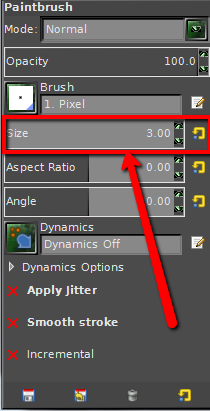
McCrazy your a bit of track, to change the size of an existing brush check below
Image

_________________
Image
No matter how much you push the envelope, it'll still be stationery.


Top
 Post subject: Re: Please help me with brush sizes!
PostPosted: Sat May 03, 2014 3:03 am  (#3) 
Offline
GimpChat Member

Joined: May 02, 2014
Posts: 8
Graechan,

thanks so much for that - but I have no idea where you get that paintbrush box from... The only paintbrush box I have is the one shown in my last picture and the tools boxes shown here... how do I get that box? I'm sorry I'm so rubbish!


Attachments:
Screen shot 2014-05-03 at 6.01.48 PM.png
Screen shot 2014-05-03 at 6.01.48 PM.png [ 118.92 KiB | Viewed 3398 times ]
Top
 Post subject: Re: Please help me with brush sizes!
PostPosted: Sat May 03, 2014 3:08 am  (#4) 
Offline
GimpChat Member

Joined: May 02, 2014
Posts: 8
Wait Greachan, your post caused me to click more things and I somehow got tool options up and I think I've found out how to change the size!!! Thank you .... what the hell is the point of radius then? And... if you know how I got tool options up - that would be useful too... though now I know what that box is called I might be able to find it in future...


Top
 Post subject: Re: Please help me with brush sizes!
PostPosted: Sat May 03, 2014 4:55 am  (#5) 
Offline
GimpChat Member
User avatar

Joined: Apr 07, 2010
Posts: 14182
It also looks like you are in the delfault mode where the docks aren't attached, is it just my eyes or are you missing the other dock. If you go to Windows > single mode, your tool dock will be attached.

_________________
Image


Top
 Post subject: Re: Please help me with brush sizes!
PostPosted: Sun May 04, 2014 6:34 am  (#6) 
Offline
GimpChat Member
User avatar

Joined: Jan 20, 2013
Posts: 590
You can download thousands of brushes from WEB and put them in the folder:

C:\Documents and Settings\Master\.gimp-2.8\brushes

_________________
Image


Top
 Post subject: Re: Please help me with brush sizes!
PostPosted: Wed May 07, 2014 4:42 am  (#7) 
Offline
GimpChat Member

Joined: May 02, 2014
Posts: 8
Yes, thank you, Molly, I was sort of getting used to the whole not being a window thing - I have now attached, as you suggested... not sure what I prefer...

Carlos, I dont have Windows... so I have no idea where I would save those brushes... I'm really struggling getting to know how to use this Mac...


Top
 Post subject: Re: Please help me with brush sizes!
PostPosted: Wed May 07, 2014 5:38 am  (#8) 
Offline
GimpChat Member

Joined: May 02, 2014
Posts: 8
So Molly, how do I make it so that when I return to using the paintbrush its still the last size I was using - I had to attach my brushes to a pane on the right as the little icon is no longer in my tools selection pane...

This is all very confusing for me... I now have a tool option tab, a colour tab, a paintbrush tab and a dynamics tab...


Top
 Post subject: Re: Please help me with brush sizes!
PostPosted: Wed May 07, 2014 5:54 am  (#9) 
Offline
GimpChat Member
User avatar

Joined: Apr 07, 2010
Posts: 14182
The only thing I can suggest is to go into a Mac site or Google how to install your brushes in your user folder. I am not a Mac user so some one here that is should be able to help you. In the screen shot it shows you use the gimp with your user name, NOT the usr/\share one.

Image

_________________
Image


Top
 Post subject: Re: Please help me with brush sizes!
PostPosted: Wed May 07, 2014 6:41 am  (#10) 
Offline
GimpChat Member

Joined: May 02, 2014
Posts: 8
Molly, you are an awesome moderator! I will try this tomorrow - I'm to tired now... I've drawn my sugar glider... that's all that matters right now... Thanks for all your help!


Top
Post new topic Reply to topic  [ 10 posts ] 

All times are UTC - 5 hours [ DST ]


* Login  


Powered by phpBB3 © phpBB Group