It is currently Thu Sep 24, 2026 10:48 am


All times are UTC - 5 hours [ DST ]


Post new topic Reply to topic  [ 24 posts ]  Go to page 1, 2  Next
Author Message
 Post subject: text art? Solved!
PostPosted: Tue May 13, 2014 7:47 pm  (#1) 
Offline
GimpChat Member
User avatar

Joined: Apr 08, 2010
Posts: 5420
Location: Northwest Ohio
GIMP Version: 2.8.10
Operating System: Mac OS
GIMP Experience: Basic Level


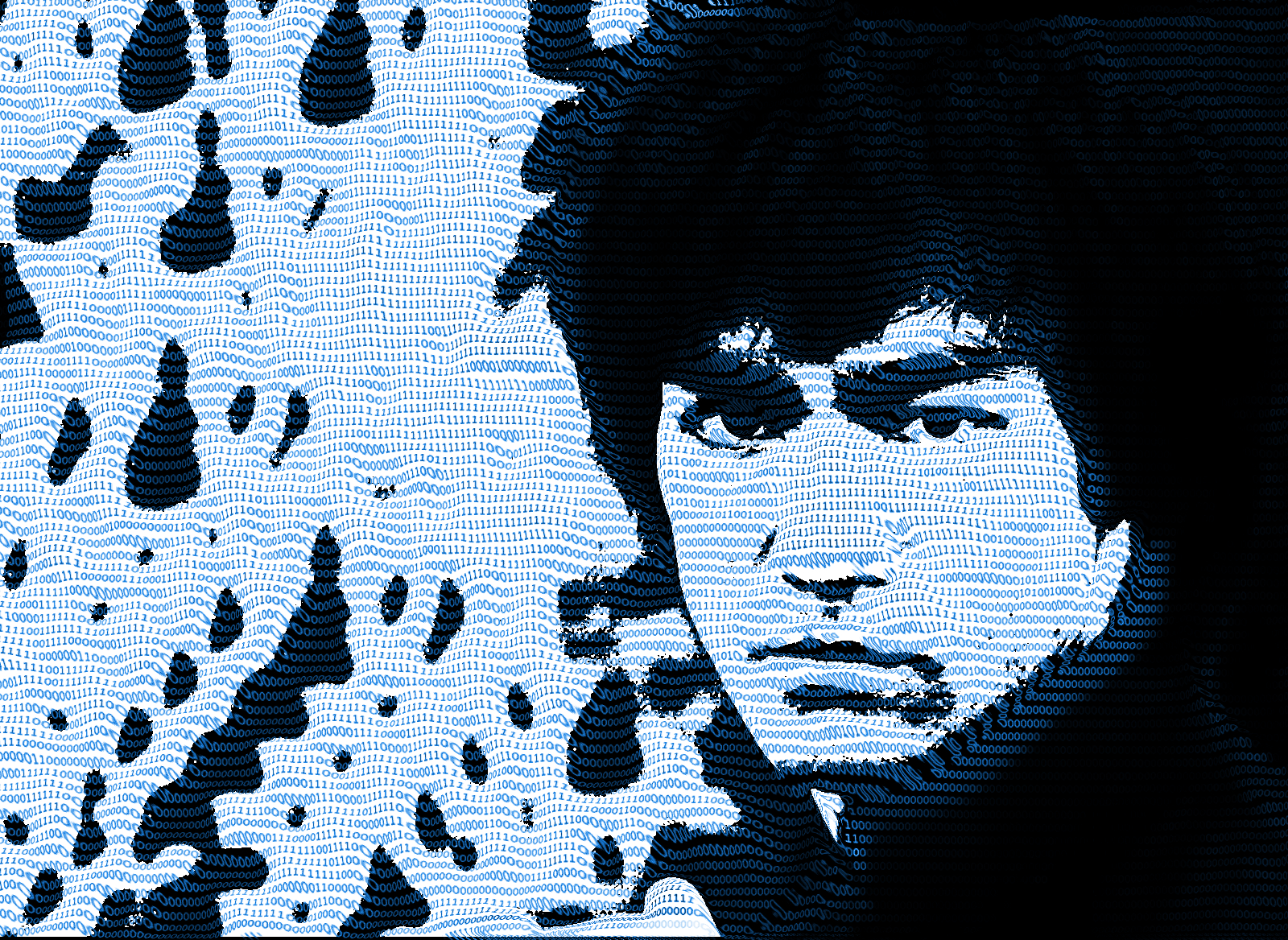
Does anyone recall what you call it when you take a bunch of text and displace it onto a photo to make it look like the photo is made up of the text? I can never find anything using search because I never know what words to use in the search.


Last edited by 2-ton on Tue May 13, 2014 9:08 pm, edited 1 time in total.

Share on Facebook Share on Twitter Share on Orkut Share on Digg Share on MySpace Share on Delicious Share on Technorati
Top
 Post subject: Re: text art?
PostPosted: Tue May 13, 2014 7:50 pm  (#2) 
Offline
GimpChat Member
User avatar

Joined: Apr 07, 2010
Posts: 14182
Cloud text, you can download free generators for that in google, just type in cloud text. Or word cloud generator or work tag.

_________________
Image


Top
 Post subject: Re: text art?
PostPosted: Tue May 13, 2014 7:52 pm  (#3) 
Offline
GimpChat Member

Joined: Nov 04, 2013
Posts: 207
ASCII Art, hope that helps.


Top
 Post subject: Re: text art?
PostPosted: Tue May 13, 2014 7:57 pm  (#4) 
Offline
GimpChat Member
User avatar

Joined: Apr 08, 2010
Posts: 5420
Location: Northwest Ohio
Thanks….Off to check them out. I had thought there was a tutorial on here,


Top
 Post subject: Re: text art?
PostPosted: Tue May 13, 2014 8:01 pm  (#5) 
Offline
GimpChat Member
User avatar

Joined: Apr 07, 2010
Posts: 14182
I used one of those generators to make that banner with the gimp chat sign and my two Wilber's, with the denim outfits on., one with the poodle.

_________________
Image


Top
 Post subject: Re: text art?
PostPosted: Tue May 13, 2014 8:09 pm  (#6) 
Offline
GimpChat Member
User avatar

Joined: Apr 08, 2010
Posts: 5420
Location: Northwest Ohio
Something like this, but for Gimp. I am sure there was a thread and tutorial here somewhere…
http://youtu.be/pBGXksqYzeQ


Top
 Post subject: Re: text art?
PostPosted: Tue May 13, 2014 8:15 pm  (#7) 
Offline
GimpChat Member
User avatar

Joined: Apr 07, 2010
Posts: 14182
Yes, that one is here, I think it was mahvins, not sure, I will look in the morning, when I boot up my PC.

_________________
Image


Top
 Post subject: Re: text art?
PostPosted: Tue May 13, 2014 8:18 pm  (#8) 
Offline
GimpChat Member
User avatar

Joined: Jul 17, 2012
Posts: 2769
2-ton wrote:
Something like this, but for Gimp. I am sure there was a thread and tutorial here somewhere…
http://youtu.be/pBGXksqYzeQ

http://www.gimpusers.com/tutorials/create-text-portrait


Top
 Post subject: Re: text art?
PostPosted: Tue May 13, 2014 8:29 pm  (#9) 
Offline
GimpChat Member
User avatar

Joined: Apr 08, 2010
Posts: 5420
Location: Northwest Ohio
Hi Esper! Almost…the text part seems about right, but the effect had it displaced or bumped or something, that deformed to to the photo, so it looked like the photo was actually 3-d underneath the text and making it 'form-fitted', with the depth and contours or the pic below. Argh, I cannot explain it very well. It's as if the text was molded over the 'person' underneath.


Top
 Post subject: Re: text art?
PostPosted: Tue May 13, 2014 8:31 pm  (#10) 
Offline
GimpChat Member
User avatar

Joined: Jul 17, 2012
Posts: 2769
Hi 2-ton :mrgreen:

this one ?
http://gimpchat.com/viewtopic.php?f=23&t=4945


Top
 Post subject: Re: text art?
PostPosted: Tue May 13, 2014 8:47 pm  (#11) 
Offline
GimpChat Member
User avatar

Joined: Apr 08, 2010
Posts: 5420
Location: Northwest Ohio
YES, that's it! Thanks for finding it, I have been looking and looking but couldn't remember the 'flowing text' title!


Top
 Post subject: Re: text art? Solved!
PostPosted: Tue May 13, 2014 10:55 pm  (#12) 
Offline
GimpChat Member
User avatar

Joined: Apr 08, 2010
Posts: 5420
Location: Northwest Ohio
Well, this is a toughie…much more difficult to do than I remembered. Looks like I will have to do it several times to get it to look decent.


Top
 Post subject: Re: text art? Solved!
PostPosted: Wed May 14, 2014 4:31 am  (#13) 
Offline
GimpChat Member
User avatar

Joined: Mar 23, 2012
Posts: 7388
Location: Göteborg at last!
Is this what you are looking for? viewtopic.php?f=23&t=4884


Top
 Post subject: Re: text art? Solved!
PostPosted: Wed May 14, 2014 12:51 pm  (#14) 
Offline
GimpChat Member
User avatar

Joined: Apr 08, 2010
Posts: 5420
Location: Northwest Ohio
No, but your tutorial on the flowing text the Esper linked is exactly what I was loping for. I don't suppose you have any helpful hints on how I can do this easier? Here is a shot of my first try…I was hoping to be able to make the text more warped to show more detail of the person underneath, rather than just use a transparency of the pic to tell who it is. If that makes any sense. I got lost in the tutorial, and ended up just mapping the text to a desaturated pic, but it didn't warp enough to tell what it was so I had to add the faint pic behind the text.
Image


Top
 Post subject: Re: text art? Solved!
PostPosted: Wed May 14, 2014 2:49 pm  (#15) 
Offline
GimpChat Member
User avatar

Joined: Jul 17, 2012
Posts: 2769
how about G'MIC Ascii art ?

viewtopic.php?f=28&t=10047


Top
 Post subject: Re: text art? Solved!
PostPosted: Wed May 14, 2014 8:10 pm  (#16) 
Offline
GimpChat Member
User avatar

Joined: Apr 08, 2010
Posts: 5420
Location: Northwest Ohio
I might try the ascii in g'mic, but I really wanted to have specific text in the picture. I am still working on Erisian's tutorial. I can get to step 7, then I sort of get lost and my results don't look like his steps in the tutorial after that. Especially the eyes and mouth…total fail there.


Last edited by 2-ton on Wed May 14, 2014 9:23 pm, edited 1 time in total.

Top
 Post subject: Re: text art? Solved!
PostPosted: Wed May 14, 2014 8:40 pm  (#17) 
Offline
GimpChat Member
User avatar

Joined: Jul 17, 2012
Posts: 2769
Image


Top
 Post subject: Re: text art? Solved!
PostPosted: Wed May 14, 2014 9:24 pm  (#18) 
Offline
GimpChat Member
User avatar

Joined: Apr 08, 2010
Posts: 5420
Location: Northwest Ohio
I like that, now if I could do that with the text block I have prepared, it would work. But, alas, my g'mic version is too old to have that filter. And I have to wait for Partha to make an updated McGimp with the latest g'mic before I will have that filter. So…back to Erisian's tutorial and some tearing out of my hair!


Top
 Post subject: Re: text art? Solved!
PostPosted: Wed May 14, 2014 9:43 pm  (#19) 
Offline
GimpChat Member
User avatar

Joined: Jul 17, 2012
Posts: 2769
just to be clear, 2-ton, this is really a combination of the ascii G'MIC filter and the displacement technique, plus my own spin on it

i think what you did, is the right direction
but the text is too warped (you need less displacement) and the whole image lacks contrast
you could render the guy and invert the color of the text, that makes up the background, for example, so that you get a black bg with white text


Top
 Post subject: Re: text art? Solved!
PostPosted: Wed May 14, 2014 10:27 pm  (#20) 
Offline
New Member

Joined: Feb 22, 2014
Posts: 4
This PDF hard copy may help it was made for a seniors computer club.


Attachments:
image text.pdf [1.34 MiB]
Downloaded 126 times
Top
Post new topic Reply to topic  [ 24 posts ]  Go to page 1, 2  Next

All times are UTC - 5 hours [ DST ]


* Login  


Powered by phpBB3 © phpBB Group