It is currently Tue Nov 24, 2026 12:57 am


All times are UTC - 5 hours [ DST ]


Post new topic Reply to topic  [ 11 posts ] 
Author Message
 Post subject: Need some help with missing pictures
PostPosted: Sun Jun 08, 2014 6:39 am  (#1) 
Offline
GimpChat Member

Joined: Jun 07, 2014
Posts: 7
Hello,
I am new to GIMP and I am trying to build a banner for a class I am in. When I have placed my layers together I am missing parts of the pics. I have an border/outline that shows where the picture should extend to but I am only able to see half the picture. Any suggestion on how to fix this?Image
The link above is a screen shot of what I am looking at. Thanks for any help on this !!!!!!!!!!!!!!!!!


Share on Facebook Share on Twitter Share on Orkut Share on Digg Share on MySpace Share on Delicious Share on Technorati
Top
 Post subject: Re: Need some help with missing pictures
PostPosted: Sun Jun 08, 2014 6:46 am  (#2) 
Offline
GimpChat Member
User avatar

Joined: Apr 07, 2010
Posts: 14182
Can you attach your xcf below with the layers?

_________________
Image


Top
 Post subject: Re: Need some help with missing pictures
PostPosted: Sun Jun 08, 2014 6:53 am  (#3) 
Offline
GimpChat Member

Joined: Jun 07, 2014
Posts: 7
I will give it a try! I have my xcf but I am embarrassed to say I am not sure how to display it here.
Little help please.


Top
 Post subject: Re: Need some help with missing pictures
PostPosted: Sun Jun 08, 2014 6:58 am  (#4) 
Offline
GimpChat Member
User avatar

Joined: Apr 07, 2010
Posts: 14182
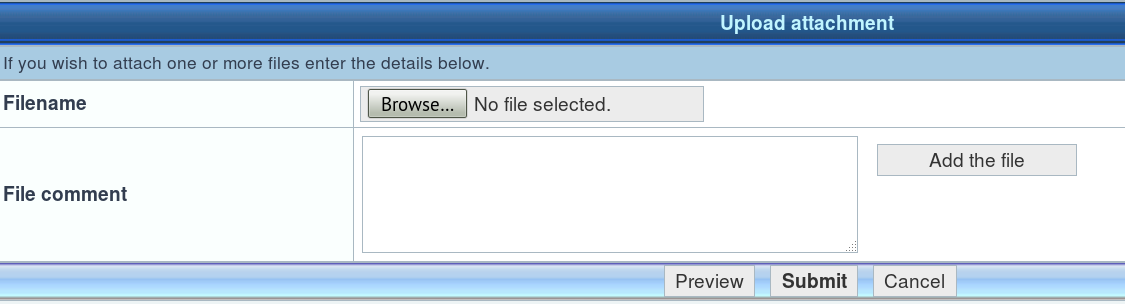
In the text window, look at the bottom to where you see submit and full editor, click full page then look at the bottom where you see add attachments, click browse, add your xcf then submit.
Image

_________________
Image


Top
 Post subject: Re: Need some help with missing pictures
PostPosted: Sun Jun 08, 2014 7:04 am  (#5) 
Offline
GimpChat Member

Joined: Jun 07, 2014
Posts: 7
Attachment:
foregn06.xcf [962.88 KiB]
Downloaded 128 times

Hope this works thank you for being patient.


Top
 Post subject: Re: Need some help with missing pictures
PostPosted: Sun Jun 08, 2014 7:17 am  (#6) 
Offline
GimpChat Member
User avatar

Joined: Apr 07, 2010
Posts: 14182
What I can see is that you have one large layer, with two smaller layers inside. One has the two children and the other has the little girl with the flower.
Somehow, the little girl got cut in half.
If you still have that picture, delete the half one and open as layers the little girl again and she will be on a separate layer.
You can use your move tool :move on each layer to place them where you want, then go layer to image on each layer.
Someone else will come along with a better explanation.

_________________
Image


Top
 Post subject: Re: Need some help with missing pictures
PostPosted: Sun Jun 08, 2014 7:23 am  (#7) 
Offline
GimpChat Member

Joined: Jun 07, 2014
Posts: 7
Thanks for your help! I guess I will need to redo the little girl again. any idea why everything is cut in half?


Top
 Post subject: Re: Need some help with missing pictures
PostPosted: Sun Jun 08, 2014 7:50 am  (#8) 
Offline
GimpChat Member
User avatar

Joined: Apr 07, 2010
Posts: 14182
Are both these pictures the same size? and no, I don't know how it got cut in half.
What size do you want your finished to be? Open your background and resize it to what you want the finished picture to be, then go to file > open as layers and select the two layers you want to use in that image. You should now have 3 layers, the bottom will be your background layer, then the other two above that.
You can edit and resize, then right click > alpha to selection, then copy > paste them into your new layer.

_________________
Image


Top
 Post subject: Re: Need some help with missing pictures
PostPosted: Sun Jun 08, 2014 8:41 am  (#9) 
Offline
GimpChat Member
User avatar

Joined: Apr 07, 2010
Posts: 14182
@TooNoob
Okay, this is what I did.
Open your background layer
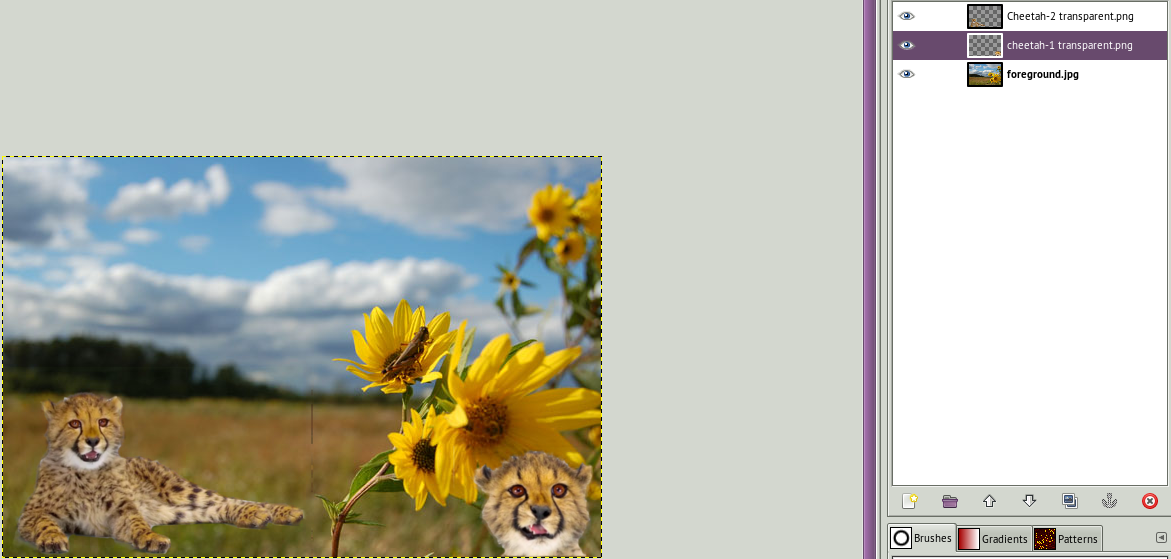
Go to File > open as layers and open your two images on separate layers, click on on a layer and use this :scale to resize your image. Go to your next layer and do the same thing.
My cheetah's started out very large and I resized them to fit into the background. I then clicked on a layer and used the move tool to place them where I wanted them on the background.
I enclosed the xcf for you to see how I did it and also a screen shot of what it looks like.
You can then export it as a png OR you can merge the top layer down then merge them both down into the background layer.
Image


Attachments:
cheetas on bacground.xcf [826.44 KiB]
Downloaded 110 times

_________________
Image
Top
 Post subject: Re: Need some help with missing pictures
PostPosted: Mon Jun 09, 2014 7:48 am  (#10) 
Offline
GimpChat Member

Joined: Jun 07, 2014
Posts: 7
I got it thank you!!!!


Top
 Post subject: Re: Need some help with missing pictures
PostPosted: Mon Jun 09, 2014 7:56 am  (#11) 
Offline
GimpChat Member
User avatar

Joined: Apr 07, 2010
Posts: 14182
you are welcome.

_________________
Image


Top
Post new topic Reply to topic  [ 11 posts ] 

All times are UTC - 5 hours [ DST ]


* Login  


Powered by phpBB3 © phpBB Group