It is currently Fri Oct 02, 2026 11:39 pm


All times are UTC - 5 hours [ DST ]


Post new topic Reply to topic  [ 18 posts ] 
Author Message
 Post subject: smudge along path
PostPosted: Tue Jun 10, 2014 4:38 pm  (#1) 
Offline
GimpChat Member
User avatar

Joined: Jan 15, 2013
Posts: 133
GIMP Version: 2.8.10
Operating System: Linux
GIMP Experience: Intermediate Level


Is there any built in way to smudge along a path?
It would be handy if it's possible but I must admit I'm not sure how it would work. (direction, end fades, etc..)
Just curious.

_________________
Gimp 2.8.16
Arch Linux - XFCE 4.12
Some of my work.


Share on Facebook Share on Twitter Share on Orkut Share on Digg Share on MySpace Share on Delicious Share on Technorati
Top
 Post subject: Re: smudge along path
PostPosted: Tue Jun 10, 2014 4:49 pm  (#2) 
Offline
GimpChat Member
User avatar

Joined: Apr 07, 2010
Posts: 14182
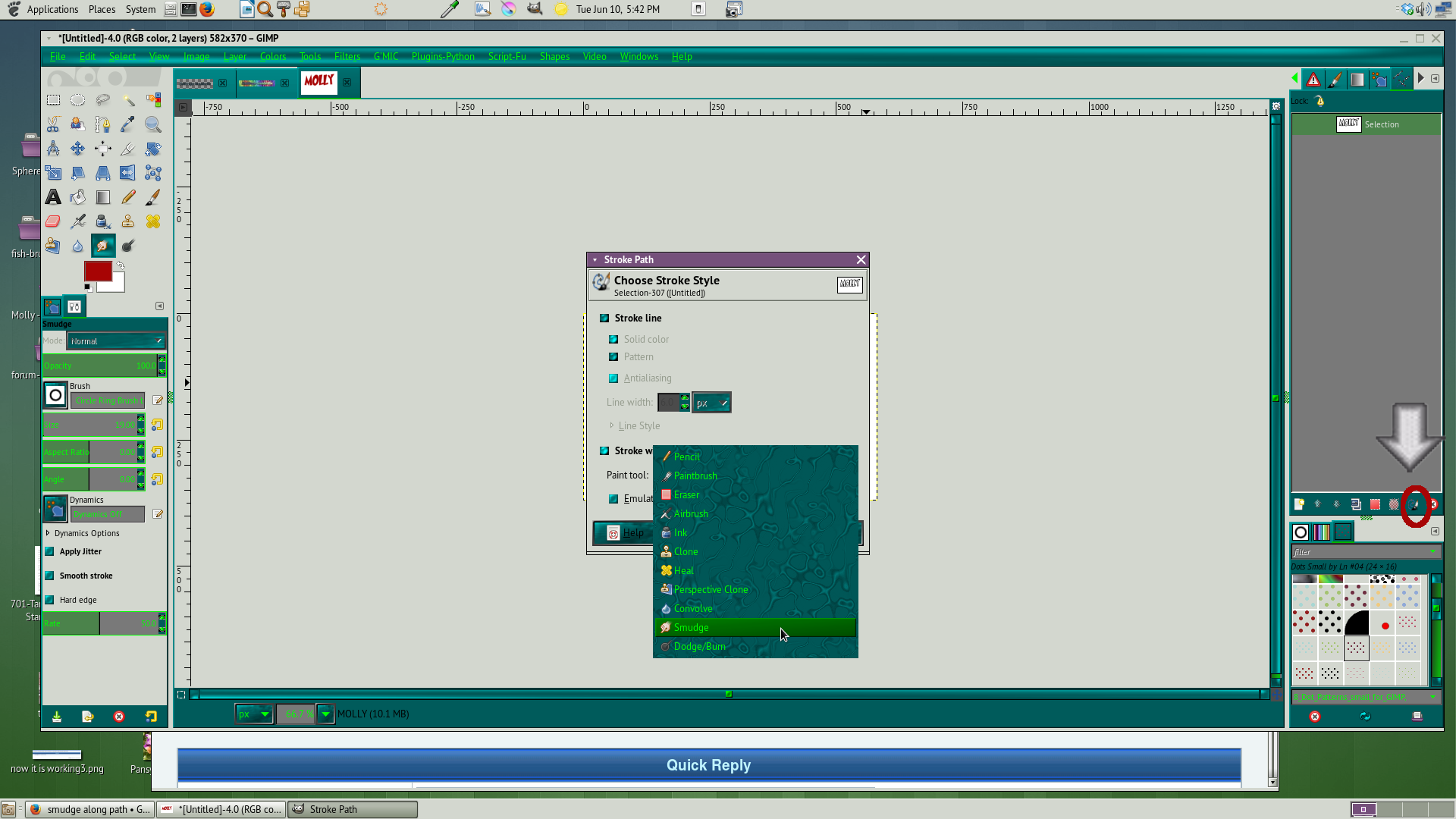
Yes, alpha select your text, then select to path, > deselect. Go to paths and use the paint along path option and use the dropdown and select smudge.
Image

_________________
Image


Top
 Post subject: Re: smudge along path
PostPosted: Tue Jun 10, 2014 4:51 pm  (#3) 
Offline
GimpChat Member
User avatar

Joined: Jan 15, 2013
Posts: 133
Ack!
How did I miss that before?
Not doing text, but this is exactly what I needed. Thank you Molly! :D

_________________
Gimp 2.8.16
Arch Linux - XFCE 4.12
Some of my work.


Top
 Post subject: Re: smudge along path
PostPosted: Tue Jun 10, 2014 4:54 pm  (#4) 
Offline
GimpChat Member
User avatar

Joined: Apr 07, 2010
Posts: 14182
I have never tried it so let us know if it does what you want.
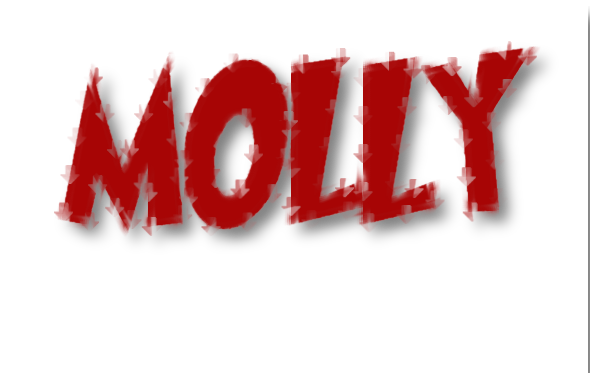
Here is mine at 10 pixels. Image

_________________
Image


Top
 Post subject: Re: smudge along path
PostPosted: Tue Jun 10, 2014 5:15 pm  (#5) 
Offline
Script Coder
User avatar

Joined: Oct 25, 2010
Posts: 4812
If the path is obtained from a text layer, it is much faster to use "Layer>Text to path".

Attachment:
SmudgeAndBlur.png
SmudgeAndBlur.png [ 170 KiB | Viewed 3494 times ]

_________________
Image


Top
 Post subject: Re: smudge along path
PostPosted: Tue Jun 10, 2014 5:17 pm  (#6) 
Offline
GimpChat Member
User avatar

Joined: Jan 15, 2013
Posts: 133
It works exactly as I wanted it to. :)
I work on a lot of anime images to try and restore the quality that was lost in a scan or other bad media. Smoothing filters can help a lot, but usually leave some nasty artifacts along lines of different colors. Smoothing with the smudge tool by hand is way too difficult most of the time. Now I can draw a path line the exact shape I want and clean it up wonderfully.

Thanks again Molly!

_________________
Gimp 2.8.16
Arch Linux - XFCE 4.12
Some of my work.


Top
 Post subject: Re: smudge along path
PostPosted: Tue Jun 10, 2014 5:37 pm  (#7) 
Offline
GimpChat Member
User avatar

Joined: Apr 07, 2010
Posts: 14182
Wow, I was wondering what advantage it would be. Glad to hear it is good for what you want. I must try some of the other options in that drop down. As I said one other time that a person could spend a life time and still not cover all the bases of Gimp.

_________________
Image


Top
 Post subject: Re: smudge along path
PostPosted: Tue Jun 10, 2014 7:55 pm  (#8) 
Offline
GimpChat Member
User avatar

Joined: Dec 10, 2013
Posts: 1004
akovia thanks for the question and molly thanks for your response! Learned something new.

_________________
Image
Macbook Air - MacOS Sierra 10.12
McGimp 2.8.14
G'mic 1.6.5


Top
 Post subject: Re: smudge along path
PostPosted: Tue Jun 10, 2014 7:56 pm  (#9) 
Offline
GimpChat Member
User avatar

Joined: Apr 07, 2010
Posts: 14182
me too Dalia, there are so many things in Gimp that we never see.

_________________
Image


Top
 Post subject: Re: smudge along path
PostPosted: Wed Jun 11, 2014 2:34 am  (#10) 
Offline
GimpChat Member
User avatar

Joined: Mar 01, 2014
Posts: 14198
Location: Spain, Aragón
Molly you are so practical! :clap I think the need to do something at a time is what opens our mind or wit to know where and how to find the tools that we have to develop it. It's great to have a team like Gimp-Chat is with so much talent. :gimp

_________________
Image

Gimp 2.10.36 (samj) portable _ OS Windows 10 Home_ 64bits
Don’t be afraid to start over. It’s a new chance to rebuild what you want.


Top
 Post subject: Re: smudge along path
PostPosted: Wed Jun 11, 2014 3:00 am  (#11) 
Offline
GimpChat Member
User avatar

Joined: Mar 01, 2014
Posts: 14198
Location: Spain, Aragón
Molly, how did you do to get smudge was out od the path? Mine is all inside of the path. :tyspin


Attachments:
smudge.png
smudge.png [ 495.94 KiB | Viewed 1894 times ]

_________________
Image

Gimp 2.10.36 (samj) portable _ OS Windows 10 Home_ 64bits
Don’t be afraid to start over. It’s a new chance to rebuild what you want.
Top
 Post subject: Re: smudge along path
PostPosted: Wed Jun 11, 2014 3:26 am  (#12) 
Offline
GimpChat Member
User avatar

Joined: Mar 01, 2014
Posts: 14198
Location: Spain, Aragón
In the previous one I hadn't set out the selection to the path. But in this one I have. However I don't get my result. I like yours much more, Molly.


Attachments:
smudge-out.png
smudge-out.png [ 163.46 KiB | Viewed 1895 times ]

_________________
Image

Gimp 2.10.36 (samj) portable _ OS Windows 10 Home_ 64bits
Don’t be afraid to start over. It’s a new chance to rebuild what you want.


Last edited by Issabella on Wed Jun 11, 2014 4:35 am, edited 1 time in total.
Top
 Post subject: Re: smudge along path
PostPosted: Wed Jun 11, 2014 4:24 am  (#13) 
Offline
GimpChat Member
User avatar

Joined: Apr 07, 2010
Posts: 14182
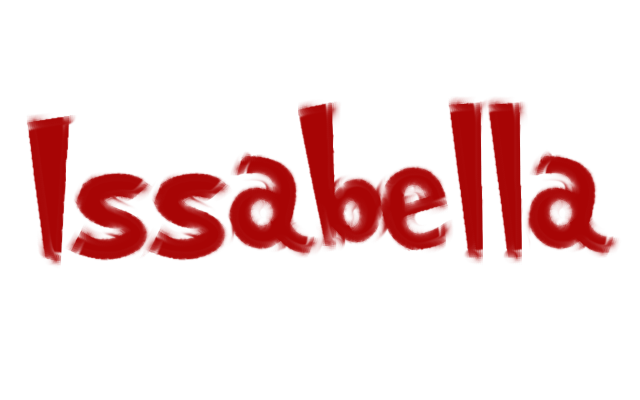
After you do the text, alplha to selection > Selection to Path > Select NONE. Go to your path dialogue > at the bottom you will see an icon paint along path.. I set this one to 15 then clicked where it says stroke with paint tool, then use the drop down and choose smudge then stroke
Make sure you do the selection NONE before you go over to the paths dialogue
Image

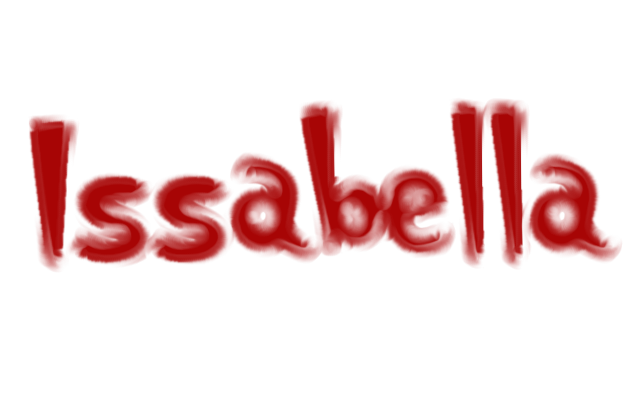
If you want more smudge, repeat the smudge. I did another one repeating 5 times.
Image

_________________
Image


Top
 Post subject: Re: smudge along path
PostPosted: Wed Jun 11, 2014 4:28 am  (#14) 
Offline
GimpChat Member
User avatar

Joined: Mar 01, 2014
Posts: 14198
Location: Spain, Aragón
Thank you so much Molly. :tyspin I'll do it.

_________________
Image

Gimp 2.10.36 (samj) portable _ OS Windows 10 Home_ 64bits
Don’t be afraid to start over. It’s a new chance to rebuild what you want.


Top
 Post subject: Re: smudge along path
PostPosted: Wed Jun 11, 2014 4:41 am  (#15) 
Offline
GimpChat Member
User avatar

Joined: Apr 07, 2010
Posts: 14182
The more you repeat it the more smudge you will get. kind of cool.

_________________
Image


Top
 Post subject: Re: smudge along path
PostPosted: Wed Jun 11, 2014 5:32 am  (#16) 
Offline
GimpChat Member
User avatar

Joined: Mar 01, 2014
Posts: 14198
Location: Spain, Aragón
what a great experiment, Molly! It's fantastic! you're a clever girl! :jumpclap

_________________
Image

Gimp 2.10.36 (samj) portable _ OS Windows 10 Home_ 64bits
Don’t be afraid to start over. It’s a new chance to rebuild what you want.


Top
 Post subject: Re: smudge along path
PostPosted: Wed Jun 11, 2014 5:49 am  (#17) 
Offline
GimpChat Member
User avatar

Joined: Mar 01, 2014
Posts: 14198
Location: Spain, Aragón
Thank you Molly. Here my last tries one of the with a pattern and the other simple. I think that the font makes a difference. :) better yours, :hi5


Attachments:
withtexture.png
withtexture.png [ 94.82 KiB | Viewed 1886 times ]
withpaint.png
withpaint.png [ 32.79 KiB | Viewed 1886 times ]

_________________
Image

Gimp 2.10.36 (samj) portable _ OS Windows 10 Home_ 64bits
Don’t be afraid to start over. It’s a new chance to rebuild what you want.
Top
 Post subject: Re: smudge along path
PostPosted: Wed Jun 11, 2014 5:57 am  (#18) 
Offline
GimpChat Member
User avatar

Joined: Apr 07, 2010
Posts: 14182
cool, the green one looks best to me.

_________________
Image


Top
Post new topic Reply to topic  [ 18 posts ] 

All times are UTC - 5 hours [ DST ]


* Login  


Powered by phpBB3 © phpBB Group