It is currently Tue Nov 24, 2026 9:46 am


All times are UTC - 5 hours [ DST ]


Post new topic Reply to topic  [ 16 posts ] 
Author Message
 Post subject: Photo enhancement
PostPosted: Sat Jun 28, 2014 6:28 am  (#1) 
Offline
GimpChat Member
User avatar

Joined: Dec 22, 2011
Posts: 399
GIMP Version: 2.8.10
Operating System: Windows
GIMP Experience: Beginner Level


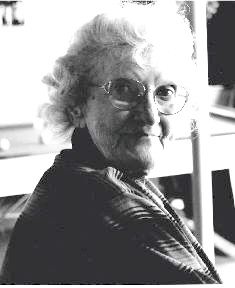
Hiya, Can anybody tell me the best and easiest way to lighten up the dark side of her face please, thanks :)


Attachments:
10419670_10154323682255374_580060520_n.jpg
10419670_10154323682255374_580060520_n.jpg [ 10.27 KiB | Viewed 4460 times ]

_________________
Image
Share on Facebook Share on Twitter Share on Orkut Share on Digg Share on MySpace Share on Delicious Share on Technorati
Top
 Post subject: Re: Photo enhancement
PostPosted: Sat Jun 28, 2014 7:01 am  (#2) 
Offline
GimpChat Member
User avatar

Joined: Dec 22, 2011
Posts: 399
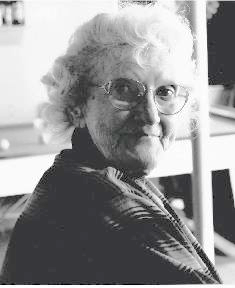
I have managed to achieve that reasonably well but now need help to take the blur out :D


Attachments:
xxx.jpg
xxx.jpg [ 12.98 KiB | Viewed 4444 times ]

_________________
Image
Top
 Post subject: Re: Photo enhancement
PostPosted: Sat Jun 28, 2014 7:22 am  (#3) 
Offline
Global Moderator
User avatar

Joined: Apr 01, 2012
Posts: 8511
Location: On the other side of your screen
Image
Have you tried denoising?

_________________
Image
Free Fun Photo Editing & resources
Poems from the Lord
Gimp Newby
Gimp version 3.2.8 and GMIC-Qt 4.0.2 OS :- Windows 10 Home 64


Top
 Post subject: Re: Photo enhancement
PostPosted: Sat Jun 28, 2014 7:37 am  (#4) 
Offline
GimpChat Member
User avatar

Joined: Jan 10, 2013
Posts: 863
Ciao Delk,
I used the filter curves and Luminosity Mask.
The adjustment I think it's personal taste, could have lit more, but it seemed to me enough.

Penso che hai un buon risultato. Non vedo alcuna sfocatura, solo un po 'troppo luminoso ;)
Image

_________________
bbbbbbbbbbbImage
bbbbbbbbbbb Be patient, English is not my language.


Top
 Post subject: Re: Photo enhancement
PostPosted: Sat Jun 28, 2014 7:50 am  (#5) 
Offline
GimpChat Member
User avatar

Joined: Dec 22, 2011
Posts: 399
Thank you, I am still figuring out how to use all these wonderful filters etc.

Where do I find denoise?

Cannot see curves and Luminosity Mask in filters either :(

_________________
Image


Top
 Post subject: Re: Photo enhancement
PostPosted: Sat Jun 28, 2014 8:13 am  (#6) 
Offline
Global Moderator
User avatar

Joined: Apr 01, 2012
Posts: 8511
Location: On the other side of your screen
Deblk wrote:
Thank you, I am still figuring out how to use all these wonderful filters etc.

Where do I find denoise?

Under repair in G'MIC

_________________
Image
Free Fun Photo Editing & resources
Poems from the Lord
Gimp Newby
Gimp version 3.2.8 and GMIC-Qt 4.0.2 OS :- Windows 10 Home 64


Top
 Post subject: Re: Photo enhancement
PostPosted: Sat Jun 28, 2014 8:22 am  (#7) 
Offline
Global Moderator
User avatar

Joined: Apr 01, 2012
Posts: 8511
Location: On the other side of your screen
Did you find it Deb?

_________________
Image
Free Fun Photo Editing & resources
Poems from the Lord
Gimp Newby
Gimp version 3.2.8 and GMIC-Qt 4.0.2 OS :- Windows 10 Home 64


Top
 Post subject: Re: Photo enhancement
PostPosted: Sat Jun 28, 2014 8:27 am  (#8) 
Offline
GimpChat Member
User avatar

Joined: Dec 22, 2011
Posts: 399
sallyanne wrote:
Did you find it Deb?

Do you mean banding denoise?

_________________
Image


Top
 Post subject: Re: Photo enhancement
PostPosted: Sat Jun 28, 2014 8:35 am  (#9) 
Offline
Global Moderator
User avatar

Joined: Apr 01, 2012
Posts: 8511
Location: On the other side of your screen
I think I used 'Iains fast denoise' but that may be ok too.
Looks like your mask creator (different types) is in G'MIC too, under details.

_________________
Image
Free Fun Photo Editing & resources
Poems from the Lord
Gimp Newby
Gimp version 3.2.8 and GMIC-Qt 4.0.2 OS :- Windows 10 Home 64


Last edited by sallyanne on Sat Jun 28, 2014 8:36 am, edited 1 time in total.

Top
 Post subject: Re: Photo enhancement
PostPosted: Sat Jun 28, 2014 8:36 am  (#10) 
Offline
GimpChat Member
User avatar

Joined: Jan 10, 2013
Posts: 863
Deblk
In Filters-G'MIC-Negative-Film Emulation [Old] there are interesting options.
The preset Kodak Portra 400NC gives a good fit in the clarity of the picture.

I still think you got a good fit. ;)

_________________
bbbbbbbbbbbImage
bbbbbbbbbbb Be patient, English is not my language.


Top
 Post subject: Re: Photo enhancement
PostPosted: Sat Jun 28, 2014 8:39 am  (#11) 
Offline
Global Moderator
User avatar

Joined: Apr 01, 2012
Posts: 8511
Location: On the other side of your screen
Good night peoples. I hope you find what you are after Deb. I am sure Akros will talk you through anything if you need. Bye for now.

_________________
Image
Free Fun Photo Editing & resources
Poems from the Lord
Gimp Newby
Gimp version 3.2.8 and GMIC-Qt 4.0.2 OS :- Windows 10 Home 64


Top
 Post subject: Re: Photo enhancement
PostPosted: Sat Jun 28, 2014 9:13 am  (#12) 
Offline
GimpChat Member
User avatar

Joined: Jan 10, 2013
Posts: 863
sallyanne wrote:
Good night peoples. I hope you find what you are after Deb. I am sure Akros will talk you through anything if you need. Bye for now.

Sally here is 11:00 am, early to go sleep ;)
But in the land of kangaroos is already dark, so good night Sally :otb


Deblk, a suggestion would be that in your edited image (#2), use Colors-Levels and click Auto.
It would be a quick and easy way to get an improvement.

In my it gives this result.
ImageImage
Left/Original

_________________
bbbbbbbbbbbImage
bbbbbbbbbbb Be patient, English is not my language.


Top
 Post subject: Re: Photo enhancement
PostPosted: Sat Jun 28, 2014 12:54 pm  (#13) 
Offline
GimpChat Member

Joined: Jan 20, 2014
Posts: 66
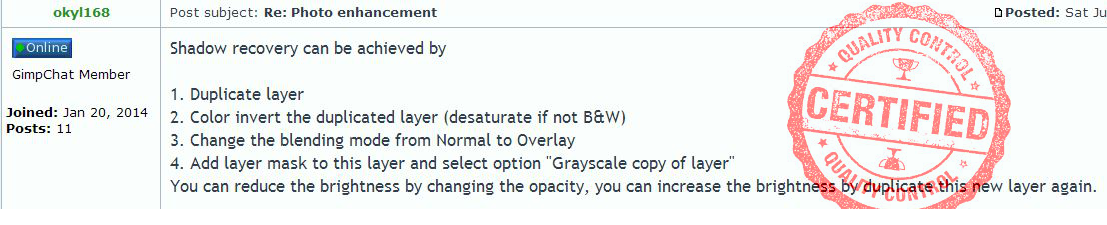
Shadow recovery can be achieved by

1. Duplicate layer
2. Color invert the duplicated layer (desaturate if not B&W)
3. Change the blending mode from Normal to Overlay
4. Add layer mask to this layer and select option "Grayscale copy of layer"
You can reduce the brightness by changing the opacity, you can increase the brightness by duplicate this new layer again.


Top
 Post subject: Re: Photo enhancement
PostPosted: Sat Jun 28, 2014 1:24 pm  (#14) 
Offline
GimpChat Member
User avatar

Joined: Jan 10, 2013
Posts: 863
okyl168 wrote:
Shadow recovery can be achieved by

okyl168 Very good! :bigthup
Image

_________________
bbbbbbbbbbbImage
bbbbbbbbbbb Be patient, English is not my language.


Top
 Post subject: Re: Photo enhancement
PostPosted: Sat Jun 28, 2014 1:37 pm  (#15) 
Offline
GimpChat Member
User avatar

Joined: Jan 20, 2013
Posts: 14835
Location: roma, italy
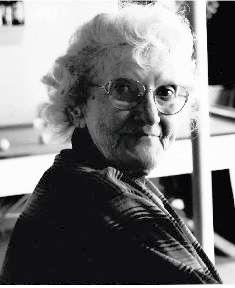
retinex
selective gaussian blur

Attachment:
10419670_10154323682255374_580060520_n_retinex.jpg
10419670_10154323682255374_580060520_n_retinex.jpg [ 16.15 KiB | Viewed 1833 times ]

_________________
"Where am I ?"


Top
 Post subject: Re: Photo enhancement
PostPosted: Sun Jun 29, 2014 1:46 pm  (#16) 
Offline
GimpChat Member
User avatar

Joined: Dec 22, 2011
Posts: 399
Thanks everybody :)

_________________
Image


Top
Post new topic Reply to topic  [ 16 posts ] 

All times are UTC - 5 hours [ DST ]


* Login  


Powered by phpBB3 © phpBB Group