It is currently Wed Sep 30, 2026 7:11 pm


All times are UTC - 5 hours [ DST ]


Post new topic Reply to topic  [ 6 posts ] 
Author Message
 Post subject: Image in text
PostPosted: Sat Jul 26, 2014 12:27 pm  (#1) 
Offline
GimpChat Member

Joined: Nov 09, 2012
Posts: 134
GIMP Version: 2.8.10
Operating System: Windows
GIMP Experience: Beginner Level


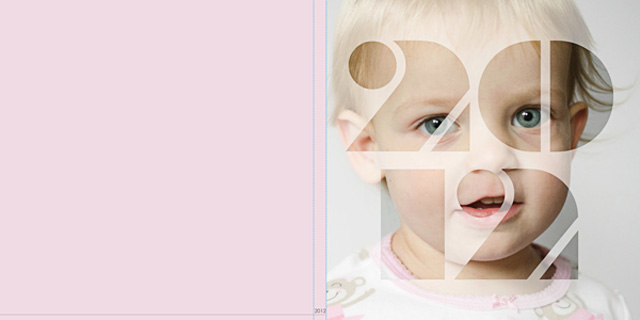
I am trying to replicate this photo in gimp. But with a wedding cake for my wifes magazine im making her.
Im not sure what to do. I tried it out by turning my text to a path and then stroking it, but bluring the outside looks like a mask maybe. but not sure how to do it

help would be much appreciated.

thanks

Image


Share on Facebook Share on Twitter Share on Orkut Share on Digg Share on MySpace Share on Delicious Share on Technorati
Top
 Post subject: Re: Image in text
PostPosted: Sat Jul 26, 2014 12:41 pm  (#2) 
Offline
GimpChat Member
User avatar

Joined: Nov 16, 2011
Posts: 5127
Location: Metro Vancouver, BC
On a colored layer, cutout text, adjust the blur, opacity, mode, etc.
This might help as well, How to make see-through text to image

_________________
Image
Gimp 2.8.18, Linux, median user
Gimp Chat Tutorials Index
Spirit Bear (Kermode)


Top
 Post subject: Re: Image in text
PostPosted: Sat Jul 26, 2014 12:42 pm  (#3) 
Offline
Script Coder
User avatar

Joined: Apr 23, 2010
Posts: 1553
Location: not from Guildford after all
Examine the XCF from this webpage (download using the Original file link).

Image

_________________
Any sufficiently primitive technology is indistinguishable from a rock.


Top
 Post subject: Re: Image in text
PostPosted: Sat Jul 26, 2014 1:35 pm  (#4) 
Offline
Global Moderator
User avatar

Joined: May 16, 2010
Posts: 16175
Didnt paynekj write a script "Blurry_Box or xach blurry thing" or something of that nature that accomplished this effect?
viewtopic.php?f=9&t=3215&start=10


Top
 Post subject: Re: Image in text
PostPosted: Sat Jul 26, 2014 11:30 pm  (#5) 
Offline
GimpChat Member

Joined: Nov 09, 2012
Posts: 134
thanks guys. i figured out one way using layermask but it took forever, so thank you for the xcf file. gonna examine it and see whats up

EDIT.

This is how i did it. I Opened up the original image, made some text over the image on its own text layer. I then did an alpha selection on the text layer, turned off the layer with the eye button, then did a new layer mask>selection. Image disaperead but the text now had the image in it. Then i just pasted the original image down and changed opacity. take a look. thanks for the help. I am now looking at the xcf file supplied and trying to see how they did it with on less layer. haha thanks for all. time to make a youtube vid so others can learn by visual

Image


Top
 Post subject: Re: Image in text
PostPosted: Sun Jul 27, 2014 1:33 am  (#6) 
Offline
Script Coder
User avatar

Joined: Apr 23, 2010
Posts: 1553
Location: not from Guildford after all
LT72884 wrote:
I am now looking at the xcf file supplied and trying to see how they did it with on less layer.

There are (as is typical) several ways to achieve this; and there is nothing wrong with your "selection" method.

Nonetheless, here are the steps I took:
  • Create your text layer (color of the text does not matter)
  • Perform "Layer->Layer to Image Size"
  • Add a layermask, initialized to the layer's alpha channel with the "Invert mask" option checked
  • Fill the layer itself with white
  • Drop the opacity

_________________
Any sufficiently primitive technology is indistinguishable from a rock.


Top
Post new topic Reply to topic  [ 6 posts ] 

All times are UTC - 5 hours [ DST ]


* Login  


Powered by phpBB3 © phpBB Group