It is currently Wed Sep 30, 2026 2:38 pm


All times are UTC - 5 hours [ DST ]


Post new topic Reply to topic  [ 10 posts ] 
Author Message
 Post subject: Selection Question
PostPosted: Wed Oct 15, 2014 5:32 pm  (#1) 
Offline
New Member

Joined: Oct 14, 2014
Posts: 2
GIMP Version: 2.8.10
Operating System: Windows
OS Version: 7
GIMP Experience: Beginner Level


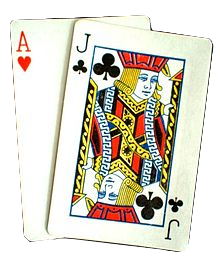
I am making a logo and need to incorporate the attached picture. The thing is I want the black background gone and make it transparent. Is there an easy way to select just the cards? I know about the lasso tool but I need precision.


Any help would be appreciated.


Attachments:
220px-Blackjack.jpg
220px-Blackjack.jpg [ 17.04 KiB | Viewed 3436 times ]
Share on Facebook Share on Twitter Share on Orkut Share on Digg Share on MySpace Share on Delicious Share on Technorati
Top
 Post subject: Re: Selection Question
PostPosted: Wed Oct 15, 2014 5:56 pm  (#2) 
Offline
GimpChat Member
User avatar

Joined: Nov 16, 2011
Posts: 5127
Location: Metro Vancouver, BC
Getting Around in GIMP - Layer Masks

_________________
Image
Gimp 2.8.18, Linux, median user
Gimp Chat Tutorials Index
Spirit Bear (Kermode)


Top
 Post subject: Re: Selection Question
PostPosted: Wed Oct 15, 2014 6:02 pm  (#3) 
Offline
GimpChat Member
User avatar

Joined: Apr 07, 2010
Posts: 14182
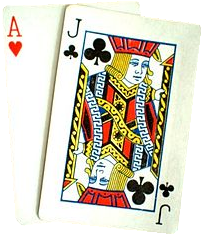
I would think the quick mask would work the best, I did one but I didn't take a lot of time. There is still a little black I missed.
Image

_________________
Image


Top
 Post subject: Re: Selection Question
PostPosted: Wed Oct 15, 2014 6:10 pm  (#4) 
Offline
GimpChat Founder
User avatar

Joined: May 22, 2008
Posts: 5241
Location: Gimpville
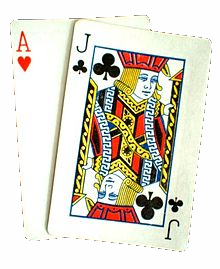
Another approach would be to use use the Magic Wand to get most of the black on the initial selection, then crop off the remainder with the Lasso Tool. To cleanup the edges, wand, grow by 1px, delete.

Image

_________________
“If you reach for the stars, you just might land on a decently sized hill.” - Stuart Hill


Top
 Post subject: Re: Selection Question
PostPosted: Wed Oct 15, 2014 6:18 pm  (#5) 
Offline
GimpChat Member

Joined: Jul 11, 2010
Posts: 349
How quickly we forget. what about GMIC foreground select interactive.

Image


Top
 Post subject: Re: Selection Question
PostPosted: Wed Oct 15, 2014 11:41 pm  (#6) 
Offline
GimpChat Founder
User avatar

Joined: May 22, 2008
Posts: 5241
Location: Gimpville
Thanks for the reminder of the G'MIC filter, bilbo. I've been meaning to test out the new version.

Maybe a better approach would be to actually use SVG images of cards and incorporate those into your logo. You can find them here.

Image

Image

_________________
“If you reach for the stars, you just might land on a decently sized hill.” - Stuart Hill


Top
 Post subject: Re: Selection Question
PostPosted: Thu Oct 16, 2014 12:49 am  (#7) 
Offline
GimpChat Member
User avatar

Joined: Dec 08, 2013
Posts: 1088
There is also the retro method of using the path tool and selecting from path ;-}

_________________
Image


Top
 Post subject: Re: Selection Question
PostPosted: Thu Oct 16, 2014 1:42 am  (#8) 
Offline
Script Coder
User avatar

Joined: Oct 25, 2010
Posts: 4812
In three easy steps:
- use the magic wand to select the background (caution: the background is not uniform; you have to shift click in a couple of places
- Select>Grow 2px to have the selection cover the edges of the cards
- Color>Color to alpha, and remove the background color

In all of 3 seconds:

Attachment:
Cards.png
Cards.png [ 118.64 KiB | Viewed 3320 times ]

_________________
Image


Top
 Post subject: Re: Selection Question
PostPosted: Thu Oct 16, 2014 2:41 am  (#9) 
Offline
Script Coder
User avatar

Joined: Oct 25, 2010
Posts: 4812
raindropz wrote:
what about GMIC foreground select interactive.


See viewtopic.php?f=8&t=11265#p151679

This said, it leaves a rim of background...

_________________
Image


Top
 Post subject: Re: Selection Question
PostPosted: Fri Oct 17, 2014 9:10 am  (#10) 
Offline
GimpChat Member

Joined: Jul 11, 2010
Posts: 349
ofnuts wrote:
raindropz wrote:
what about GMIC foreground select interactive.


See http://www.gimpchat.com/viewtopic.php?f ... 65#p151679

This said, it leaves a rim of background...

Sorry, I was in a hurry. I should have selected the cards, reduced the selection 1 or 2 pixels, and deleted that part. Just curious! raindrops?


Top
Post new topic Reply to topic  [ 10 posts ] 

All times are UTC - 5 hours [ DST ]


* Login  


Powered by phpBB3 © phpBB Group