It is currently Wed Sep 30, 2026 9:14 am


All times are UTC - 5 hours [ DST ]


Post new topic Reply to topic  [ 16 posts ] 
Author Message
 Post subject: Circle of Dashes Help [SOLVED]
PostPosted: Fri Oct 03, 2014 7:03 pm  (#1) 
Offline
Administrator
User avatar

Joined: Aug 10, 2012
Posts: 14219
Location: Native to NYC living in Arizona, Gimp 2.8 - 3.0, Win 11 PC.
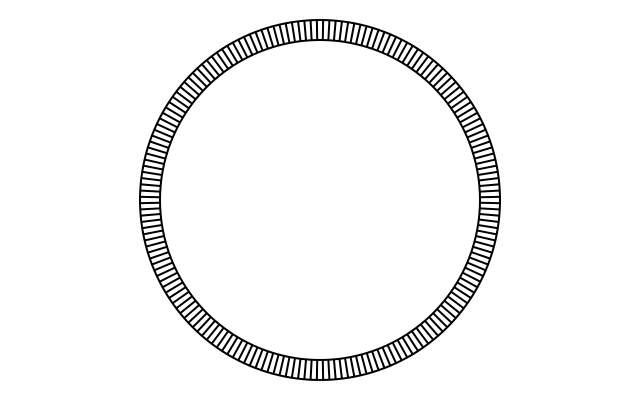
I've been trying, unsuccessfully to create a circle of dashes from this image. Whatever I try, it always ends up distorted.
Any idea how to accomplish this?
Attachment:
H Dash.png
H Dash.png [ 1.78 KiB | Viewed 5240 times ]

_________________
Image
"A wise man learns more from a foolish question than a fool can learn from a wise answer"
Image


Last edited by Wallace on Fri Oct 03, 2014 8:38 pm, edited 1 time in total.

Share on Facebook Share on Twitter Share on Orkut Share on Digg Share on MySpace Share on Delicious Share on Technorati
Top
 Post subject: Re: Circle of Dashes Help
PostPosted: Fri Oct 03, 2014 7:30 pm  (#2) 
Offline
Script Coder
User avatar

Joined: Oct 25, 2010
Posts: 4812
*cough*

http://sourceforge.net/projects/gimp-pa ... y/download

Attachment:
DialMarks.png
DialMarks.png [ 28.51 KiB | Viewed 5210 times ]

_________________
Image


Top
 Post subject: Re: Circle of Dashes Help
PostPosted: Fri Oct 03, 2014 7:41 pm  (#3) 
Offline
Administrator
User avatar

Joined: Aug 10, 2012
Posts: 14219
Location: Native to NYC living in Arizona, Gimp 2.8 - 3.0, Win 11 PC.
ofnuts wrote:


Thanks. :oops:

How long has this Python plugin file been around?

Edit...

Now all I need to do is figure out how to use it to make what I'm after. :oops:

_________________
Image
"A wise man learns more from a foolish question than a fool can learn from a wise answer"
Image


Top
 Post subject: Re: Circle of Dashes Help
PostPosted: Fri Oct 03, 2014 8:09 pm  (#4) 
Offline
Script Coder
User avatar

Joined: Oct 25, 2010
Posts: 4812
Wallace wrote:
How long has this Python plugin file been around?

According to its header:
v0.0: 2013-11-15: First published version

_________________
Image


Top
 Post subject: Re: Circle of Dashes Help
PostPosted: Fri Oct 03, 2014 8:31 pm  (#5) 
Offline
Administrator
User avatar

Joined: Aug 10, 2012
Posts: 14219
Location: Native to NYC living in Arizona, Gimp 2.8 - 3.0, Win 11 PC.
ofnuts wrote:
Wallace wrote:
How long has this Python plugin file been around?

According to its header:
v0.0: 2013-11-15: First published version


Okay smarty-pants. :clap

BTW... I figured out how to use this plug-in, within only a few short minutes and here's the proof...
Image
Thanks a bunch. :bigthup

_________________
Image
"A wise man learns more from a foolish question than a fool can learn from a wise answer"
Image


Top
 Post subject: Re: Circle of Dashes Help [SOLVED]
PostPosted: Sat Oct 04, 2014 1:26 am  (#6) 
Offline
Script Coder
User avatar

Joined: Feb 18, 2011
Posts: 4826
Location: Bendigo Vic. Australia
Wallace your doing well all I got was this
Image
Would you be able to share your settings

_________________
Image
No matter how much you push the envelope, it'll still be stationery.


Top
 Post subject: Re: Circle of Dashes Help [SOLVED]
PostPosted: Sat Oct 04, 2014 3:36 am  (#7) 
Offline
Script Coder
User avatar

Joined: Oct 25, 2010
Posts: 4812
Graechan wrote:
Wallace your doing well all I got was this
[ Image ]
Would you be able to share your settings


If you ask for 180 marks that are 2° wide the marks will nearly overlap. Try 180 marks at 1° each. Once you have a path, Select>From path and bucket-fill (you have to aim inside one of the marks, which will be easier to do if you zoom in).

_________________
Image


Top
 Post subject: Re: Circle of Dashes Help [SOLVED]
PostPosted: Sat Oct 04, 2014 10:04 am  (#8) 
Offline
GimpChat Member
User avatar

Joined: Mar 10, 2014
Posts: 845
is it correct?
Image

Image

bigger
Image


Top
 Post subject: Re: Circle of Dashes Help [SOLVED]
PostPosted: Sat Oct 04, 2014 12:43 pm  (#9) 
Offline
Administrator
User avatar

Joined: Aug 10, 2012
Posts: 14219
Location: Native to NYC living in Arizona, Gimp 2.8 - 3.0, Win 11 PC.
Graechan wrote:
Wallace your doing well all I got was this
[ Image ]
Would you be able to share your settings

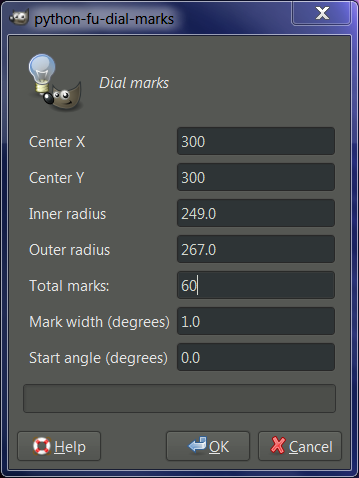
These are the settings I used to make this dial.
Image
Center X and Y is the center of my canvas at 127 pixels, I may be off a pixel or 2.
The Inner radius is where you want your line to start, my line starts at 97 pixels from the center.
The Outer radius is where the line ends. These lines end at 112 pixels form the center, making the line about 13 pixels long.
I'm not 100% sure about Mark width (degrees) or Start angle (degrees), but 1.0 seem to work out well for me

_________________
Image
"A wise man learns more from a foolish question than a fool can learn from a wise answer"
Image


Top
 Post subject: Re: Circle of Dashes Help [SOLVED]
PostPosted: Sat Oct 04, 2014 1:55 pm  (#10) 
Offline
GimpChat Member
User avatar

Joined: Nov 16, 2011
Posts: 5127
Location: Metro Vancouver, BC
Thanks for the good example Wallace. :bigthup

_________________
Image
Gimp 2.8.18, Linux, median user
Gimp Chat Tutorials Index
Spirit Bear (Kermode)


Top
 Post subject: Re: Circle of Dashes Help [SOLVED]
PostPosted: Sat Oct 04, 2014 2:33 pm  (#11) 
Offline
Administrator
User avatar

Joined: Aug 10, 2012
Posts: 14219
Location: Native to NYC living in Arizona, Gimp 2.8 - 3.0, Win 11 PC.
Odinbc wrote:
Thanks for the good example Wallace. :bigthup

No problem Odin.

Here's another example of a clock dial.
Image

Minutes & Hours
Image Image

With the Start angle (degrees) set to 0.0 the lines fell dead center where they should for a clock dial.

_________________
Image
"A wise man learns more from a foolish question than a fool can learn from a wise answer"
Image


Top
 Post subject: Re: Circle of Dashes Help [SOLVED]
PostPosted: Sat Oct 04, 2014 2:37 pm  (#12) 
Offline
Script Coder
User avatar

Joined: Oct 25, 2010
Posts: 4812
Wallace wrote:
Graechan wrote:
Wallace your doing well all I got was this
[ Image ]
Would you be able to share your settings

These are the settings I used to make this dial.
[ Image ]
Center X and Y is the center of my canvas at 127 pixels, I may be off a pixel or 2.
The Inner radius is where you want your line to start, my line starts at 97 pixels from the center.
The Outer radius is where the line ends. These lines end at 112 pixels form the center, making the line about 13 pixels long.
I'm not 100% sure about Mark width (degrees) or Start angle (degrees), but 1.0 seem to work out well for me


Mark width is the width of the mark: easier to see with less marks (20° and 40°, in blue), and the start angle is the angle of the middle of the first mark, clockwise from the horizontal (20°, in red).

Attachment:
DialMarks.png
DialMarks.png [ 20.93 KiB | Viewed 2436 times ]

_________________
Image


Top
 Post subject: Re: Circle of Dashes Help [SOLVED]
PostPosted: Sat Oct 04, 2014 2:43 pm  (#13) 
Offline
Administrator
User avatar

Joined: Aug 10, 2012
Posts: 14219
Location: Native to NYC living in Arizona, Gimp 2.8 - 3.0, Win 11 PC.
ofnuts wrote:
Wallace wrote:
Graechan wrote:
Wallace your doing well all I got was this
[ Image ]
Would you be able to share your settings

These are the settings I used to make this dial.
[ Image ]
Center X and Y is the center of my canvas at 127 pixels, I may be off a pixel or 2.
The Inner radius is where you want your line to start, my line starts at 97 pixels from the center.
The Outer radius is where the line ends. These lines end at 112 pixels form the center, making the line about 13 pixels long.
I'm not 100% sure about Mark width (degrees) or Start angle (degrees), but 1.0 seem to work out well for me


Mark width is the width of the mark: easier to see with less marks (20° and 40°, in blue), and the start angle is the angle of the middle of the first mark, clockwise from the horizontal (20°, in red).

Attachment:
DialMarks.png

Thanks for this Ofnuts. :bigthup

_________________
Image
"A wise man learns more from a foolish question than a fool can learn from a wise answer"
Image


Top
 Post subject: Re: Circle of Dashes Help [SOLVED]
PostPosted: Wed Oct 22, 2014 10:57 am  (#14) 
Offline
Script Coder
User avatar

Joined: Oct 25, 2010
Posts: 4812
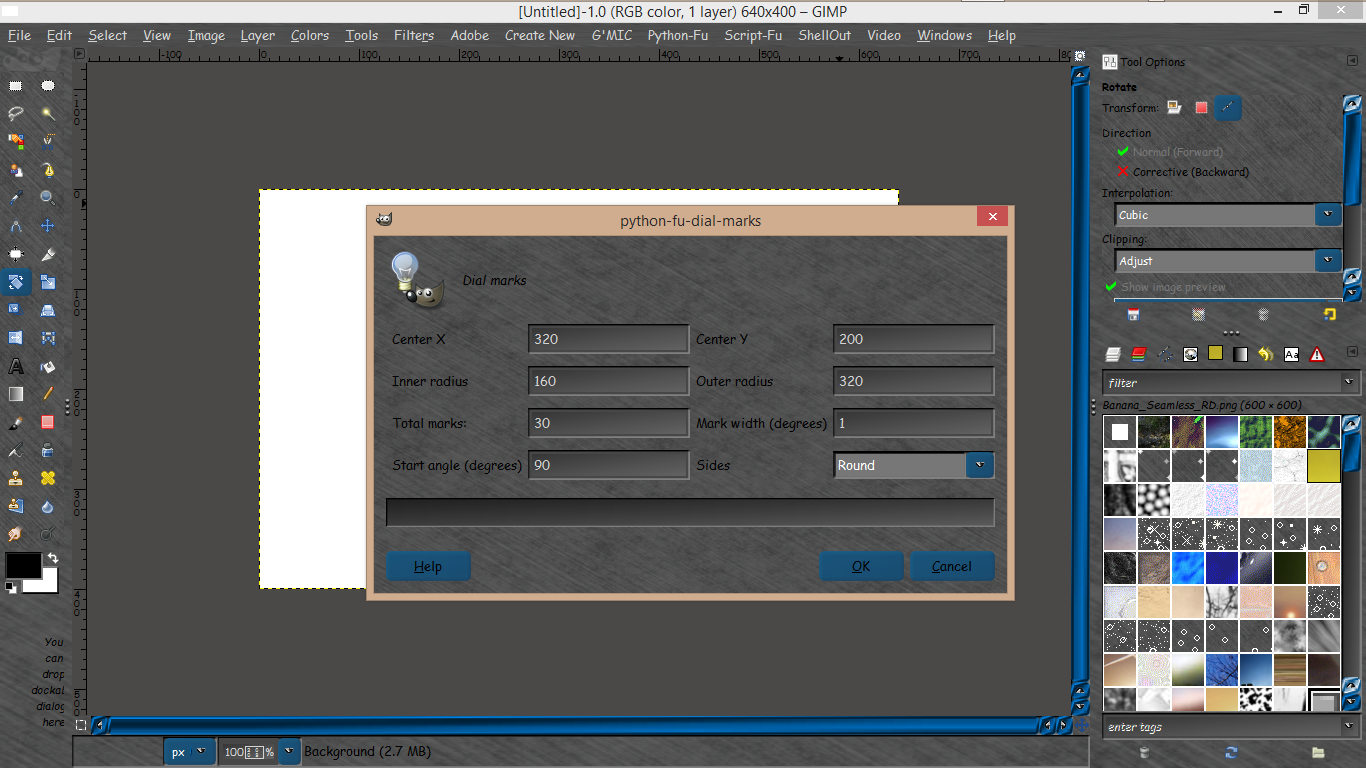
Updated the script. Will now also do round sides:

Attachment:
DialMarksRound.png
DialMarksRound.png [ 5.77 KiB | Viewed 2390 times ]

_________________
Image


Top
 Post subject: Re: Circle of Dashes Help [SOLVED]
PostPosted: Wed Oct 22, 2014 12:00 pm  (#15) 
Offline
Global Moderator
User avatar

Joined: May 16, 2010
Posts: 16175
Very nice Ofnuts. Thank you.

Image

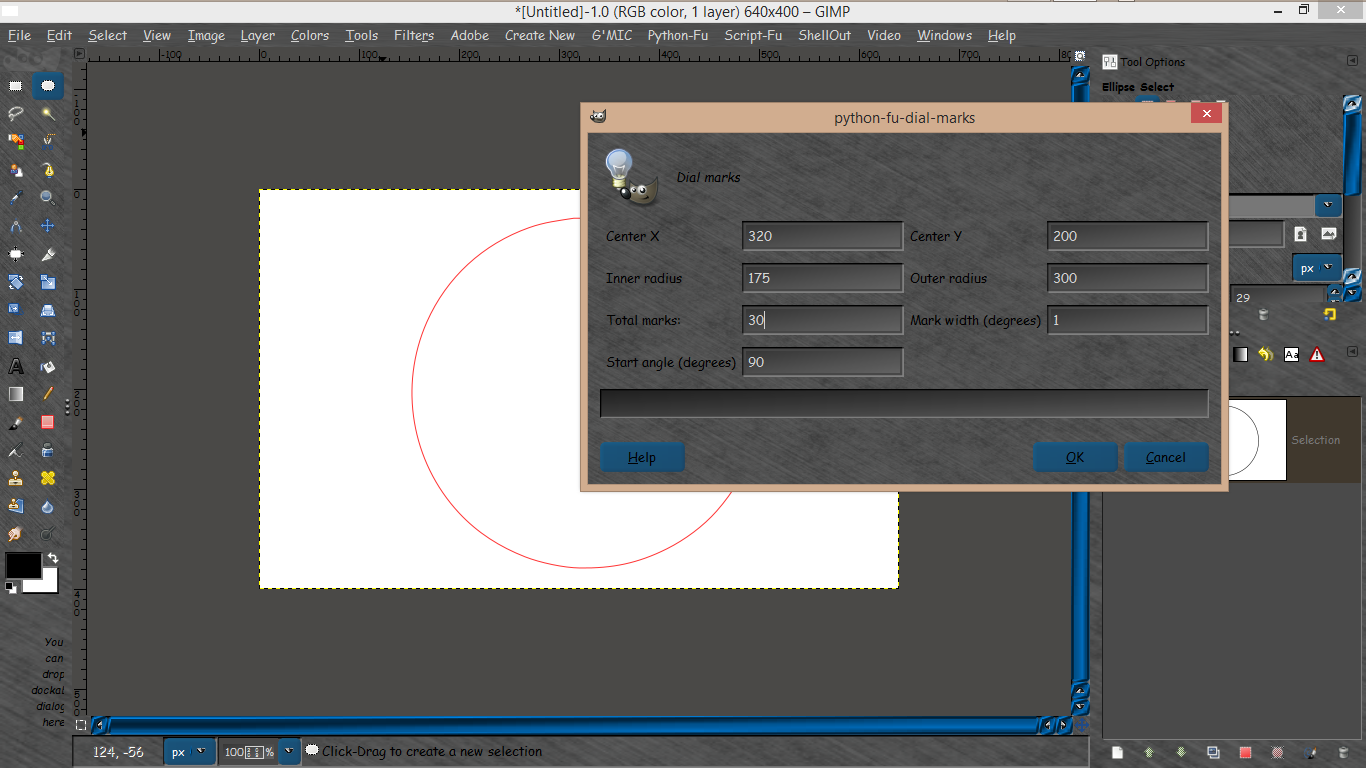
And the settings for this size image.

I simply created a second exact path scaled it down and rotated it.

Stroked both paths using my seamless banana pattern.
Image.

Image


Top
 Post subject: Re: Circle of Dashes Help [SOLVED]
PostPosted: Wed Oct 22, 2014 12:10 pm  (#16) 
Offline
Global Moderator
User avatar

Joined: May 16, 2010
Posts: 16175
One more rounded this time.

Settings
Image

Results
Image


Top
Post new topic Reply to topic  [ 16 posts ] 

All times are UTC - 5 hours [ DST ]


* Login  


Powered by phpBB3 © phpBB Group