It is currently Wed Sep 30, 2026 10:43 am


All times are UTC - 5 hours [ DST ]


Post new topic Reply to topic  [ 8 posts ] 
Author Message
 Post subject: Separate each area from each other
PostPosted: Mon Dec 08, 2014 4:51 am  (#1) 
Offline
GimpChat Member
User avatar

Joined: Feb 14, 2013
Posts: 462
Location: Stockholm
GIMP Version: 2.8.10
Operating System: Windows
GIMP Experience: Beginner Level


Hello.
I need to change color on this areas. To do that I need to separate all areas from each other. Can I do that with Gimp
Image
Thanks in advance.
Lurifax

_________________
Late 2017 iMac Retina 4K 21,5 inch Mac OS High Sierra version 10.13.4
3,6 GHz Intel Core i7
16 GB Ram 2400 MHz DDR4
Graphic card Radeon Pro 560 4096 MB
Affinity Photo and Affinity Designers.


Share on Facebook Share on Twitter Share on Orkut Share on Digg Share on MySpace Share on Delicious Share on Technorati
Top
 Post subject: Re: Separate each area from each other
PostPosted: Mon Dec 08, 2014 5:23 am  (#2) 
Offline
GimpChat Member
User avatar

Joined: Apr 07, 2010
Posts: 14182
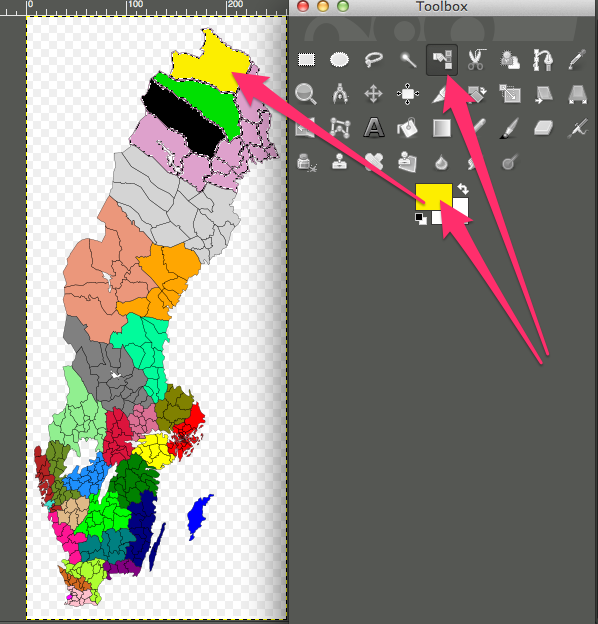
You just use your select by color tool to select each area. :colsel
Image

_________________
Image


Top
 Post subject: Re: Separate each area from each other
PostPosted: Mon Dec 08, 2014 6:07 am  (#3) 
Offline
GimpChat Member
User avatar

Joined: Feb 14, 2013
Posts: 462
Location: Stockholm
Hello molly. Sorry I dont understand what you try to tell me.
Yes Change color no problem, but how I separate the areas from each other. I try to use Alpa to selected but that don't separate each area.

_________________
Late 2017 iMac Retina 4K 21,5 inch Mac OS High Sierra version 10.13.4
3,6 GHz Intel Core i7
16 GB Ram 2400 MHz DDR4
Graphic card Radeon Pro 560 4096 MB
Affinity Photo and Affinity Designers.


Top
 Post subject: Re: Separate each area from each other
PostPosted: Mon Dec 08, 2014 6:16 am  (#4) 
Offline
GimpChat Member
User avatar

Joined: Apr 07, 2010
Posts: 14182
I used the selection by color in each area, I selected the top color, then I used color > colorize in that area. Then I select the next area and do the same. You can usea gradient or what ever you want in those selections, even patterns
Image

_________________
Image


Top
 Post subject: Re: Separate each area from each other
PostPosted: Mon Dec 08, 2014 7:11 am  (#5) 
Offline
GimpChat Member
User avatar

Joined: Feb 14, 2013
Posts: 462
Location: Stockholm
Thanks molly.
I try.

_________________
Late 2017 iMac Retina 4K 21,5 inch Mac OS High Sierra version 10.13.4
3,6 GHz Intel Core i7
16 GB Ram 2400 MHz DDR4
Graphic card Radeon Pro 560 4096 MB
Affinity Photo and Affinity Designers.


Top
 Post subject: Re: Separate each area from each other
PostPosted: Mon Dec 08, 2014 7:35 am  (#6) 
Offline
GimpChat Member
User avatar

Joined: Apr 07, 2010
Posts: 14182
I was just thinking, you could also select each selection and run the BRL on each one, I think that would be cool for that map.

_________________
Image


Top
 Post subject: Re: Separate each area from each other
PostPosted: Mon Dec 08, 2014 11:42 am  (#7) 
Offline
GimpChat Member
User avatar

Joined: Feb 14, 2013
Posts: 462
Location: Stockholm
That was easy.
Thanks molly.
Image

_________________
Late 2017 iMac Retina 4K 21,5 inch Mac OS High Sierra version 10.13.4
3,6 GHz Intel Core i7
16 GB Ram 2400 MHz DDR4
Graphic card Radeon Pro 560 4096 MB
Affinity Photo and Affinity Designers.


Top
 Post subject: Re: Separate each area from each other
PostPosted: Mon Dec 08, 2014 11:52 am  (#8) 
Offline
GimpChat Member
User avatar

Joined: Apr 07, 2010
Posts: 14182
you are welcome, yes that is easy

_________________
Image


Top
Post new topic Reply to topic  [ 8 posts ] 

All times are UTC - 5 hours [ DST ]


* Login  


Powered by phpBB3 © phpBB Group