It is currently Tue Sep 29, 2026 11:19 pm


All times are UTC - 5 hours [ DST ]


Post new topic Reply to topic  [ 4 posts ] 
Author Message
 Post subject: Text wrapping around a heart
PostPosted: Mon Jan 19, 2015 8:58 pm  (#1) 
Offline
New Member

Joined: Jan 19, 2015
Posts: 1
GIMP Version: 2.8.10
Operating System: Windows
OS Version: Windows 8.1
GIMP Experience: Basic Level


So what I am trying to do is to wrap my text around a heart path
Image
This is what i have so far. I want to get "Kill of the night" in the bottom left-quadrant. I don't know how to this. Please help and thank you


Share on Facebook Share on Twitter Share on Orkut Share on Digg Share on MySpace Share on Delicious Share on Technorati
Top
 Post subject: Re: Text wrapping around a heart
PostPosted: Mon Jan 19, 2015 10:19 pm  (#2) 
Offline
Administrator
User avatar

Joined: Aug 10, 2012
Posts: 14218
Location: Native to NYC living in Arizona, Gimp 2.8 - 3.0, Win 11 PC.
Image

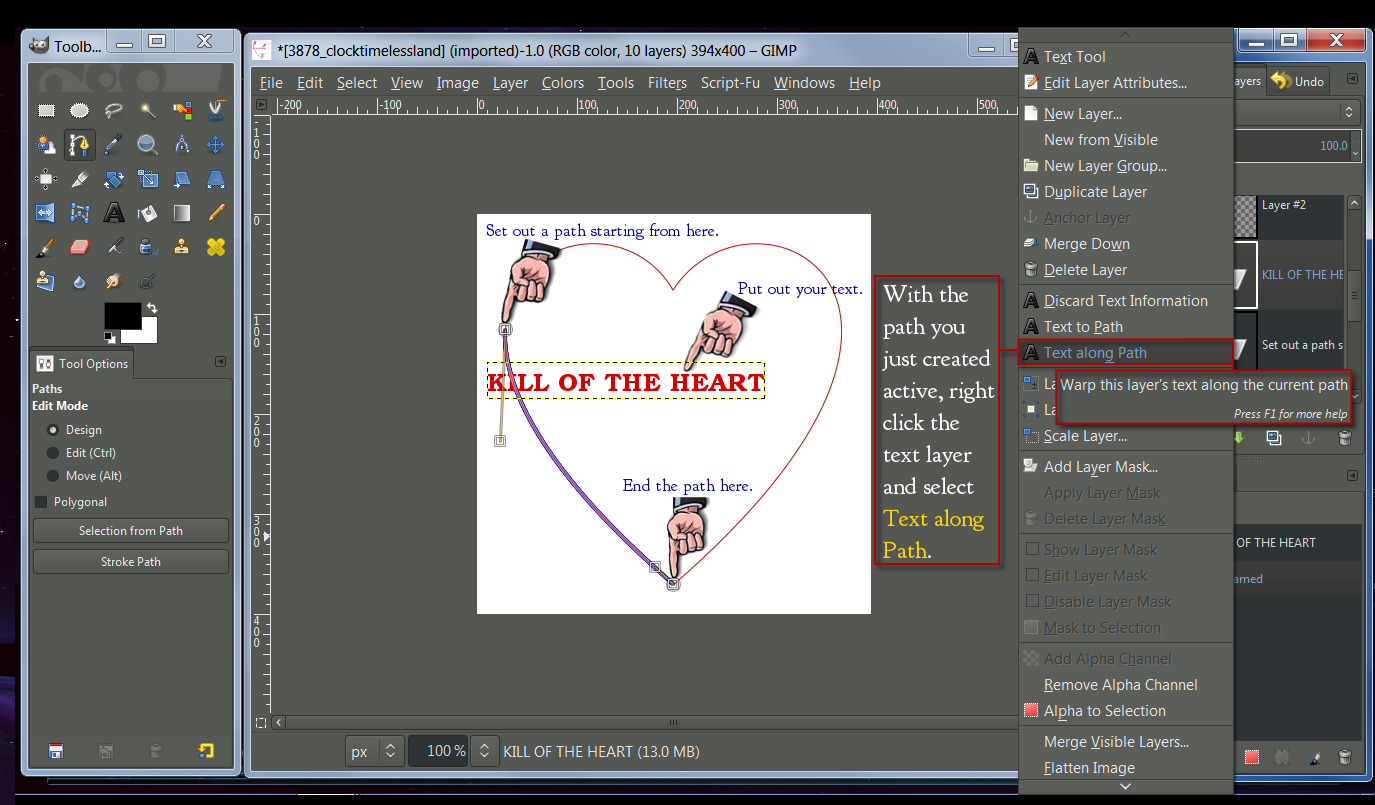
Using the paths created by the Text along Path. Make a selection from those paths and fill it with the color of your choice.

Note:
Be sure that the path you create for your text to follow, starts where you want the text to begin, and ends where you want the text to stop.
Also, the path needs to be long enough for the text to fix. If the path is short, the paths will not be correctly created by Text along path. A longer path for the text to follow will have to be made to replace the short one.

_________________
Image
"A wise man learns more from a foolish question than a fool can learn from a wise answer"
Image


Top
 Post subject: Re: Text wrapping around a heart
PostPosted: Tue Jan 20, 2015 3:01 am  (#3) 
Offline
Script Coder
User avatar

Joined: Oct 25, 2010
Posts: 4812
Things can be a bit simpler with this script.

_________________
Image


Top
 Post subject: Re: Text wrapping around a heart
PostPosted: Tue Jan 20, 2015 7:35 am  (#4) 
Offline
Global Moderator
User avatar

Joined: May 16, 2010
Posts: 16175
I would just duplicate the heart path and delete some nodes keeping only the nodes (length of the path) you need to follow. Now just delete the whole heart path and use (right click text layer), text to path on the heart path copy. But how do you want the text aligned? Curving with the path like the other text or vertical?

Ofnuts script works best for either.


Top
Post new topic Reply to topic  [ 4 posts ] 

All times are UTC - 5 hours [ DST ]


* Login  


Powered by phpBB3 © phpBB Group