It is currently Thu Sep 24, 2026 2:11 am


All times are UTC - 5 hours [ DST ]


Post new topic Reply to topic  [ 9 posts ] 
Author Message
 Post subject: Select Area to work on?
PostPosted: Thu Feb 12, 2015 4:54 am  (#1) 
Offline
GimpChat Member
User avatar

Joined: Dec 22, 2011
Posts: 399
GIMP Version: 2.8.10
Operating System: Windows
GIMP Experience: Beginner Level


Hiya....can i select an area on a foreground image then be able to to use the colour select tool and change the colour just in that area only? When I try to do that the selection goes so then the whole image is then being used. Hope that makes sense :) Tia

_________________
Image


Share on Facebook Share on Twitter Share on Orkut Share on Digg Share on MySpace Share on Delicious Share on Technorati
Top
 Post subject: Re: Select Area to work on?
PostPosted: Thu Feb 12, 2015 5:12 am  (#2) 
Offline
GimpChat Member
User avatar

Joined: Apr 07, 2010
Posts: 14182
Do you mean like this? I just used the lasso and made a selection, then used the color picker on the red cat bed and dragged the color over into the selection.
Image

_________________
Image


Top
 Post subject: Re: Select Area to work on?
PostPosted: Thu Feb 12, 2015 5:19 am  (#3) 
Offline
GimpChat Member
User avatar

Joined: Dec 22, 2011
Posts: 399
Yes sort of....if there are 2 colours in that area I would like to be able to use the select by colour tool so I can use the other colour to make it all one colour? I was using the select tool so should I use the lasso? Lovely Puddy cat :)

_________________
Image


Top
 Post subject: Re: Select Area to work on?
PostPosted: Thu Feb 12, 2015 5:43 am  (#4) 
Offline
GimpChat Member
User avatar

Joined: Apr 07, 2010
Posts: 14182
You can use any selection tool you want. If there is any kind of selection you can change anything within this selection. You can also do them on different layers too, then merge them.
Could you post the image of what it is you want to change?

_________________
Image


Top
 Post subject: Re: Select Area to work on?
PostPosted: Thu Feb 12, 2015 5:56 am  (#5) 
Offline
GimpChat Member
User avatar

Joined: Dec 22, 2011
Posts: 399
molly wrote:
You can use any selection tool you want. If there is any kind of selection you can change anything within this selection. You can also do them on different layers too, then merge them.
Could you post the image of what it is you want to change?

I have finished my project now by doing it the slow way. I would like to be able to use the technique in other projects though. What happens is when I select an area then use the 'select by colour tool' in that area the selection goes and the selected colour is then selected though the whole image.

_________________
Image


Top
 Post subject: Re: Select Area to work on?
PostPosted: Thu Feb 12, 2015 6:55 am  (#6) 
Offline
Global Moderator
User avatar

Joined: May 16, 2010
Posts: 16174
The only way to really do this is to copy your selected area and then paste it to another layer.You can then work on the colors within that area and merge back into the original layer.


Top
 Post subject: Re: Select Area to work on?
PostPosted: Thu Feb 12, 2015 7:07 am  (#7) 
Offline
Script Coder
User avatar

Joined: Dec 27, 2014
Posts: 508
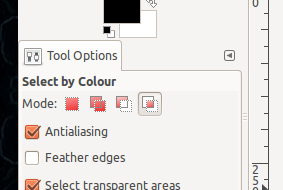
I think what you need is to set Mode = "Intersect with current selection" when you use the Select by Color tool, like this:

Image

The Select by Color tool will then only select that part of your current selection that matches the color you click on.


Top
 Post subject: Re: Select Area to work on?
PostPosted: Thu Feb 12, 2015 7:16 am  (#8) 
Offline
Script Coder
User avatar

Joined: Oct 25, 2010
Posts: 4812
Deblk wrote:
molly wrote:
You can use any selection tool you want. If there is any kind of selection you can change anything within this selection. You can also do them on different layers too, then merge them.
Could you post the image of what it is you want to change?

I have finished my project now by doing it the slow way. I would like to be able to use the technique in other projects though. What happens is when I select an area then use the 'select by colour tool' in that area the selection goes and the selected colour is then selected though the whole image.


The trick is to "intersect" two selections. For instance you select by colour normally first (that will select plenty of red areas) and then you use another selection tool (Freehand for instance) to reselect the area of interest. So you end up with only bits that are selected in both selections, the red stuff which is within your freehand selection.

Attachment:
IntersectSelections.png
IntersectSelections.png [ 242.33 KiB | Viewed 3309 times ]


You can also do the exact opposite, ie select the area first, and then do a color selection in intersect mode.

_________________
Image


Top
 Post subject: Re: Select Area to work on?
PostPosted: Thu Feb 12, 2015 1:21 pm  (#9) 
Offline
GimpChat Member
User avatar

Joined: Dec 22, 2011
Posts: 399
Brilliant...thank you guys :)

_________________
Image


Top
Post new topic Reply to topic  [ 9 posts ] 

All times are UTC - 5 hours [ DST ]


* Login  


Powered by phpBB3 © phpBB Group