It is currently Fri Oct 02, 2026 6:34 pm


All times are UTC - 5 hours [ DST ]


Post new topic Reply to topic  [ 27 posts ]  Go to page 1, 2  Next
Author Message
 Post subject: Scripting Help
PostPosted: Sat Feb 21, 2015 4:34 pm  (#1) 
Offline
GimpChat Member
User avatar

Joined: Feb 21, 2015
Posts: 22
GIMP Version: 2.8.10
Operating System: Windows
GIMP Experience: Intermediate Level


Greetings!

I've been using THE GIMP for a while now but I've just started scripting and have run into a problem. I get the message "Execution error for 'reaction diffusion': Error: ( : 1) =: argument 1 must be: number" when I try to run it.

(define (script-fu-reaction-diffusion image layer)
   (gimp-image-undo-group-start image)   
   (high-pass RUN-NONINTERACTIVE image layer 48 "Colour" FALSE)
   (gimp-threshold layer 100 255)
   (plug-in-gauss RUN-NONINTERACTIVE image layer 20 20 1)
   (gimp-image-undo-group-end image)
   (gimp-displays-flush)
)

(script-fu-register
  "script-fu-reaction-diffusion"
  "<Image>/Filters/Generic/reaction diffusion"
  "simulates reaction diffusion growth"
  "Andrew Murray"
  "Andrew Murray"
  "2015"
  "RGB*, RGBA*, GRAY*"
  SF-IMAGE    "image" 0
  SF-DRAWABLE "layer" 0
)


As far as I can deduce, the script gets confused because the high-pass script that I'm using creates a new layer and deletes the original layer. How can I tell the script to work on the new layer after that point?

Additionally, I'd like to have the script loop the following four steps a user specified amount of times. If anyone could show me how to do that I would appreciate it!

(high-pass RUN-NONINTERACTIVE image layer 48 "Colour" FALSE)
(gimp-threshold layer 100 255)
(plug-in-gauss RUN-NONINTERACTIVE image layer 20 20 1)
(gimp-displays-flush)


Share on Facebook Share on Twitter Share on Orkut Share on Digg Share on MySpace Share on Delicious Share on Technorati
Top
 Post subject: Re: Scripting Help
PostPosted: Sat Feb 21, 2015 4:39 pm  (#2) 
Offline
GimpChat Member
User avatar

Joined: Apr 07, 2010
Posts: 14182
Welcome to Gimp Chat z22,
We have a lot of very talented scriptors here so I think you will get lots of help with this issue for sure.

_________________
Image


Top
 Post subject: Re: Scripting Help
PostPosted: Sat Feb 21, 2015 5:18 pm  (#3) 
Offline
Script Coder
User avatar

Joined: Feb 18, 2011
Posts: 4826
Location: Bendigo Vic. Australia
z22 '(high-pass RUN-NONINTERACTIVE image layer 48 "Colour" FALSE)', is this a script or plugin?

_________________
Image
No matter how much you push the envelope, it'll still be stationery.


Top
 Post subject: Re: Scripting Help
PostPosted: Sat Feb 21, 2015 5:25 pm  (#4) 
Offline
GimpChat Member
User avatar

Joined: Feb 21, 2015
Posts: 22
It's a script, found at the gimp plugin registry

registry(DOT)gimp(DOT)org/node/7385 (I can't yet post links D:)


Top
 Post subject: Re: Scripting Help
PostPosted: Sat Feb 21, 2015 5:51 pm  (#5) 
Offline
GimpChat Member
User avatar

Joined: Apr 07, 2010
Posts: 14182
You can post attachments until you have 5 posts then you can use the upload button Image to post links

_________________
Image


Top
 Post subject: Re: Scripting Help
PostPosted: Sat Feb 21, 2015 5:55 pm  (#6) 
Offline
Script Coder
User avatar

Joined: Feb 18, 2011
Posts: 4826
Location: Bendigo Vic. Australia
z22 try (high-pass image layer 48 0 0 FALSE)

where
Filter Radius=48
Contrast Adjust=0
Mode=0 for "colour"
Keep Original Layer?=FALSE

_________________
Image
No matter how much you push the envelope, it'll still be stationery.


Top
 Post subject: Re: Scripting Help
PostPosted: Sat Feb 21, 2015 7:02 pm  (#7) 
Offline
Script Coder
User avatar

Joined: Feb 18, 2011
Posts: 4826
Location: Bendigo Vic. Australia
z22 here is your finished script with 2 small changes

(define (script-fu-reaction-diffusion image layer)
   (gimp-image-undo-group-start image)   
   (high-pass image layer 48 0 0 FALSE)                      ;ammended by Graechan
   (set! layer (car (gimp-image-get-active-layer image)))    ;added by Graechan
   (gimp-threshold layer 100 255)
   (plug-in-gauss RUN-NONINTERACTIVE image layer 20 20 1)
   (gimp-image-undo-group-end image)
   (gimp-displays-flush)
)

(script-fu-register
  "script-fu-reaction-diffusion"
  "<Image>/Filters/Generic/reaction diffusion"
  "simulates reaction diffusion growth"
  "Andrew Murray"
  "Andrew Murray"
  "2015"
  "RGB*, RGBA*, GRAY*"
  SF-IMAGE    "image" 0
  SF-DRAWABLE "layer" 0
)

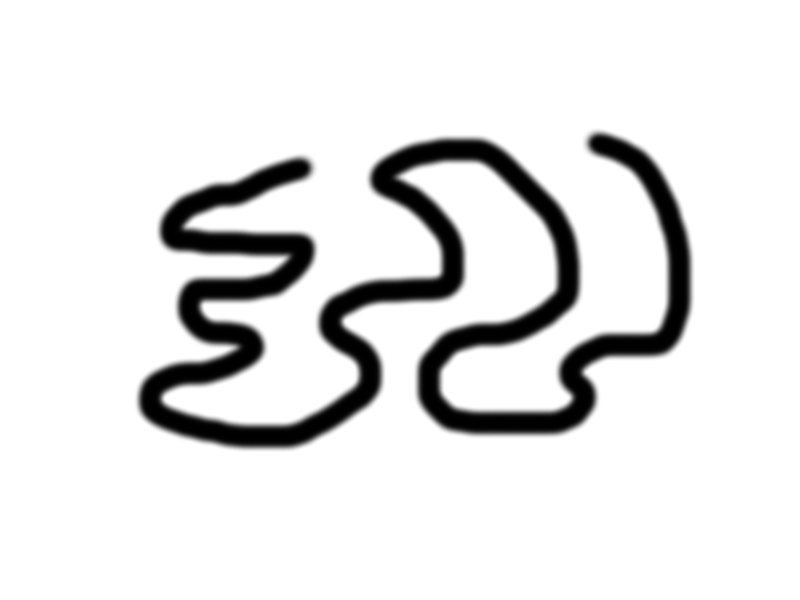
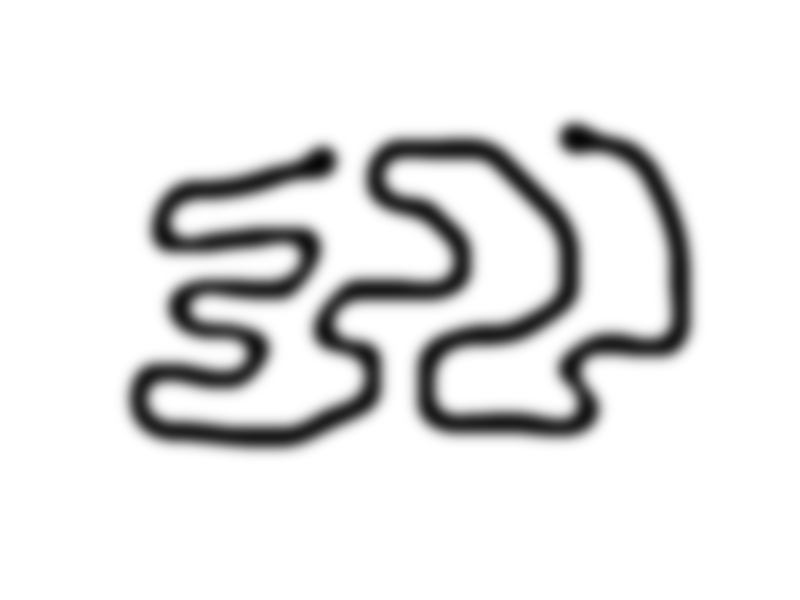
Original Image↓
Image
Output Image↓
Image

_________________
Image
No matter how much you push the envelope, it'll still be stationery.


Top
 Post subject: Re: Scripting Help
PostPosted: Sat Feb 21, 2015 9:27 pm  (#8) 
Offline
Script Coder
User avatar

Joined: Dec 27, 2014
Posts: 508
@graechan:
Now you've got me confused! What is this "Contrast Adjust=0" ?!
There is no such option in Rob-A's "high-pass" scipt (at least not in the version at the Gimp Plugin Registry).
I think that line should read:
(high-pass image layer 48 0 FALSE)

@z22:
To add user-specified number of iterations:
(define (script-fu-reaction-diffusion image layer iterations)   ; amended by JT
  (gimp-image-undo-group-start image)
  (while (> iterations 0)                 ; added by JT
    (begin
      (high-pass image layer 48 0 FALSE)                      ;ammended by Graechan, and JT
      (set! layer (car (gimp-image-get-active-layer image)))    ;added by Graechan
      (gimp-threshold layer 100 255)
      (plug-in-gauss RUN-NONINTERACTIVE image layer 20 20 1)
    )
    (set! iterations (- iterations 1))            ;added by JT
  )
  (gimp-image-undo-group-end image)
  (gimp-displays-flush)
)

(script-fu-register
  "script-fu-reaction-diffusion"
  "<Image>/Filters/Generic/reaction diffusion"
  "simulates reaction diffusion growth"
  "Andrew Murray"
  "Andrew Murray"
  "2015"
  "RGB*, RGBA*, GRAY*"
  SF-IMAGE    "image" 0
  SF-DRAWABLE "layer" 0
  SF-ADJUSTMENT "Iterations" '(1 1 100 1 10 0 1)      ; added by JT
)


Top
 Post subject: Re: Scripting Help
PostPosted: Sat Feb 21, 2015 9:44 pm  (#9) 
Offline
GimpChat Member
User avatar

Joined: Feb 21, 2015
Posts: 22
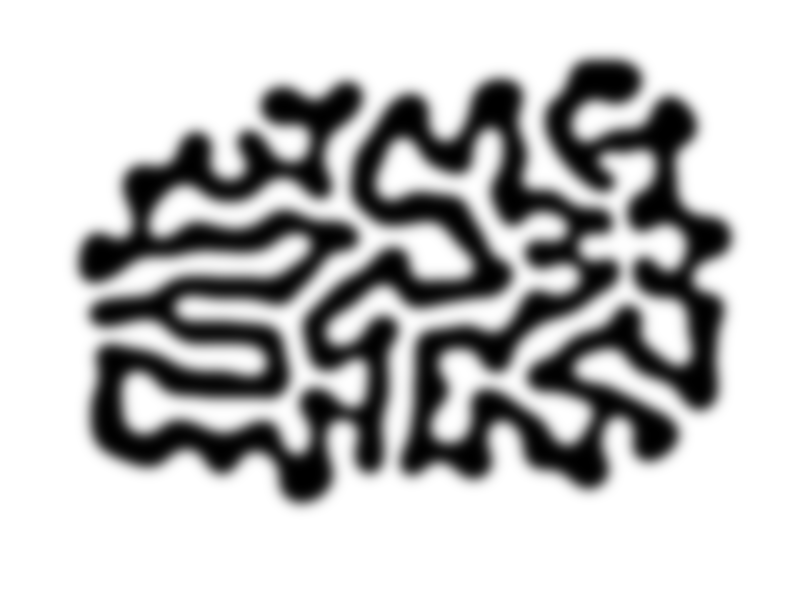
Thanks! Here's a little example of what the script can do now:

input:
Image

output with 40 iterations:
Image


Top
 Post subject: Re: Scripting Help
PostPosted: Sat Feb 21, 2015 9:46 pm  (#10) 
Offline
Script Coder
User avatar

Joined: Feb 18, 2011
Posts: 4826
Location: Bendigo Vic. Australia
jontait2 there is 2 versions 1.1 and 1.2 unfortunately I had 1.1 whereas I should have used 1.2

_________________
Image
No matter how much you push the envelope, it'll still be stationery.


Top
 Post subject: Re: Scripting Help
PostPosted: Sat Feb 21, 2015 10:15 pm  (#11) 
Offline
Script Coder
User avatar

Joined: Dec 27, 2014
Posts: 508
@z22:
Now I'm even more confused!
Taking your .png and applying 40 iterations all I got was:
Image
You must be doing something else to start this diffusion process.


Top
 Post subject: Re: Scripting Help
PostPosted: Sat Feb 21, 2015 10:21 pm  (#12) 
Offline
GimpChat Member
User avatar

Joined: Feb 21, 2015
Posts: 22
I changed the parameters for the threshold a little bit and kept the high pass statement as:

(high-pass image layer 48 0 0 FALSE)


I have no idea why this gets the results that I want it to but it does so I'm sticking with it. ;^D

Here's the updated code:

(define (script-fu-reaction-diffusion image layer iterations)
  (gimp-image-undo-group-start image)
  (while (> iterations 0)                 
    (begin
      (high-pass image layer 48 0 0 FALSE)                     
      (set! layer (car (gimp-image-get-active-layer image)))   
      (gimp-threshold layer 127 255)
      (plug-in-gauss RUN-NONINTERACTIVE image layer 20 20 1)
    )
    (set! iterations (- iterations 1))
  )
  (gimp-image-undo-group-end image)
  (gimp-displays-flush)
)

(script-fu-register
  "script-fu-reaction-diffusion"
  "<Image>/Filters/Generic/reaction diffusion"
  "simulates reaction diffusion growth"
  "Andrew Murray"
  "Andrew Murray"
  "2015"
  "RGB*, RGBA*, GRAY*"
  SF-IMAGE    "image" 0
  SF-DRAWABLE "layer" 0
  SF-ADJUSTMENT "Iterations" '(1 1 100 1 10 0 1)
)


Top
 Post subject: Re: Scripting Help
PostPosted: Sat Feb 21, 2015 10:44 pm  (#13) 
Offline
GimpChat Founder
User avatar

Joined: May 22, 2008
Posts: 5241
Location: Gimpville
jontait2 wrote:
There is no such option in Rob-A's "high-pass" scipt (at least not in the version at the Gimp Plugin Registry).
Looks like the version of this script from RobA does contains the Contrast Adjust argument:

SF-IMAGE      "image"      0
SF-DRAWABLE   "drawable"   0
SF-ADJUSTMENT "Filter Radius" '(10 2 200 1 10 0 0)
SF-ADJUSTMENT "Contrast Adjust" '(0 -100 100 1 10 0 0)
SF-OPTION     "Mode" '("Colour" "Preserve DC" "Greyscale" "Greyscale, Apply Chroma" "Redrobes")
SF-TOGGLE     "Keep Original Layer?" TRUE
http://www.silent9.com/blog/index.php?s ... 17&file=22

_________________
“If you reach for the stars, you just might land on a decently sized hill.” - Stuart Hill


Top
 Post subject: Re: Scripting Help
PostPosted: Sat Feb 21, 2015 11:09 pm  (#14) 
Offline
Script Coder
User avatar

Joined: Feb 18, 2011
Posts: 4826
Location: Bendigo Vic. Australia
z22 you will have to attach the high pass filter to you script to ensure the correct version is used
v1.1 fixes "bug" created by bug fix for gimp 2.6.9 in gimp-histogram
v1.2 changed to a different layer blend mode (thanks Blacklemon67) that
has less histogram banding, by eliminating the need for the contrast boost.

_________________
Image
No matter how much you push the envelope, it'll still be stationery.


Top
 Post subject: Re: Scripting Help
PostPosted: Sat Feb 21, 2015 11:20 pm  (#15) 
Offline
Script Coder
User avatar

Joined: Dec 27, 2014
Posts: 508
@z22:
Yeah, okay, I'm getting something a bit more promising now:
Image
That's with threshold set to 127 .. has the right form for a diffusion now but with fuzzy edges (not surprisingly!). What are you doing to clean up the outline?

BTW the code should read:
(high-pass image layer 48 0 FALSE)
if you're using Version 1.2 of Rob-A's high-pass script. Is it possible that you've actually got the old version somehow? Either that or the Script-Fu engine is simply taking your second zero as FALSE for the last parameter (Keep Original Layer?) and ignoring the extra value supplied.

@GnuTux
No, that's the OLD version! (Version 1.1). The version now at Gimp Plugin Registry is the current version (1.2). The Contrast parameter was TAKEN OUT in Version 1.2 as no longer required.
The change record in the script says:
Changes:
; v1.1 fixes "bug" created by bug fix for gimp 2.6.9 in gimp-histogram
; v1.2 changed to a different layer blend mode (thanks Blacklemon67) that
;      has less histogram banding, by eliminating the need for the contrast boost.

:ninja by Graechan


Top
 Post subject: Re: Scripting Help
PostPosted: Sat Feb 21, 2015 11:20 pm  (#16) 
Offline
Script Coder
User avatar

Joined: Apr 23, 2010
Posts: 1553
Location: not from Guildford after all
(high-pass image layer 48 0 0 FALSE)
(set! layer (car (gimp-image-get-active-layer image)))


z22, if you replace the above two lines in your script with the following code then your script will not be dependent upon the high-pass script.
  (let ((copy (car (gimp-layer-copy layer TRUE))))
     (gimp-image-insert-layer image copy 0 -1)
     (plug-in-gauss RUN-NONINTERACTIVE image copy 48 48 1)
     (gimp-layer-set-mode copy GRAIN-EXTRACT-MODE)
     (set! layer (car (gimp-image-merge-down image copy EXPAND-AS-NECESSARY))))

_________________
Any sufficiently primitive technology is indistinguishable from a rock.


Top
 Post subject: Re: Scripting Help
PostPosted: Sun Feb 22, 2015 12:23 am  (#17) 
Offline
Script Coder
User avatar

Joined: Dec 27, 2014
Posts: 508
@Saulgoode:
Yes, that produces the same results. (I hadn't realised that was all Rob-A's script was doing for the "Colour" option.)

@z22:
I've also made the Threshold a user-specified parameter since the outcome is very dependent on that setting and the optimal value varies from one image to another.
Here's the updated script if you want it (don't want to steal your baby...)
(define (script-fu-reaction-diffusion image layer threshold iterations)
  (gimp-image-undo-group-start image)
  (while (> iterations 0)
    (begin
;      (high-pass image layer 48 0 FALSE)
;      (set! layer (car (gimp-image-get-active-layer image)))
      (let ((copy (car (gimp-layer-copy layer TRUE))))
        (gimp-image-insert-layer image copy 0 -1)
        (plug-in-gauss RUN-NONINTERACTIVE image copy 48 48 1)
        (gimp-layer-set-mode copy GRAIN-EXTRACT-MODE)
        (set! layer (car (gimp-image-merge-down image copy EXPAND-AS-NECESSARY))))
      (gimp-threshold layer threshold 255)
      (plug-in-gauss RUN-NONINTERACTIVE image layer 20 20 1)
    )
    (set! iterations (- iterations 1))
  )
  (gimp-image-undo-group-end image)
  (gimp-displays-flush)
)

(script-fu-register
  "script-fu-reaction-diffusion"
  "<Image>/Filters/Generic/reaction diffusion"
  "simulates reaction diffusion growth"
  "Andrew Murray"
  "Andrew Murray"
  "2015"
  "RGB*, RGBA*, GRAY*"
  SF-IMAGE    "image" 0
  SF-DRAWABLE "layer" 0
  SF-ADJUSTMENT "Threshold" '(127 0 255 1 20 0 0)
  SF-ADJUSTMENT "Iterations" '(1 1 100 1 10 0 1)
)


Top
 Post subject: Re: Scripting Help
PostPosted: Sun Feb 22, 2015 2:05 am  (#18) 
Offline
GimpChat Member
User avatar

Joined: Feb 21, 2015
Posts: 22
Thanks for all the help everyone. Nice community you've got here :)


Top
 Post subject: Re: Scripting Help
PostPosted: Sun Feb 22, 2015 5:19 am  (#19) 
Offline
Global Moderator
User avatar

Joined: May 16, 2010
Posts: 16180
Wonderful filter. :)
I love the results on just images.

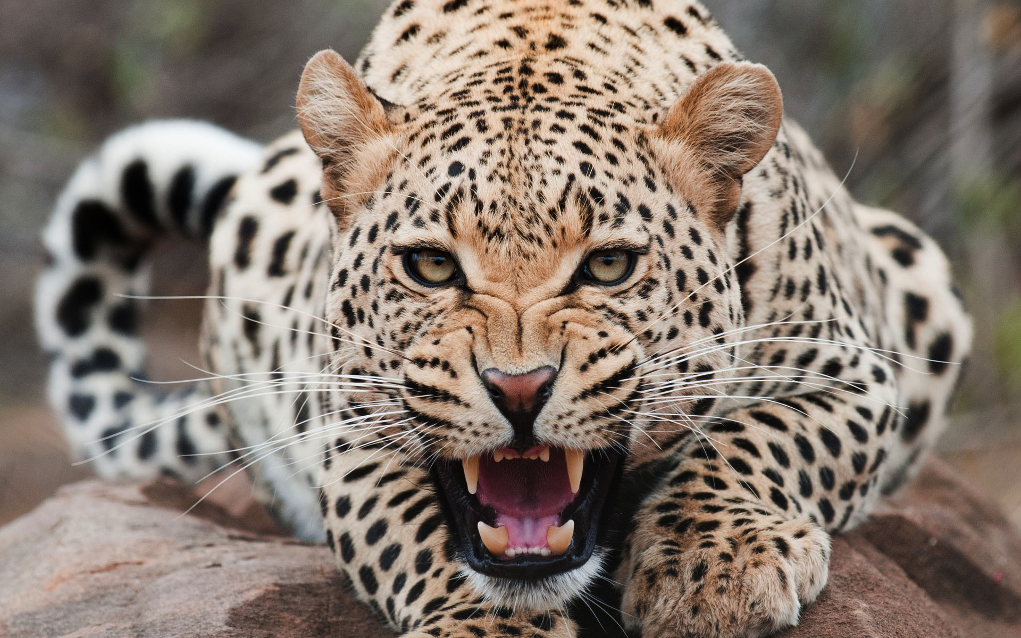
Original
Image

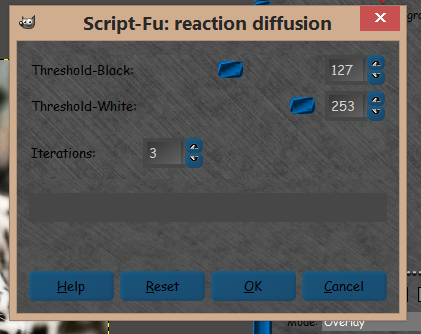
Ran with these values. Your defaults.I added the other slider which was just me playing around with the code a bit. :)
Image

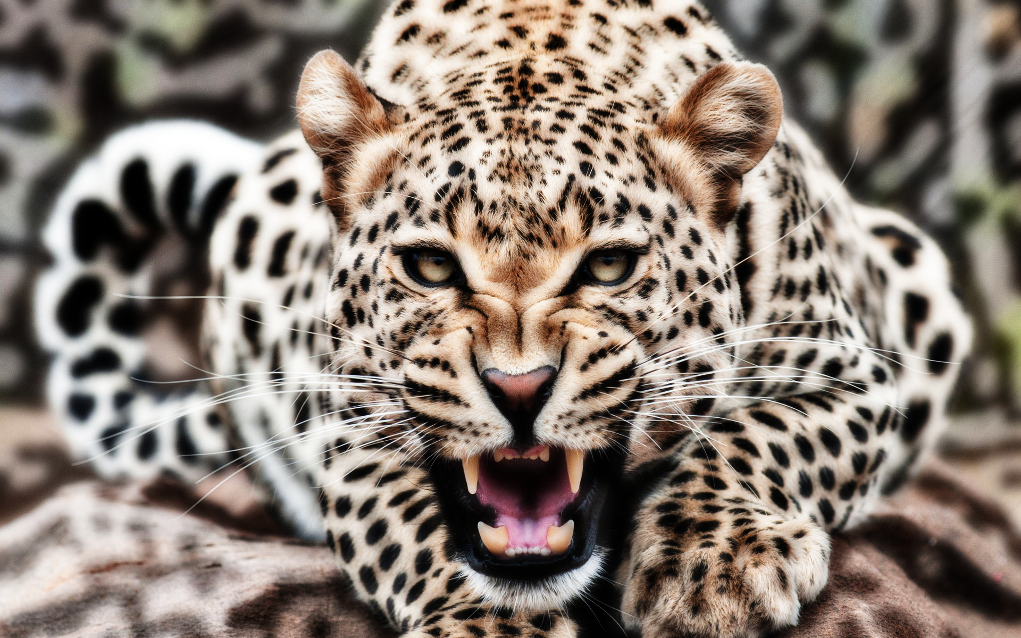
Results after running filter and moving an original image copy to the bottom of the layer sack. Now set the top defused layer to overlay.
Image


Top
 Post subject: Re: Scripting Help
PostPosted: Sun Feb 22, 2015 9:52 am  (#20) 
Offline
GimpChat Founder
User avatar

Joined: May 22, 2008
Posts: 5241
Location: Gimpville
jontait2 wrote:
@GnuTux
No, that's the OLD version! (Version 1.1). The version now at Gimp Plugin Registry is the current version (1.2).

Ah, I see that's not RobA's version. Someone else modified his script, thus the confusion.

_________________
“If you reach for the stars, you just might land on a decently sized hill.” - Stuart Hill


Top
Post new topic Reply to topic  [ 27 posts ]  Go to page 1, 2  Next

All times are UTC - 5 hours [ DST ]


* Login  


Powered by phpBB3 © phpBB Group