It is currently Fri Sep 25, 2026 3:42 am


All times are UTC - 5 hours [ DST ]


Post new topic Reply to topic  [ 10 posts ] 
Author Message
 Post subject: FIT IMAGE TO WINDOW
PostPosted: Sat Sep 26, 2015 9:15 am  (#1) 
Offline
GimpChat Member
User avatar

Joined: Jan 20, 2013
Posts: 14835
Location: roma, italy
GIMP Version: 2.8.14
Operating System: Windows
GIMP Experience: Basic Level


Hi.
Probably this topic has been discussed (and solved, I don't remember).
My question is:
how to have gimp opening images zoomed really to window
In the Preferences i have: Initial zoom ratio FIT TO WINDOW
but the image is open as shown in "OPEN" screenshot
If I press Shift+Cntrl+J (=FIT IMAGE TO WINDOW) the image is really zoomed to fit the window as shown in "AFTER_SHIFTCNTRLJ" screen shot.
Why the setup in Preferences does not "invite" Gimp to open the image in that size?
Thanks

Attachment:
After_ShiftCntrlJ.PNG
After_ShiftCntrlJ.PNG [ 1.38 MiB | Viewed 5386 times ]


Attachment:
After_ShiftCntrlJ.PNG
After_ShiftCntrlJ.PNG [ 1.38 MiB | Viewed 5386 times ]


Is there some additional preference to set-up?


Attachments:
Open.PNG
Open.PNG [ 437.6 KiB | Viewed 5386 times ]

_________________
"Where am I ?"
Share on Facebook Share on Twitter Share on Orkut Share on Digg Share on MySpace Share on Delicious Share on Technorati
Top
 Post subject: Re: FIT IMAGE TO WINDOW
PostPosted: Sat Sep 26, 2015 9:18 am  (#2) 
Offline
GimpChat Member
User avatar

Joined: Jan 20, 2013
Posts: 14835
Location: roma, italy
PS: sorry, the "after..." is shown twice but I do not see a double attachment for it....

_________________
"Where am I ?"


Top
 Post subject: Re: FIT IMAGE TO WINDOW
PostPosted: Sun Sep 27, 2015 1:13 am  (#3) 
Offline
GimpChat Member
User avatar

Joined: Jan 20, 2013
Posts: 14835
Location: roma, italy
no comments?
Is this because:
a) it doesn't happen to anybody else
b) it is as such for Gimp and there is no bypass/solution
just to know

_________________
"Where am I ?"


Top
 Post subject: Re: FIT IMAGE TO WINDOW
PostPosted: Sun Sep 27, 2015 3:57 am  (#4) 
Offline
Administrator
User avatar

Joined: Aug 10, 2012
Posts: 14209
Location: Native to NYC living in Arizona, Gimp 2.8 - 3.0, Win 11 PC.
dinasset wrote:
no comments?
Is this because:
a) it doesn't happen to anybody else
b) it is as such for Gimp and there is no bypass/solution
just to know

I think that (b) is correct.
I for one do not know any way to do what you are asking.

_________________
Image
"A wise man learns more from a foolish question than a fool can learn from a wise answer"
Image


Top
 Post subject: Re: FIT IMAGE TO WINDOW
PostPosted: Sun Sep 27, 2015 4:45 am  (#5) 
Offline
GimpChat Member
User avatar

Joined: Aug 16, 2012
Posts: 4271
Location: Göteborg, Sweden
dinasset: i'm not entirely sure i understand the problem but i think i do. if i do understand it, it's something i've tried to figure out how to change to and i don't think there is a way.

_________________


Top
 Post subject: Re: FIT IMAGE TO WINDOW
PostPosted: Sun Sep 27, 2015 5:42 am  (#6) 
Offline
GimpChat Member
User avatar

Joined: Jan 20, 2013
Posts: 14835
Location: roma, italy
thanks Wallace
thanks Anmal
I had that suspect too, but I hoped someone did find an escape to have the Gimp behaving at opening an image as it does when clicking Shift+Cntrl+J; what "disturbs" me is that both the preference-parameter and the filter-action use the same terms: "fit image to window..." and Gimp is always...Gimp
I hoped that there were maybe an hidden value which sets a kind of "surrounding margin size" when opening

_________________
"Where am I ?"


Top
 Post subject: Re: FIT IMAGE TO WINDOW
PostPosted: Sun Sep 27, 2015 6:05 am  (#7) 
Offline
Administrator
User avatar

Joined: Aug 10, 2012
Posts: 14209
Location: Native to NYC living in Arizona, Gimp 2.8 - 3.0, Win 11 PC.
dinasset wrote:
thanks Wallace
thanks Anmal
I had that suspect too, but I hoped someone did find an escape to have the Gimp behaving at opening an image as it does when clicking Shift+Cntrl+J; what "disturbs" me is that both the preference-parameter and the filter-action use the same terms: "fit image to window..." and Gimp is always...Gimp
I hoped that there were maybe an hidden value which sets a kind of "surrounding margin size" when opening

I think what AnMal and I are trying to say, is that there may be a way, but we haven't figured out what that is.
I have looked and can't seem to do what you are asking and I also thing that AnMal may have experienced the same issue.

_________________
Image
"A wise man learns more from a foolish question than a fool can learn from a wise answer"
Image


Top
 Post subject: Re: FIT IMAGE TO WINDOW
PostPosted: Sun Sep 27, 2015 10:57 am  (#8) 
Offline
GimpChat Member
User avatar

Joined: Nov 16, 2011
Posts: 5127
Location: Metro Vancouver, BC
My wild guess; Gimp has a config file that uses a combination of monitor & image size and outputs to one of Gimp default percentage canvas sizes.
Image

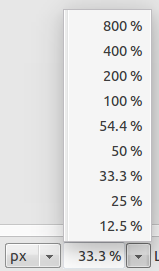
Percentage list after Shift+Cntrl+J (on my test image 54.4%).
Image

In my experience an image that has been (Shift+Cntrl+J) added to the list and closed, when reopened in the same session will default to it's original percentage. With the 54.5% test image it was always 33% on a larger images it was 25% (also on the default list).

_________________
Image
Gimp 2.8.18, Linux, median user
Gimp Chat Tutorials Index
Spirit Bear (Kermode)


Top
 Post subject: Re: FIT IMAGE TO WINDOW
PostPosted: Sun Sep 27, 2015 11:54 am  (#9) 
Offline
GimpChat Member
User avatar

Joined: Jan 20, 2013
Posts: 14835
Location: roma, italy
Odinbc,
that's interesting.
Do you know whether is it possible to "influence" that calculation?
It is evident (also from your example) that Gimp tries to "preserve" space around, because if after Shift+Cntrl+J the percentage of your image was 54.5, the formula could have selected 50% instead of 33.3% to be "closer"

_________________
"Where am I ?"


Top
 Post subject: Re: FIT IMAGE TO WINDOW
PostPosted: Sun Sep 27, 2015 12:30 pm  (#10) 
Offline
GimpChat Member
User avatar

Joined: Nov 16, 2011
Posts: 5127
Location: Metro Vancouver, BC
dinasset wrote:
Odinbc,
that's interesting.
Do you know whether is it possible to "influence" that calculation?
It is evident (also from your example) that Gimp tries to "preserve" space around, because if after Shift+Cntrl+J the percentage of your image was 54.5, the formula could have selected 50% instead of 33.3% to be "closer"
I have no idea where it is I suspect it's hard-coded (compiled), so unavailable. The only one, I can think of around here, who may know is saulgoode or you could go to Gimp Developers.

_________________
Image
Gimp 2.8.18, Linux, median user
Gimp Chat Tutorials Index
Spirit Bear (Kermode)


Top
Post new topic Reply to topic  [ 10 posts ] 

All times are UTC - 5 hours [ DST ]


* Login  


Powered by phpBB3 © phpBB Group