It is currently Wed Nov 11, 2026 11:39 pm


All times are UTC - 5 hours [ DST ]


Post new topic Reply to topic  [ 4 posts ] 
Author Message
 Post subject: GIMP Icon
PostPosted: Sat Oct 17, 2015 10:26 am  (#1) 
Offline
GimpChat Member
User avatar

Joined: Jun 02, 2013
Posts: 2090
GIMP Version: 2.8.14
Operating System: Windows
GIMP Experience: Intermediate Level


Feel dumb asking this, but the GIMP start up icon, aka the one you click on to start the program...where is it located? I thought it was in program files/gimp/share/gimp/2.0/images folder? I made some .ico icons for it, and changed the icon via properties/change icon, which worked fine, but I decided I like the stock one better, so, how do I get it back? Thanks.

_________________
Image


Share on Facebook Share on Twitter Share on Orkut Share on Digg Share on MySpace Share on Delicious Share on Technorati
Top
 Post subject: Re: GIMP Icon
PostPosted: Sat Oct 17, 2015 10:39 am  (#2) 
Offline
Administrator
User avatar

Joined: Aug 10, 2012
Posts: 14268
Location: Native to NYC living in Arizona, Gimp 2.8 - 3.0, Win 11 PC.
The Warrior wrote:
GIMP Version: 2.8.14
Operating System: Windows
GIMP Experience: Intermediate Level


Feel dumb asking this, but the GIMP start up icon,
aka the one you click on to start the program...
where is it located?
I thought it was in program files/gimp/share/gimp/2.0/images folder?
I made some .ico icons for it,
and changed the icon via properties/change icon,
which worked fine, but I decided I like the stock one better,
so,
how do I get it back?
Thanks.

You're very close Warrior. :hehe
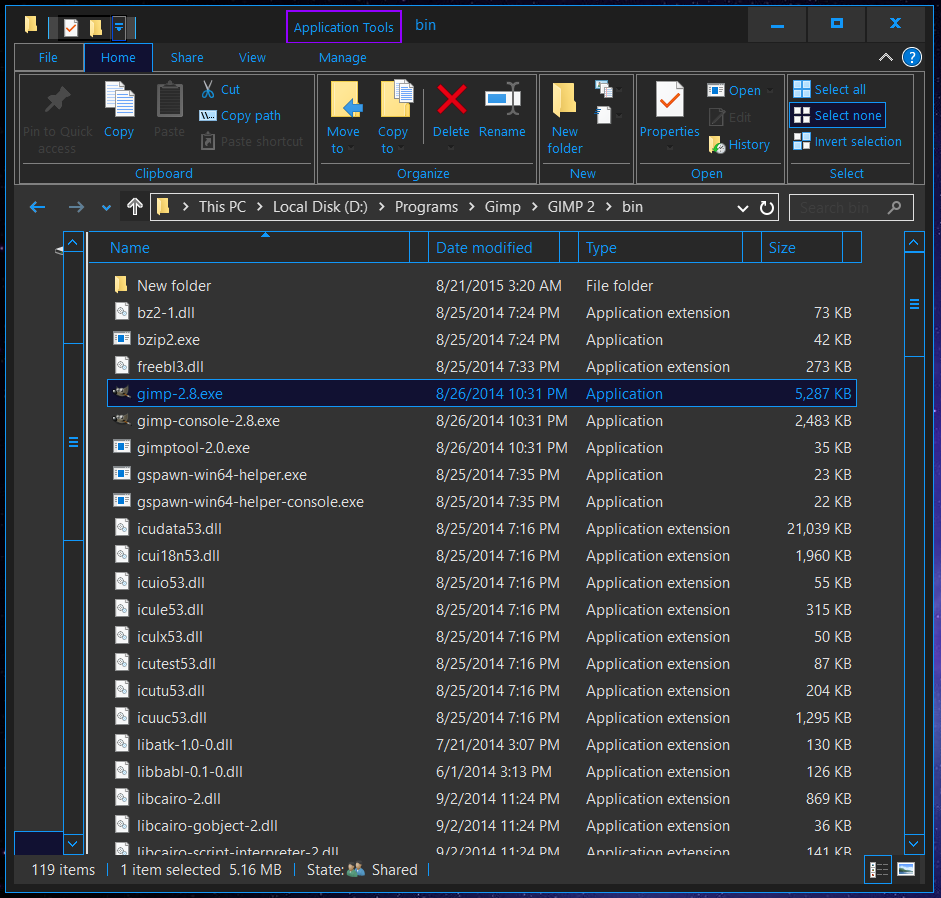
I have Gimp installed on my D drive and this it the location of the .exe file...

D:\Programs\Gimp\GIMP 2\bin\gimp-2.8.exe

Attachment:
Capture.PNG
Capture.PNG [ 140.57 KiB | Viewed 2624 times ]

_________________
Image
"A wise man learns more from a foolish question than a fool can learn from a wise answer"
Image


Top
 Post subject: Re: GIMP Icon
PostPosted: Sat Oct 17, 2015 11:04 am  (#3) 
Offline
GimpChat Member
User avatar

Joined: Jun 02, 2013
Posts: 2090
That did it. Thanks Wallace, appreciate it.

_________________
Image


Top
 Post subject: Re: GIMP Icon
PostPosted: Sat Oct 17, 2015 11:27 am  (#4) 
Offline
Administrator
User avatar

Joined: Aug 10, 2012
Posts: 14268
Location: Native to NYC living in Arizona, Gimp 2.8 - 3.0, Win 11 PC.
The Warrior wrote:
That did it.
Thanks Wallace, appreciate it.

Attachment:
no problem warrior .gif
no problem warrior .gif [ 1.69 KiB | Viewed 2609 times ]

_________________
Image
"A wise man learns more from a foolish question than a fool can learn from a wise answer"
Image


Top
Post new topic Reply to topic  [ 4 posts ] 

All times are UTC - 5 hours [ DST ]


* Login  


Powered by phpBB3 © phpBB Group