It is currently Thu Jul 16, 2026 4:57 pm


All times are UTC - 5 hours [ DST ]


Post new topic Reply to topic  [ 35 posts ]  Go to page 1, 2  Next
Author Message
 Post subject: getting colors from the image
PostPosted: Thu Dec 04, 2014 4:51 pm  (#1) 
Offline
GimpChat Member
User avatar

Joined: Jan 20, 2013
Posts: 14831
Location: roma, italy
GIMP Version: 2.8.14
Operating System: Windows
GIMP Experience: Beginner Level

List any relevant plug-ins or scripts:
none

List any ERROR messages you received:
none


Hi all gimp experts.
So far I was lucky in getting from the "magical circle" of gimp experts very useful info (and even full routines already written which I could insert into my scripts!)
Today my help request is this:
- is it possible in a script getting the colours of which the image is composed?
Well, not the complete list of an original photo, but for instance the list of the x colours of an image reduced by the cartoonizing filter (x=8, 16, or 32)
Going thru a random picking of pixels from the image until the x different colours have been picked does not seem to me a very clever solution...
Suggestions?
Thanks a lot

_________________
"Where am I ?"


Share on Facebook Share on Twitter Share on Orkut Share on Digg Share on MySpace Share on Delicious Share on Technorati
Top
 Post subject: Re: getting colors from the image
PostPosted: Thu Dec 04, 2014 6:00 pm  (#2) 
Offline
Script Coder
User avatar

Joined: Oct 25, 2010
Posts: 4812
If the image is color-indexed you can get the colors from the colormap.

A script of mine that plays with the color map(NSFSM warning: python)

_________________
Image


Top
 Post subject: Re: getting colors from the image
PostPosted: Thu Dec 04, 2014 6:10 pm  (#3) 
Offline
Administrator
User avatar

Joined: Aug 10, 2012
Posts: 14121
Location: Native to NYC living in Arizona, Gimp 2.8 - 3.0, Win 11 PC.
You can also try this...
Image
Image
Image
And also this...
Translate into Palette...
Image
http://registry.gimp.org/node/28695

_________________
Image
"A wise man learns more from a foolish question than a fool can learn from a wise answer"
Image


Top
 Post subject: Re: getting colors from the image
PostPosted: Thu Dec 04, 2014 7:40 pm  (#4) 
Offline
Script Coder
User avatar

Joined: Feb 18, 2011
Posts: 4826
Location: Bendigo Vic. Australia
while on the subject how would I get the average color

_________________
Image
No matter how much you push the envelope, it'll still be stationery.


Top
 Post subject: Re: getting colors from the image
PostPosted: Thu Dec 04, 2014 7:41 pm  (#5) 
Offline
GimpChat Member
User avatar

Joined: Apr 07, 2010
Posts: 14182
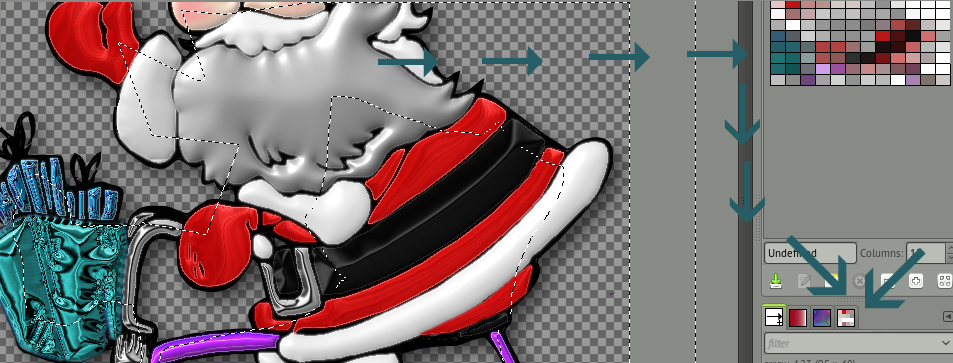
My Santa Palette
Image

_________________
Image


Top
 Post subject: Re: getting colors from the image
PostPosted: Thu Dec 04, 2014 8:08 pm  (#6) 
Offline
Administrator
User avatar

Joined: Aug 10, 2012
Posts: 14121
Location: Native to NYC living in Arizona, Gimp 2.8 - 3.0, Win 11 PC.
Graechan wrote:
while on the subject how would I get the average color

I'd like to know that too.

_________________
Image
"A wise man learns more from a foolish question than a fool can learn from a wise answer"
Image


Top
 Post subject: Re: getting colors from the image
PostPosted: Thu Dec 04, 2014 8:21 pm  (#7) 
Offline
Script Coder
User avatar

Joined: Oct 25, 2010
Posts: 4812
Wallace wrote:
Graechan wrote:
while on the subject how would I get the average color

I'd like to know that too.

Filter>Blur>Pixelize and give the size of the canvas (in other words, pixelize to one single big fat "pixel"). Then sample the color of that area.

_________________
Image


Top
 Post subject: Re: getting colors from the image
PostPosted: Thu Dec 04, 2014 8:23 pm  (#8) 
Offline
Script Coder
User avatar

Joined: Oct 25, 2010
Posts: 4812
Wallace wrote:
You can also try this...
[ Image ]
[ Image ]
[ Image ]
And also this...
Translate into Palette...
[ Image ]
http://registry.gimp.org/node/28695

Not a very good method. It scales the image to X*Y pixels, then samples each pixel. No check that the same color shows up twice in the palette...

_________________
Image


Top
 Post subject: Re: getting colors from the image
PostPosted: Thu Dec 04, 2014 9:20 pm  (#9) 
Offline
Script Coder
User avatar

Joined: Feb 18, 2011
Posts: 4826
Location: Bendigo Vic. Australia
the Pixelize method is simple but effective I've been trying to get something using the procedure (gimp-histogram drawable channel start-range end-range)
Thank you ofnuts

_________________
Image
No matter how much you push the envelope, it'll still be stationery.


Top
 Post subject: Re: getting colors from the image
PostPosted: Thu Dec 04, 2014 9:47 pm  (#10) 
Offline
Administrator
User avatar

Joined: Aug 10, 2012
Posts: 14121
Location: Native to NYC living in Arizona, Gimp 2.8 - 3.0, Win 11 PC.
ofnuts wrote:
Wallace wrote:
Graechan wrote:
while on the subject how would I get the average color

I'd like to know that too.

Filter>Blur>Pixelize and give the size of the canvas (in other words, pixelize to one single big fat "pixel"). Then sample the color of that area.

That's crazy, but cool. :bigthup Why would someone need or want to do this?


_________________
Image
"A wise man learns more from a foolish question than a fool can learn from a wise answer"
Image


Top
 Post subject: Re: getting colors from the image
PostPosted: Thu Dec 04, 2014 9:51 pm  (#11) 
Offline
Script Coder
User avatar

Joined: Feb 18, 2011
Posts: 4826
Location: Bendigo Vic. Australia
Quote:
That's crazy, but cool. :bigthup Why would someone need or want to do this?

Me of cause, I wanted the average color for a 'border color' in a script

_________________
Image
No matter how much you push the envelope, it'll still be stationery.


Top
 Post subject: Re: getting colors from the image
PostPosted: Fri Dec 05, 2014 12:18 am  (#12) 
Offline
Script Coder
User avatar

Joined: Apr 23, 2010
Posts: 1553
Location: not from Guildford after all
One could also use the color picker with a sufficiently large radius (half the length of the diagonal).

(gimp-image-pick-color image
                       layer
                       (/ width 2)
                       (/ height 2)
                       TRUE
                       TRUE
                       (/ (sqrt (+ (pow width 2)
                                   (pow height 2) ))
                          2 ))

_________________
Any sufficiently primitive technology is indistinguishable from a rock.


Top
 Post subject: Re: getting colors from the image
PostPosted: Fri Dec 05, 2014 2:51 am  (#13) 
Offline
GimpChat Member
User avatar

Joined: Jan 20, 2013
Posts: 14831
Location: roma, italy
wow! a lot of discussions/contributions!
it seems to be an "attractive" topic!
I need some time to "process" internally (by understanding and experimenting) all the infos.
Thanks a lot!

_________________
"Where am I ?"


Top
 Post subject: Re: getting colors from the image
PostPosted: Fri Dec 05, 2014 2:53 am  (#14) 
Offline
Script Coder
User avatar

Joined: Feb 18, 2011
Posts: 4826
Location: Bendigo Vic. Australia
Saulgoode I've not seen this scheme language parameter before 'pow'

_________________
Image
No matter how much you push the envelope, it'll still be stationery.


Top
 Post subject: Re: getting colors from the image
PostPosted: Fri Dec 05, 2014 4:28 am  (#15) 
Offline
Script Coder
User avatar

Joined: Apr 23, 2010
Posts: 1553
Location: not from Guildford after all
Graechan wrote:
Saulgoode I've not seen this scheme language parameter before 'pow'

I should have used 'expt' ('pow' is deprecated).

_________________
Any sufficiently primitive technology is indistinguishable from a rock.


Top
 Post subject: Re: getting colors from the image
PostPosted: Fri Dec 05, 2014 12:36 pm  (#16) 
Offline
GimpChat Member
User avatar

Joined: Nov 16, 2011
Posts: 5127
Location: Metro Vancouver, BC
Graechan wrote:
while on the subject how would I get the average color
8.29. Border Average can be used with or without a selection.

_________________
Image
Gimp 2.8.18, Linux, median user
Gimp Chat Tutorials Index
Spirit Bear (Kermode)


Top
 Post subject: Re: getting colors from the image
PostPosted: Fri Dec 05, 2014 7:58 pm  (#17) 
Offline
Script Coder
User avatar

Joined: Feb 18, 2011
Posts: 4826
Location: Bendigo Vic. Australia
Thank you Saulgoode I found expt in my paperwork but I'm still confused, just the same I'll accept it works,
at least It shows I attempt to understand and learn from your snippets of code

_________________
Image
No matter how much you push the envelope, it'll still be stationery.


Top
 Post subject: Re: getting colors from the image
PostPosted: Fri Dec 05, 2014 9:14 pm  (#18) 
Offline
Script Coder
User avatar

Joined: Oct 25, 2010
Posts: 4812
Graechan wrote:
Thank you Saulgoode I found expt in my paperwork but I'm still confused, just the same I'll accept it works,
at least It shows I attempt to understand and learn from your snippets of code

You didn't recognize Pythagore's theorem (diagonal=square_root(height²*width²))?

_________________
Image


Top
 Post subject: Re: getting colors from the image
PostPosted: Sun Nov 29, 2015 4:23 pm  (#19) 
Offline
GimpChat Member
User avatar

Joined: Jan 20, 2013
Posts: 14831
Location: roma, italy
just today I tried to use the pdb.plug_in_borderaverage but I was unable to get the expected result (neither the FG was set automatically by the filter nor I could set it by myself using the returned colour).
On the opposite, Saulgoode's method works fine (getting the average image colour).
Does someone know whether the mentioned plug-in does still work?
Sometimes it could be better to get the average colour of the borders -as the plug-in promises- instead of the more or less full image

_________________
"Where am I ?"


Top
 Post subject: Re: getting colors from the image
PostPosted: Sun Nov 29, 2015 6:06 pm  (#20) 
Offline
GimpChat Member
User avatar

Joined: Nov 16, 2011
Posts: 5127
Location: Metro Vancouver, BC
The Border Average Filter works fine. The Border Size and Number of Colors choices can give radically different results, especially Bucket Size.

_________________
Image
Gimp 2.8.18, Linux, median user
Gimp Chat Tutorials Index
Spirit Bear (Kermode)


Top
Post new topic Reply to topic  [ 35 posts ]  Go to page 1, 2  Next

All times are UTC - 5 hours [ DST ]


* Login  


Powered by phpBB3 © phpBB Group