It is currently Fri Aug 07, 2026 4:09 am


All times are UTC - 5 hours [ DST ]


Post new topic Reply to topic  [ 17 posts ] 
Author Message
 Post subject: [My queries] How to..
PostPosted: Sat Feb 20, 2016 2:02 am  (#1) 
Offline
GimpChat Member

Joined: Jan 19, 2016
Posts: 63
GIMP Version: 2.8.10
Operating System: Windows
OS Version: Windows XP 32 bit
GIMP Experience: New User


I'll ask my all questions here. How to make something or anything related to scripts and plugins in GIMP.
Please I request You to help me.
Looking forward to your reply and help. Lots of thanks in Advance :) :D
Whenever any of my question get solved, I'll write solved against it.

Here I start:

Q1. How to make this effect in GIMP?
(attachment) The translucent images overlapped with one another and giving new color to the overlapped region by themselves.
I want to make such effects. Taking multiple such images.

Edited later:
Posts #2,3,5,11,13,16,17 Solved the Q1 problem.


Attachments:
File comment: Q1. Image
Translucent-overlapped-images.JPG
Translucent-overlapped-images.JPG [ 13.02 KiB | Viewed 2284 times ]


Last edited by INDtanay on Mon Feb 22, 2016 7:11 am, edited 3 times in total.
Share on Facebook Share on Twitter Share on Orkut Share on Digg Share on MySpace Share on Delicious Share on Technorati
Top
 Post subject: Re: [My queries] How to..
PostPosted: Sat Feb 20, 2016 2:07 am  (#2) 
Offline
Global Moderator
User avatar

Joined: Apr 01, 2012
Posts: 8448
Location: On the other side of your screen
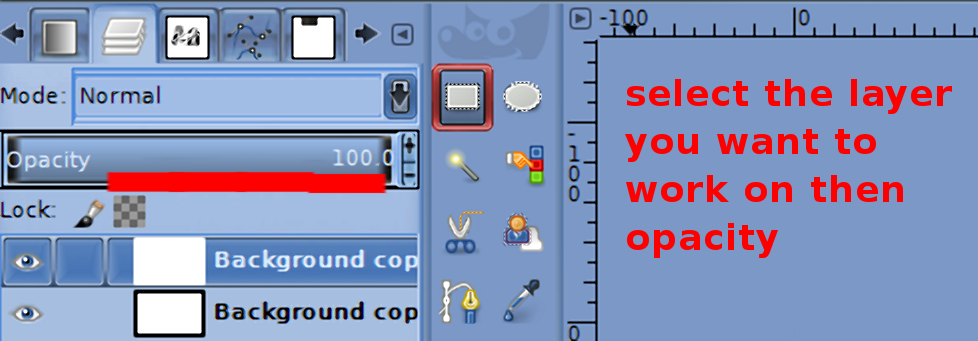
I would use one large layer that the whole picture can fit on and then use a different layer for each circle. Changing opacity as required for each.

_________________
Image
Free Fun Photo Editing & resources
Poems from the Lord
Gimp Newby
Gimp version 3.2.4 and GMIC-Qt 4.0.2 OS :- Windows 10 Home 64


Top
 Post subject: Re: [My queries] How to..
PostPosted: Sat Feb 20, 2016 2:12 am  (#3) 
Offline
GimpChat Member
User avatar

Joined: Mar 01, 2014
Posts: 14111
Location: Spain, Aragón
I agree with Sallyanne. Make a large background and each object to overlap should be in different layers on and go moving them playing with different opacities. :)

_________________
Image

Gimp 2.10.30(samj) portable _ OS Windows 10 Home_ 64bits
Don’t be afraid to start over. It’s a new chance to rebuild what you want.


Top
 Post subject: Re: [My queries] How to..
PostPosted: Sat Feb 20, 2016 2:30 am  (#4) 
Offline
GimpChat Member

Joined: Jan 19, 2016
Posts: 63
Q2. An effect from Polished Plastic Fu (attachments)
On moving top layer downwards does not change the style. How to make it?


Attachments:
File comment: Q2. Image: Moved layer but design unaffected
Polished Plastic FU 2.png
Polished Plastic FU 2.png [ 32.53 KiB | Viewed 2271 times ]
File comment: Q2. Image: Original
Polished Plastic FU 1.png
Polished Plastic FU 1.png [ 32.67 KiB | Viewed 2271 times ]
Top
 Post subject: Re: [My queries] How to..
PostPosted: Sat Feb 20, 2016 2:51 am  (#5) 
Offline
GimpChat Member
User avatar

Joined: Mar 01, 2014
Posts: 14111
Location: Spain, Aragón
Apart from moving the layers and opacities you should change the layer mode. On the right upper side in layers you have many options.

_________________
Image

Gimp 2.10.30(samj) portable _ OS Windows 10 Home_ 64bits
Don’t be afraid to start over. It’s a new chance to rebuild what you want.


Top
 Post subject: Re: [My queries] How to..
PostPosted: Sat Feb 20, 2016 2:52 am  (#6) 
Offline
GimpChat Member

Joined: Jan 19, 2016
Posts: 63
Q3. Glossy Metal 3D Text By Monsoonami GIMP 2.8
(Attachments)
How to create the net that the script coder used in the script?


Edited later:
Post #7 solved this problem. Make small sized patterns file( .pat). Better make seamless patterns, then fill with "pattern fill".


Attachments:
File comment: Q3. Image: the net layer moved upwards. I want to make this net layer
2 Glossy_Metal_3D_Text_By_Monsoonami.png
2 Glossy_Metal_3D_Text_By_Monsoonami.png [ 143.49 KiB | Viewed 2260 times ]
File comment: Q3. Image: Original
1 Glossy_Metal_3D_Text_By_Monsoonami.png
1 Glossy_Metal_3D_Text_By_Monsoonami.png [ 151.23 KiB | Viewed 2260 times ]


Last edited by INDtanay on Mon Feb 22, 2016 7:16 am, edited 1 time in total.
Top
 Post subject: Re: [My queries] How to..
PostPosted: Sat Feb 20, 2016 3:01 am  (#7) 
Offline
GimpChat Member
User avatar

Joined: Mar 01, 2014
Posts: 14111
Location: Spain, Aragón
You can create any pattern. To get that net pattern, you should start to get a new layer in small size in high zoom. Start creating a simple design to test it. Then you should keep the design in pat file. Excuse me but my English is terrible. Anyway there are many tutorials in gimp that can help you a lot.

_________________
Image

Gimp 2.10.30(samj) portable _ OS Windows 10 Home_ 64bits
Don’t be afraid to start over. It’s a new chance to rebuild what you want.


Top
 Post subject: Re: [My queries] How to..
PostPosted: Sat Feb 20, 2016 3:03 am  (#8) 
Offline
GimpChat Member

Joined: Jan 19, 2016
Posts: 63
Q4. Sometimes I work on images with many number of layers. How to know the layer number (from both top and bottom) on which I'm currently working?

Edited later:
Posts #9,11,12,16,17 solved this problem.


Last edited by INDtanay on Mon Feb 22, 2016 7:23 am, edited 1 time in total.

Top
 Post subject: Re: [My queries] How to..
PostPosted: Sat Feb 20, 2016 3:09 am  (#9) 
Offline
GimpChat Member
User avatar

Joined: Mar 01, 2014
Posts: 14111
Location: Spain, Aragón
You could close the eyes to them except for the one you want to work on. So you press in your keyboard the shift one just when press the eye of the layer at the same time.

_________________
Image

Gimp 2.10.30(samj) portable _ OS Windows 10 Home_ 64bits
Don’t be afraid to start over. It’s a new chance to rebuild what you want.


Top
 Post subject: Re: [My queries] How to..
PostPosted: Sat Feb 20, 2016 3:35 am  (#10) 
Offline
GimpChat Member

Joined: Jan 19, 2016
Posts: 63
Related to Q.1 Reply

sallyanne wrote:
Changing opacity as required for each.

How to change opacity for each layer?
As an example I've created 500x500 image and added 4 layers filled with different colors/patterns. But I don't get this opacity tool.
Btw I found Pattern overlay in Layer>Layer Effects. Here I'll have to copy the whole layer and then set the opacity.
Related to Q.4 Reply

Issabella wrote:
So you press in your keyboard the shift one just when press the eye of the layer at the same time.

Where is this Eye of the Layer? Many of my layers are similar but with a minor change (in animation) So I want to know the layer number I've selected.


Top
 Post subject: Re: [My queries] How to..
PostPosted: Sat Feb 20, 2016 3:54 am  (#11) 
Offline
GimpChat Member
User avatar

Joined: Mar 01, 2014
Posts: 14111
Location: Spain, Aragón
Look at the shot.


Attachments:
Captura-Explanation.JPG
Captura-Explanation.JPG [ 76.17 KiB | Viewed 1371 times ]

_________________
Image

Gimp 2.10.30(samj) portable _ OS Windows 10 Home_ 64bits
Don’t be afraid to start over. It’s a new chance to rebuild what you want.
Top
 Post subject: Re: [My queries] How to..
PostPosted: Sat Feb 20, 2016 4:11 am  (#12) 
Offline
GimpChat Member
User avatar

Joined: Jan 20, 2013
Posts: 14831
Location: roma, italy
INDtanay wrote:
Q4. Sometimes I work on images with many number of layers. How to know the layer number (from both top and bottom) on which I'm currently working?

install and run this script having your image with all layers open; it will put the object id in the layer description
Attachment:
IMAGE_identify-image-objects.scm [17.12 KiB]
Downloaded 85 times


PS: it's not mine, you read the author inside, I only changed the placement on the menu. it goes under
"<Image>/BestFilters/Image"

_________________
"Where am I ?"


Top
 Post subject: Re: [My queries] How to..
PostPosted: Sun Feb 21, 2016 2:42 am  (#13) 
Offline
Global Moderator
User avatar

Joined: Apr 01, 2012
Posts: 8448
Location: On the other side of your screen
For Question One
I did a couple of pics for you

Image
Image
Attachment:
circles, different opacities.xcf

I have added a xcf for you to check out if you want.

_________________
Image
Free Fun Photo Editing & resources
Poems from the Lord
Gimp Newby
Gimp version 3.2.4 and GMIC-Qt 4.0.2 OS :- Windows 10 Home 64


Top
 Post subject: Re: [My queries] How to..
PostPosted: Sun Feb 21, 2016 5:12 am  (#14) 
Offline
Script Coder
User avatar

Joined: Oct 25, 2010
Posts: 4812
INDtanay wrote:
GIMP Version: 2.8.10
Operating System: Windows
OS Version: Windows XP 32 bit
GIMP Experience: New User


I'll ask my all questions here. How to make something or anything related to scripts and plugins in GIMP.


Please use a new thread for each question.

1) these individual threads will hopefully have a meaningful title, so people will quickly tell if they can answer
2) people having the same problems later are more likely to find your question and the answers
3) people are more likely to check out new threads (and answer them). How can we tell that recent posts to your thread corresponds to a new question and are not to some uninteresting discussion

_________________
Image


Top
 Post subject: Re: [My queries] How to..
PostPosted: Sun Feb 21, 2016 5:23 am  (#15) 
Offline
GimpChat Member

Joined: Jan 19, 2016
Posts: 63
Thanks all :)

But everything is different with me. Where to find its eye. see attachment

Edited later:
post 16 and 17 by Sallyanne and Ella solved the problem.
Eye found.


Attachments:
q1 IMAGE 02.JPG
q1 IMAGE 02.JPG [ 40.81 KiB | Viewed 1332 times ]
q1 IMAGE.JPG
q1 IMAGE.JPG [ 70.72 KiB | Viewed 1332 times ]


Last edited by INDtanay on Mon Feb 22, 2016 6:57 am, edited 1 time in total.
Top
 Post subject: Re: [My queries] How to..
PostPosted: Sun Feb 21, 2016 5:39 am  (#16) 
Offline
Global Moderator
User avatar

Joined: Apr 01, 2012
Posts: 8448
Location: On the other side of your screen
INDtanay wrote:
Thanks all :)

But everything is different with me. Where to find its eye. see attachment


In your attachment you only have the selection (rectangular select) showing.
Follow my directions below or if you want Ella's

You will see it/them in the layer's view. If you do not already have that view try opening a new dialogue and attach it - you can add as many as you need.
Click on the small arrow beside your toolbox options and click on 'attach a tab'. You will be given a few options here. If you don't have a layers tab yet you can add one here - then you should see everything you need.
By the way is your view One window or a couple. I think with the single window view you should have everything in the one window which then you can add tabs to.

_________________
Image
Free Fun Photo Editing & resources
Poems from the Lord
Gimp Newby
Gimp version 3.2.4 and GMIC-Qt 4.0.2 OS :- Windows 10 Home 64


Last edited by sallyanne on Sun Feb 21, 2016 7:16 am, edited 3 times in total.

Top
 Post subject: Re: [My queries] How to..
PostPosted: Sun Feb 21, 2016 6:15 am  (#17) 
Offline
GimpChat Member
User avatar

Joined: May 17, 2014
Posts: 1568
I don't see the layers dialogue in your attachment.
To open it you should click Ctrl + L there you can find the layers and the eyes.

Sallyanne, Your explanation is much more detailed, I can't do that in English.
I only gave the shortcut for de layers dialogue, hope you don’t mind.

_________________
Ella's gallery - YouTube


Top
Post new topic Reply to topic  [ 17 posts ] 

All times are UTC - 5 hours [ DST ]


* Login  


Powered by phpBB3 © phpBB Group