It is currently Sat Nov 14, 2026 12:57 am


All times are UTC - 5 hours [ DST ]


Post new topic Reply to topic  [ 8 posts ] 
Author Message
 Post subject: Umm hi
PostPosted: Thu Mar 24, 2011 3:17 pm  (#1) 
Offline
GimpChat Member

Joined: Dec 10, 2010
Posts: 6
I wasnt sure where to post but could some help me with some thing.. Im making a Bio Hazard Tattoo for Second life and i wanted to make orange parts of it with camoflauge for example (pic) Is it possible? if so could some one help me lol thanks!

RedSpirit1


Attachments:
File comment: I want the orange parts to have camo
bloodtat.jpg
bloodtat.jpg [ 9.77 KiB | Viewed 2334 times ]
Share on Facebook Share on Twitter Share on Orkut Share on Digg Share on MySpace Share on Delicious Share on Technorati
Top
 Post subject: Re: Umm hi
PostPosted: Thu Mar 24, 2011 3:21 pm  (#2) 
Offline
Retired Staff
User avatar

Joined: May 22, 2008
Posts: 6946
Location: Somewhere in GIMP
Do you want the whole symbol filled with camouflage?

:welcome to Gimp Chat Red Spirit. Yes, you posted your question in the right place. :hehe

The outlines of your symbol look a bit rough. Was that intentional? If not, you can download a font that has the biohazard symbol in it. The symbol has a circle in the center that can be erased.

You can get the font here

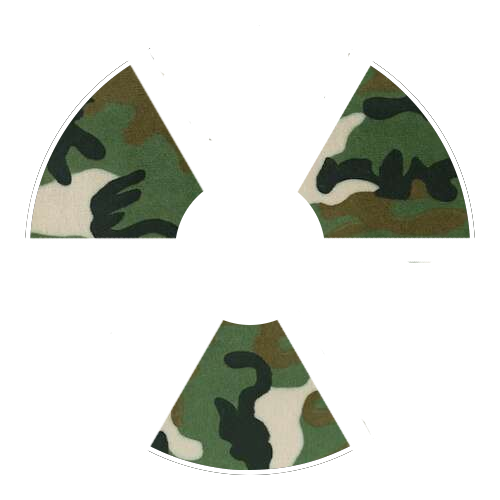
Here is an example of the original font plus one I removed the center circle from and filled with a camouflage pattern you can make in gimp. You can make the camouflage any colors you wish.

Image

_________________
Image
World War IV will be fought with sticks and stones. - Albert Einstein


Top
 Post subject: Re: Umm hi
PostPosted: Thu Mar 24, 2011 4:00 pm  (#3) 
Offline
Script Coder
User avatar

Joined: Apr 23, 2010
Posts: 1553
Location: not from Guildford after all
"File->Create->Patterns->Camouflage" -- Change the image size to match the largest dimension of yours (284 for the example) and click OK.

After the camo image has been created, drag its thumbnail preview in Layers dialog to your image and drop it (alternately, you could use copy-n-paste).

"Layer->Stack->Lower Layer" so that the camo layer is underneath the hazard layer in the layerstack.

"Layer->Mask->Add layermask" -- in the dialog box that appears, click on the "Grayscale copy of layer" option and then OK.

"Colors->Threshold" to convert the grayish color in the mask to pure black.

_________________
Any sufficiently primitive technology is indistinguishable from a rock.


Top
 Post subject: Re: Umm hi
PostPosted: Thu Mar 24, 2011 4:08 pm  (#4) 
Offline
GimpChat Member

Joined: Aug 27, 2010
Posts: 491
This can be done several ways:

Image


Top
 Post subject: Re: Umm hi
PostPosted: Thu Mar 24, 2011 4:17 pm  (#5) 
Offline
GimpChat Member
User avatar

Joined: Jul 04, 2010
Posts: 2253
Location: Retired Moderator Slowly Returning to the Living.
Welcome RedSpirit! You definitely found the right place! As mike above said, there are many ways to do this. Another would be to create a blank layer and making the entire layer camo with File>Create>Patterns>Camouflage. On your original layer, select the white area in your original image, and cut that off of the camo layer. I could probably list several more ways of doing it, too. Have fun and play!

Greg

_________________
Artists aren't crazy! We're eccentric! ~G.M. Ross

Image

My Sigs = My Photos
Check out my work at http://www.flickr.com/photos/photomastergreg.


Top
 Post subject: Re: Umm hi
PostPosted: Fri Mar 25, 2011 3:17 am  (#6) 
Offline
Global Moderator
User avatar

Joined: May 16, 2010
Posts: 16262
Many ideas have already been listed for you so i am just going to say Welcome to Gimp Chat! :)

_________________
Image


Top
 Post subject: Re: Umm hi
PostPosted: Fri Mar 25, 2011 2:36 pm  (#7) 
Offline
GimpChat Member
User avatar

Joined: Mar 02, 2011
Posts: 1850
Location: Michigan
Rod wrote:
Many ideas have already been listed for you so i am just going to say Welcome to Gimp Chat! :)

+1 and if you need any help post it here
:gimp

_________________
Image
I'm back I think


Top
 Post subject: Re: Umm hi
PostPosted: Fri Mar 25, 2011 8:24 pm  (#8) 
Offline
GimpChat Member

Joined: Dec 10, 2010
Posts: 6
Great tips thanks you guys! I did make the pattern camoflauge in a new window and used the elipse tool and cut and pasted and Its not working for me lol and @oregonian yea i want the bio hazard in my picture in camo.


Top
Post new topic Reply to topic  [ 8 posts ] 

All times are UTC - 5 hours [ DST ]


* Login  


Powered by phpBB3 © phpBB Group