It is currently Wed Jun 03, 2026 4:50 pm


All times are UTC - 5 hours [ DST ]


Post new topic Reply to topic  [ 12 posts ] 
Author Message
 Post subject: how to change/fill with different colors
PostPosted: Fri May 13, 2016 4:30 am  (#1) 
Offline
GimpChat Member

Joined: Dec 10, 2013
Posts: 106
GIMP Version: 2.8.14
Operating System: Windows
GIMP Experience: New User


Here's an example, I've got some white text (Here's example only, in fact I have to deal with many text) on a transparent background.
How to change the color of the text to any other colors effectively?

Now I only know to fill it with bucket fill one by one it's very ineffectively.
And I think it's not a wise way

Any better way
Attachment:
cus.png
cus.png [ 20.71 KiB | Viewed 4150 times ]


Share on Facebook Share on Twitter Share on Orkut Share on Digg Share on MySpace Share on Delicious Share on Technorati
Top
 Post subject: Re: how to change/fill with different colors
PostPosted: Fri May 13, 2016 5:01 am  (#2) 
Offline
GimpChat Member
User avatar

Joined: Jul 04, 2015
Posts: 256
The best way to set the color of text is when you create it. However, you can select the text layer, then the text tool and change the color.

Here are the basics for text: GIMP Text Basics


Top
 Post subject: Re: how to change/fill with different colors
PostPosted: Fri May 13, 2016 6:25 am  (#3) 
Offline
Administrator
User avatar

Joined: Aug 10, 2012
Posts: 14011
Location: Native to NYC living in Arizona, Gimp 2.8 - 3.0, Win 11 PC.
kenny1999 wrote:
GIMP Version: 2.8.14
Operating System: Windows
GIMP Experience: New User


Here's an example, I've got some white text (Here's example only, in fact I have to deal with many text) on a transparent background.
How to change the color of the text to any other colors effectively?

Now I only know to fill it with bucket fill one by one it's very ineffectively.
And I think it's not a wise way

Any better way
Attachment:
cus.png

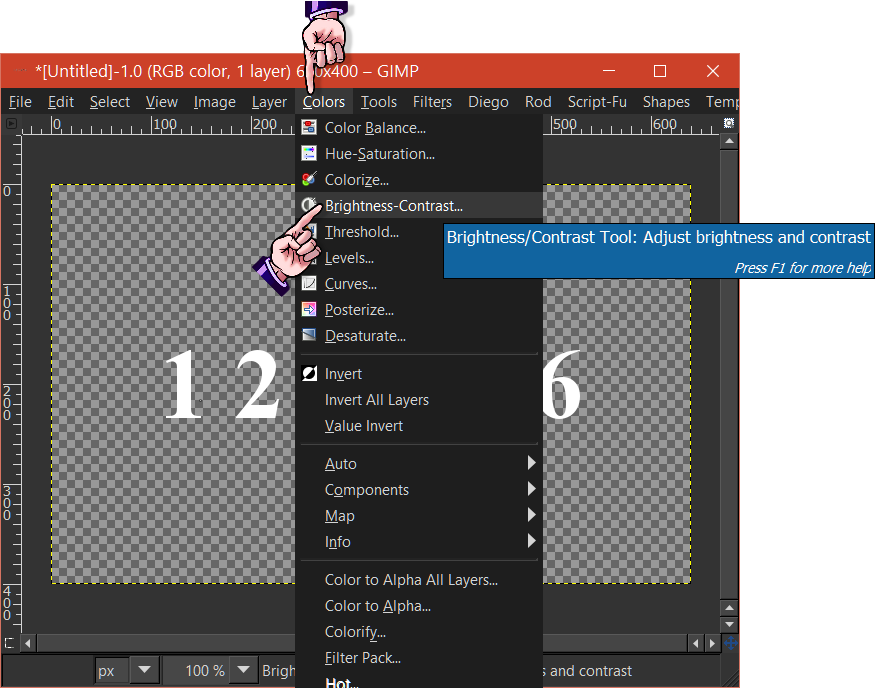
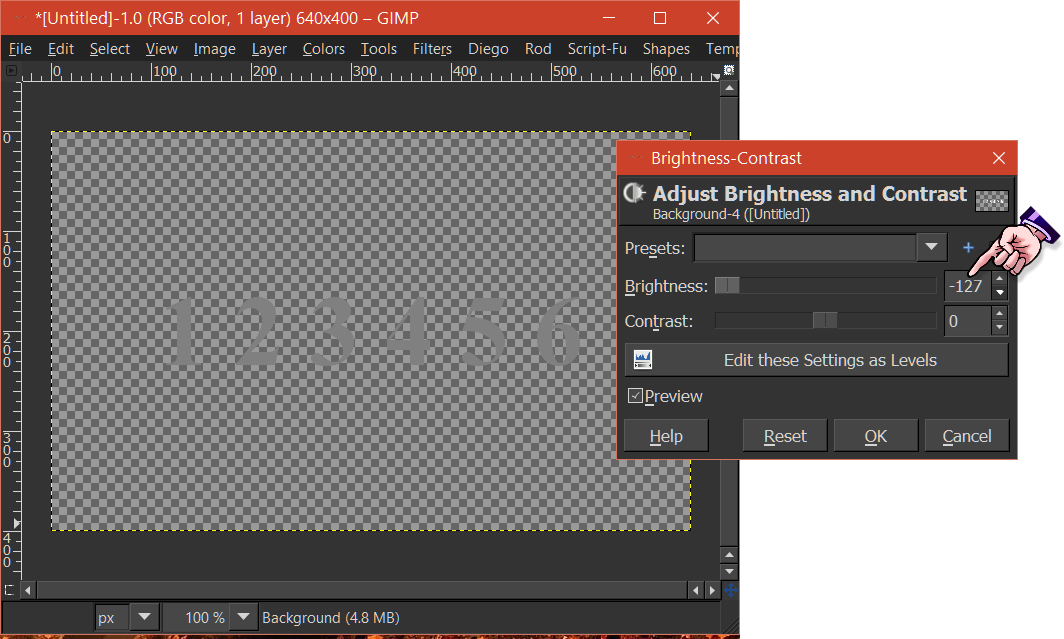
You should first darken the text, using Brightness-Contrast and turn the brightness all the way down.
ImageImage
The text should appear to be a Gray color.

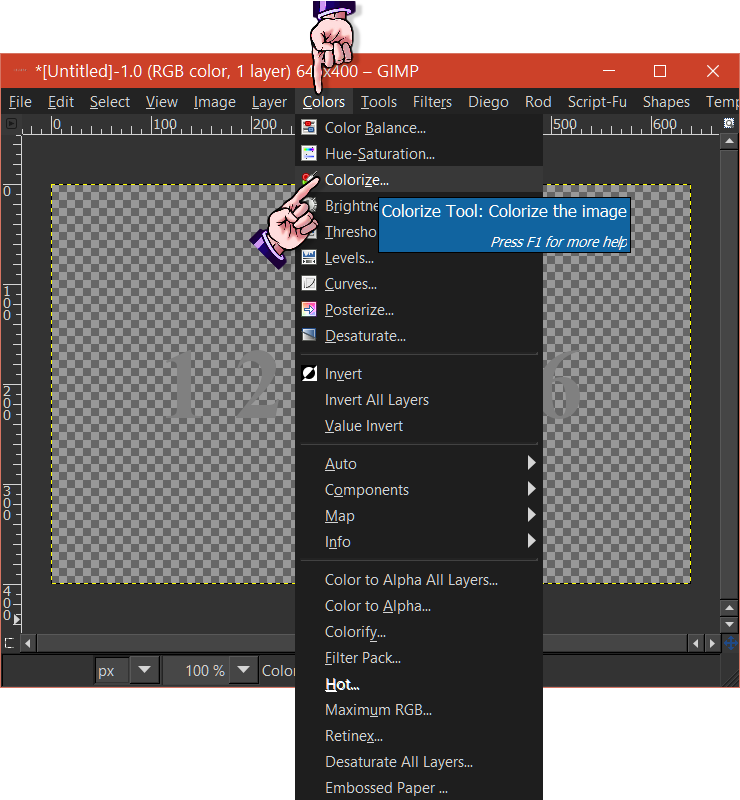
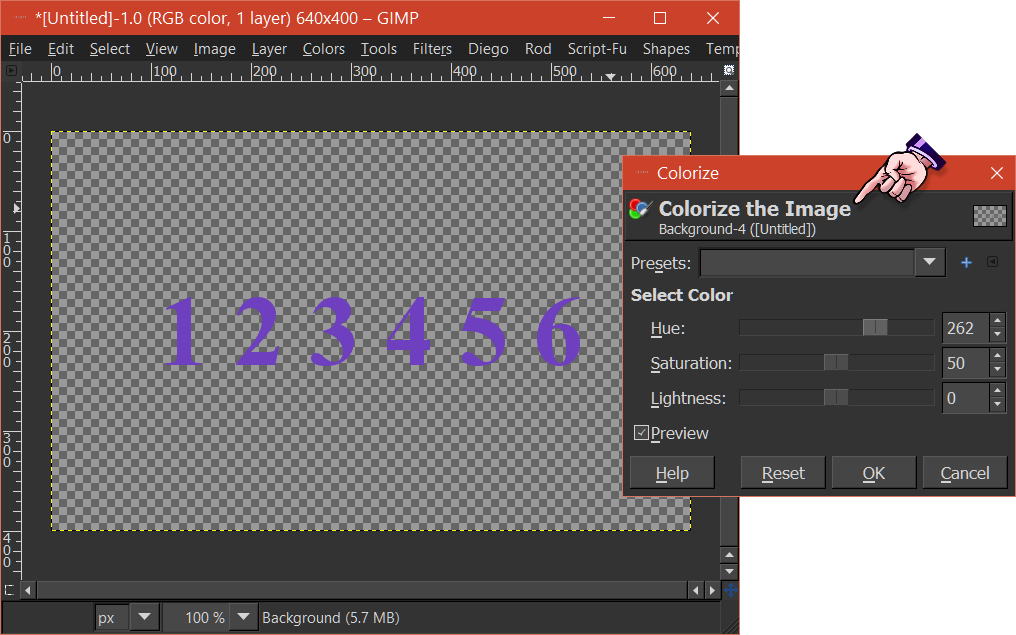
Next use, Color>Colorize to add color to the Gray text.
ImageImage

_________________
Image
"A wise man learns more from a foolish question than a fool can learn from a wise answer"
Image


Top
 Post subject: Re: how to change/fill with different colors
PostPosted: Fri May 13, 2016 7:18 am  (#4) 
Offline
Script Coder
User avatar

Joined: Oct 25, 2010
Posts: 4812
Wallace wrote:
kenny1999 wrote:
GIMP Version: 2.8.14
Operating System: Windows
GIMP Experience: New User


Here's an example, I've got some white text (Here's example only, in fact I have to deal with many text) on a transparent background.
How to change the color of the text to any other colors effectively?

Now I only know to fill it with bucket fill one by one it's very ineffectively.
And I think it's not a wise way

Any better way
Attachment:
cus.png

You should first darken the text, using Brightness-Contrast and turn the brightness all the way down.
[ Image ][ Image ]
The text should appear to be a Gray color.

Next use, Color>Colorize to add color to the Gray text.
[ Image ][ Image ]

It is much faster to lock alpha and the bucket-fill with required color. But if the text is still a text layer, I agree with Steven8 that it's best to go back to the text editor

_________________
Image


Top
 Post subject: Re: how to change/fill with different colors
PostPosted: Fri May 13, 2016 9:45 am  (#5) 
Offline
GimpChat Member

Joined: Dec 10, 2013
Posts: 106
Wallace wrote:
kenny1999 wrote:
GIMP Version: 2.8.14
Operating System: Windows
GIMP Experience: New User


Here's an example, I've got some white text (Here's example only, in fact I have to deal with many text) on a transparent background.
How to change the color of the text to any other colors effectively?

Now I only know to fill it with bucket fill one by one it's very ineffectively.
And I think it's not a wise way

Any better way
Attachment:
cus.png

You should first darken the text, using Brightness-Contrast and turn the brightness all the way down.
[ Image ][ Image ]
The text should appear to be a Gray color.

Next use, Color>Colorize to add color to the Gray text.
[ Image ][ Image ]


Very great way!! Thanks!!

What is the logic behind?? first turning down eveyrthing to -127 Gray

I've tested, if I don't turned it down the Brightness-Contrast It deos not work!!

btw, any other methods? Looks like deciding Hue/Saturation/Lightness is not very convenient

THanksagain


Last edited by kenny1999 on Fri May 13, 2016 11:23 am, edited 1 time in total.

Top
 Post subject: Re: how to change/fill with different colors
PostPosted: Fri May 13, 2016 11:21 am  (#6) 
Offline
Administrator
User avatar

Joined: Aug 10, 2012
Posts: 14011
Location: Native to NYC living in Arizona, Gimp 2.8 - 3.0, Win 11 PC.
kenny1999 wrote:


Very great way!! Thanks!!

What is the logic behind?? first turning down eveyrthing to -127 Gray

I've tested, if I don't turned it down the Brightness-Contrast It deos not work!!

THanksagain


You're welcome kenny1999.
:bigthup

_________________
Image
"A wise man learns more from a foolish question than a fool can learn from a wise answer"
Image


Top
 Post subject: Re: how to change/fill with different colors
PostPosted: Fri May 13, 2016 12:21 pm  (#7) 
Offline
GimpChat Member

Joined: Dec 10, 2013
Posts: 106
Wallace wrote:
kenny1999 wrote:


Very great way!! Thanks!!

What is the logic behind?? first turning down eveyrthing to -127 Gray

I've tested, if I don't turned it down the Brightness-Contrast It deos not work!!

THanksagain


You're welcome kenny1999.
:bigthup


In addition to this method, any other method??

deciding hue/saturation/lighnetess .... sometimes difficutl to decide


Top
 Post subject: Re: how to change/fill with different colors
PostPosted: Fri May 13, 2016 12:42 pm  (#8) 
Offline
Script Coder
User avatar

Joined: May 07, 2014
Posts: 4469
Location: Canada
another method is to right click your text layer then choose "Alpha to selection"
then change the foreground color or background color of your choice and drag the foreground or background color directly onto the image and voila.

or alpha lock the text layer, then select all or select none. and drag the foreground or background color onto the image.

I just like the drag and drop :hehe

_________________
TinT
My GIMP 2.10 plug-in writer Fiverr Gig
Plaid Community Forum
Imageplaid-patterns.com


Top
 Post subject: Re: how to change/fill with different colors
PostPosted: Fri May 13, 2016 5:33 pm  (#9) 
Offline
GimpChat Member

Joined: Dec 10, 2013
Posts: 106
trandoductin wrote:
another method is to right click your text layer then choose "Alpha to selection"
then change the foreground color or background color of your choice and drag the foreground or background color directly onto the image and voila.

or alpha lock the text layer, then select all or select none. and drag the foreground or background color onto the image.

I just like the drag and drop :hehe


hi now I've successfully alpha-to-selection the layer, but how to change the foreground/background colcour and drag that color directly onto the image??,,


Top
 Post subject: Re: how to change/fill with different colors
PostPosted: Fri May 13, 2016 7:57 pm  (#10) 
Offline
GimpChat Member

Joined: Dec 10, 2013
Posts: 106
why it has to change the background color in order to change the text color. It sounds wired


Top
 Post subject: Re: how to change/fill with different colors
PostPosted: Fri May 13, 2016 8:22 pm  (#11) 
Offline
Script Coder
User avatar

Joined: May 07, 2014
Posts: 4469
Location: Canada
kenny1999 wrote:
why it has to change the background color in order to change the text color. It sounds wired

you just need to change one color to the color you want either the background or the foreground..then you drag it like click it and hold the down the mouse button and move the mouse until the cursor is over the image and then let go of the mouse button.

_________________
TinT
My GIMP 2.10 plug-in writer Fiverr Gig
Plaid Community Forum
Imageplaid-patterns.com


Top
 Post subject: Re: how to change/fill with different colors
PostPosted: Fri May 13, 2016 8:27 pm  (#12) 
Offline
Script Coder
User avatar

Joined: May 07, 2014
Posts: 4469
Location: Canada
kenny1999 wrote:
trandoductin wrote:
another method is to right click your text layer then choose "Alpha to selection"
then change the foreground color or background color of your choice and drag the foreground or background color directly onto the image and voila.

or alpha lock the text layer, then select all or select none. and drag the foreground or background color onto the image.

I just like the drag and drop :hehe


hi now I've successfully alpha-to-selection the layer, but how to change the foreground/background colcour and drag that color directly onto the image??,,


To change the foreground color or background color just click on it (those colors are the rectangles at the bottom of your tools.

_________________
TinT
My GIMP 2.10 plug-in writer Fiverr Gig
Plaid Community Forum
Imageplaid-patterns.com


Top
Post new topic Reply to topic  [ 12 posts ] 

All times are UTC - 5 hours [ DST ]


* Login  


Powered by phpBB3 © phpBB Group