It is currently Sat Nov 14, 2026 12:32 am


All times are UTC - 5 hours [ DST ]


Post new topic Reply to topic  [ 19 posts ] 
Author Message
 Post subject: How to get Dialog box to appear
PostPosted: Fri Apr 01, 2011 3:01 pm  (#1) 
Offline
GimpChat Member

Joined: Apr 01, 2011
Posts: 6
Hello new friends. I'm a brand new user to GIMP. I am good at PowerPoint but GIMP will allow me to make much better graphics. After watching several videos done by GIMPtricks I have one problem - I think. I can't get the Dialog box labeled "Layers" to open up after I click on "Windows", "Dockable Dialogs", and then "Layers". In her videos it pops up automatically. Am I doing something wrong or missing something terribly obvious? I appreciate your patience with the new guy...


Share on Facebook Share on Twitter Share on Orkut Share on Digg Share on MySpace Share on Delicious Share on Technorati
Top
 Post subject: Re: How to get Dialog box to appear
PostPosted: Fri Apr 01, 2011 3:02 pm  (#2) 
Offline
GimpChat Member
User avatar

Joined: Mar 02, 2011
Posts: 1850
Location: Michigan
I hope this helpsp

Also you may have to re-install GIMP

And what version are you using

_________________
Image
I'm back I think


Top
 Post subject: Re: How to get Dialog box to appear
PostPosted: Fri Apr 01, 2011 5:04 pm  (#3) 
Offline
GimpChat Member

Joined: Apr 01, 2011
Posts: 6
Amanda47,

Yeah, that's the video I tried and it didn't work :-( I am using 2.6.11 Apparently I'll have to re-install GIMP. I thought of that but considered it a last resort. Oh well, here goes!
Thank you for getting back to me, Amanda.


Top
 Post subject: Re: How to get Dialog box to appear
PostPosted: Fri Apr 01, 2011 5:08 pm  (#4) 
Offline
GimpChat Member
User avatar

Joined: Mar 02, 2011
Posts: 1850
Location: Michigan
Amanda? o.O Willy lols

and yeah I would suggest reinstalling
Hopefully that works,
Willy

_________________
Image
I'm back I think


Top
 Post subject: Re: How to get Dialog box to appear
PostPosted: Fri Apr 01, 2011 5:30 pm  (#5) 
Offline
Global Moderator
User avatar

Joined: May 16, 2010
Posts: 16262
Visual Guy wrote:
Hello new friends. I'm a brand new user to GIMP. I am good at PowerPoint but GIMP will allow me to make much better graphics. After watching several videos done by GIMPtricks I have one problem - I think. I can't get the Dialog box labeled "Layers" to open up after I click on "Windows", "Dockable Dialogs", and then "Layers". In her videos it pops up automatically. Am I doing something wrong or missing something terribly obvious? I appreciate your patience with the new guy...

Normally this will happen if that particular dialog is already docked.You shouldn't have to re-install Gimp.
Not unless you have moved anything around in the Gimp directory tree that is.
Try this - Windows/Dockable dialogs/click layers and see if one of your opened windows lights up.
If one does (like its been selected) - than your layers dialog is in there somewhere.Look for this icon - :layertab

_________________
Image


Top
 Post subject: Re: How to get Dialog box to appear
PostPosted: Fri Apr 01, 2011 5:33 pm  (#6) 
Offline
Retired Staff
User avatar

Joined: May 22, 2008
Posts: 6946
Location: Somewhere in GIMP
Wild guess here. Check your taskbar to see if the layers window minimized to there. If so, click it and it should come up.

Image

_________________
Image
World War IV will be fought with sticks and stones. - Albert Einstein


Top
 Post subject: Re: How to get Dialog box to appear
PostPosted: Fri Apr 01, 2011 5:35 pm  (#7) 
Offline
Global Moderator
User avatar

Joined: May 16, 2010
Posts: 16262
Oregonian wrote:
Wild guess here. Check your taskbar to see if the layers window minimized to there. If so, click it and it should come up.

Image


That's probably exactly where it is too. :)
What we need is a close all dialogs button so we can re-open to find those suckers :lol
Visual Guy - be sure and dock that dialog to your toolbox and you won't lose it anymore.
By the way welcome to Gimp Chat!

_________________
Image


Top
 Post subject: Re: How to get Dialog box to appear
PostPosted: Fri Apr 01, 2011 5:37 pm  (#8) 
Offline
GimpChat Member
User avatar

Joined: Oct 06, 2010
Posts: 4050
Image

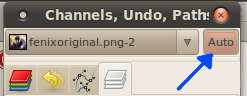
Just a hunch, try clicking the auto button with an image open.

_________________
"In order to attain the impossible, one must attempt the absurd."
~ Miguel de Cervantes


Top
 Post subject: Re: How to get Dialog box to appear
PostPosted: Fri Apr 01, 2011 5:46 pm  (#9) 
Offline
Global Moderator
User avatar

Joined: May 16, 2010
Posts: 16262
I have all my dialogs attached to my toolbox so i have more image real estate.
Therefore i have no auto button.At least i do not see one.
Image

_________________
Image


Top
 Post subject: Re: How to get Dialog box to appear
PostPosted: Fri Apr 01, 2011 5:48 pm  (#10) 
Offline
Retired Staff
User avatar

Joined: May 22, 2008
Posts: 6946
Location: Somewhere in GIMP
The auto button is on the layers window. If he can't see the layers window he can't click the button.

_________________
Image
World War IV will be fought with sticks and stones. - Albert Einstein


Top
 Post subject: Re: How to get Dialog box to appear
PostPosted: Fri Apr 01, 2011 5:48 pm  (#11) 
Offline
GimpChat Member
User avatar

Joined: Mar 02, 2011
Posts: 1850
Location: Michigan
How did you get the Paterns one up there? To the right of Color Selector?

_________________
Image
I'm back I think


Top
 Post subject: Re: How to get Dialog box to appear
PostPosted: Fri Apr 01, 2011 5:54 pm  (#12) 
Offline
Global Moderator
User avatar

Joined: May 16, 2010
Posts: 16262
Edit/Pref/Toolbox

_________________
Image


Top
 Post subject: Re: How to get Dialog box to appear
PostPosted: Fri Apr 01, 2011 6:01 pm  (#13) 
Offline
GimpChat Member
User avatar

Joined: Oct 06, 2010
Posts: 4050
Good point. I thought he meant he couldn't see the layers. :O

_________________
"In order to attain the impossible, one must attempt the absurd."
~ Miguel de Cervantes


Top
 Post subject: Re: How to get Dialog box to appear
PostPosted: Fri Apr 01, 2011 6:05 pm  (#14) 
Offline
Global Moderator
User avatar

Joined: May 16, 2010
Posts: 16262
:lol

_________________
Image


Top
 Post subject: Re: How to get Dialog box to appear
PostPosted: Fri Apr 01, 2011 6:20 pm  (#15) 
Offline
GimpChat Member
User avatar

Joined: Oct 07, 2010
Posts: 439
Location: home/Nixnine/.gimp-2.0/scripts/nixnine.scm
If you could post a screenshot of gimp open it might help.

_________________
I refuse to be confused, but am often confused at this refusal.


Top
 Post subject: Re: How to get Dialog box to appear
PostPosted: Fri Apr 01, 2011 6:25 pm  (#16) 
Offline
GimpChat Member
User avatar

Joined: Oct 06, 2010
Posts: 4050
At least we're trying to help, no?

_________________
"In order to attain the impossible, one must attempt the absurd."
~ Miguel de Cervantes


Top
 Post subject: Re: How to get Dialog box to appear
PostPosted: Fri Apr 01, 2011 6:37 pm  (#17) 
Offline
Retired Staff
User avatar

Joined: May 22, 2008
Posts: 6946
Location: Somewhere in GIMP
mahvin wrote:
At least we're trying to help, no?
:hehe

This is good. Multiple choices here. :mrgreen:

_________________
Image
World War IV will be fought with sticks and stones. - Albert Einstein


Top
 Post subject: Re: How to get Dialog box to appear
PostPosted: Fri Apr 01, 2011 6:56 pm  (#18) 
Offline
Global Moderator
User avatar

Joined: May 16, 2010
Posts: 16262
Better than no choices for sure! :)

_________________
Image


Top
 Post subject: Re: How to get Dialog box to appear
PostPosted: Fri Apr 01, 2011 8:12 pm  (#19) 
Offline
GimpChat Member

Joined: Apr 11, 2010
Posts: 545
Location: In the mini-chat, saying silly things
Think he fixed it in the end, either by reinstalling or starting up gimp again. (I'm not sure what he meant by re-loading) Think showing all the screenshots helped. :) He found his layers back in a tab.

Correct me if I'm wrong Visual Guy.

_________________
Image


Top
Post new topic Reply to topic  [ 19 posts ] 

All times are UTC - 5 hours [ DST ]


* Login  


Powered by phpBB3 © phpBB Group