It is currently Thu Sep 24, 2026 7:10 pm


All times are UTC - 5 hours [ DST ]


Post new topic Reply to topic  [ 4 posts ] 
Author Message
 Post subject: Symbol
PostPosted: Sun Jul 03, 2016 1:11 pm  (#1) 
Offline
GimpChat Member
User avatar

Joined: Dec 22, 2011
Posts: 399
GIMP Version: 2.8.14
Operating System: Windows
GIMP Experience: New User


Attachment:
Untitled.jpg
Untitled.jpg [ 11.95 KiB | Viewed 2138 times ]
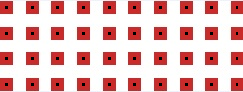
Hiya...is there anyway I can put a symbol on selected pixel...see blown up image :) TIA

_________________
Image


Share on Facebook Share on Twitter Share on Orkut Share on Digg Share on MySpace Share on Delicious Share on Technorati
Top
 Post subject: Re: Symbol
PostPosted: Sun Jul 03, 2016 1:14 pm  (#2) 
Offline
Administrator
User avatar

Joined: Aug 10, 2012
Posts: 14209
Location: Native to NYC living in Arizona, Gimp 2.8 - 3.0, Win 11 PC.
Deblk wrote:
GIMP Version: 2.8.14
Operating System: Windows
GIMP Experience: New User


Attachment:
Untitled.jpg
Hiya...is there anyway I can put a symbol on selected pixel...see blown up image :) TIA

That's a pretty small image.
I'm not sure what type of symbol you would be able to fit.

_________________
Image
"A wise man learns more from a foolish question than a fool can learn from a wise answer"
Image


Top
 Post subject: Re: Symbol
PostPosted: Sun Jul 03, 2016 1:25 pm  (#3) 
Offline
GimpChat Member
User avatar

Joined: Dec 22, 2011
Posts: 399
Wallace wrote:
Deblk wrote:
GIMP Version: 2.8.14
Operating System: Windows
GIMP Experience: New User


Attachment:
Untitled.jpg
Hiya...is there anyway I can put a symbol on selected pixel...see blown up image :) TIA

That's a pretty small image.
I'm not sure what type of symbol you would be able to fit.

Yes you're right...was thinking of a x or dot

_________________
Image


Top
 Post subject: Re: Symbol
PostPosted: Sun Jul 03, 2016 1:38 pm  (#4) 
Offline
Administrator
User avatar

Joined: Aug 10, 2012
Posts: 14209
Location: Native to NYC living in Arizona, Gimp 2.8 - 3.0, Win 11 PC.
Deblk wrote:
Yes you're right...was thinking of a x or dot


I did a select by color of the red,
with the threshold set to 100.

The shrank the selection by 5.

If the selection is filled,
it should look like a dot.

Image

Image

_________________
Image
"A wise man learns more from a foolish question than a fool can learn from a wise answer"
Image


Top
Post new topic Reply to topic  [ 4 posts ] 

All times are UTC - 5 hours [ DST ]


* Login  


Powered by phpBB3 © phpBB Group