It is currently Sat Sep 26, 2026 7:33 pm


All times are UTC - 5 hours [ DST ]


Post new topic Reply to topic  [ 4 posts ] 
Author Message
 Post subject: change the color of text ?
PostPosted: Fri Jul 08, 2016 2:01 am  (#1) 
Offline
GimpChat Member

Joined: Dec 10, 2013
Posts: 106
GIMP Version: 2.8.14
Operating System: Windows
GIMP Experience: New User


I've created some text with text tool

How to change the text next time easier without having to type everything again?

Please show me the steps! Thanks!


Share on Facebook Share on Twitter Share on Orkut Share on Digg Share on MySpace Share on Delicious Share on Technorati
Top
 Post subject: Re: change the color of text ?
PostPosted: Fri Jul 08, 2016 3:08 am  (#2) 
Offline
GimpChat Member
User avatar

Joined: Jan 20, 2013
Posts: 14835
Location: roma, italy
original text in black

Attachment:
start-text.jpg
start-text.jpg [ 23.16 KiB | Viewed 8359 times ]


click on any black pixel, select using Select by Color tool, choose a new colour (e.g. green on FG), fill the selection using Bucket Fill tool
new text

Attachment:
start-text-sel-black-fill-green.jpg
start-text-sel-black-fill-green.jpg [ 41.61 KiB | Viewed 8359 times ]

_________________
"Where am I ?"


Top
 Post subject: Re: change the color of text ?
PostPosted: Fri Jul 08, 2016 3:25 am  (#3) 
Offline
GimpChat Member
User avatar

Joined: Mar 01, 2014
Posts: 14198
Location: Spain, Aragón
Apart what Dinasset has said. You can select the text layer, right bottom - alpha to selection and with bucket fill tool apply the colour you wish on the text (in your foreground colour chosen previously) :)

_________________
Image

Gimp 2.10.36 (samj) portable _ OS Windows 10 Home_ 64bits
Don’t be afraid to start over. It’s a new chance to rebuild what you want.


Top
 Post subject: Re: change the color of text ?
PostPosted: Fri Jul 08, 2016 4:03 am  (#4) 
Offline
GimpChat Member

Joined: Mar 04, 2011
Posts: 2615
kenny1999 wrote:
GIMP Version: 2.8.14
Operating System: Windows
GIMP Experience: New User


I've created some text with text tool

How to change the text next time easier without having to type everything again?

Please show me the steps! Thanks!


This really is a fundamental question on work flow.

If you keep your text as a text layer - the layer icon has a big T showing

1. All the text can be re-coloured anytime from the text Tool Options

2. All or some of the text can be re-coloured by on canvas selection and using the on-canvas text options.

3. The text can be re-edited as required.

Attachment:
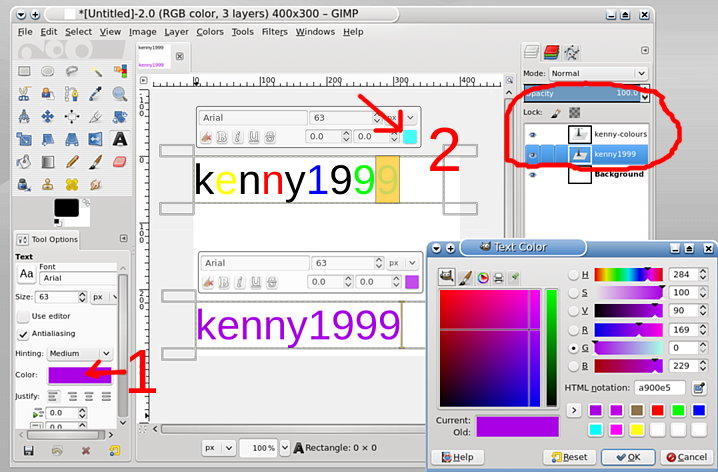
letters.jpg
letters.jpg [ 81.1 KiB | Viewed 8343 times ]


What you do not want to do is: Export the image only.

Always Save work as a gimp .xcf file and only export finished work. Keep the .xcf file as a backup

When you apply any sort of effect or manipulation to the text layer, it loses the text property.
To apply an effect, duplicate the text layer and work on the duplicate.


Top
Post new topic Reply to topic  [ 4 posts ] 

All times are UTC - 5 hours [ DST ]


* Login  


Powered by phpBB3 © phpBB Group


