It is currently Sun Oct 04, 2026 11:18 am


All times are UTC - 5 hours [ DST ]


Post new topic Reply to topic  [ 62 posts ]  Go to page 1, 2, 3, 4  Next
Author Message
 Post subject: Photos - removing granular and blurring
PostPosted: Mon Jul 04, 2016 5:00 pm  (#1) 
Offline
GimpChat Member

Joined: Feb 26, 2014
Posts: 248
GIMP Version: 2.8.14
Operating System: Windows
GIMP Experience: New User


Hi All,

I have a photo taken with a point-and-shoot camera by an inexperienced camera-person.

It's a good photo I can't replicate and I'd like to use it in a packet.

I read "Grokking the GIMP" and Googled
how to fix granular photos using Gimp" but got mostly irrelevant results except one person agreed with the Grok author - use Unsharp Mask.

I tried that and it made no difference.

Another site suggested using Filter>Noise ...but that didn't make the photo any less granular or blurry.

Could you please share what's worked for you in Gimp reducing graininess and/or blurring?

Thanks so much!


Share on Facebook Share on Twitter Share on Orkut Share on Digg Share on MySpace Share on Delicious Share on Technorati
Top
 Post subject: Re: Photos - removing granular and blurring
PostPosted: Mon Jul 04, 2016 5:39 pm  (#2) 
Offline
GimpChat Member
User avatar

Joined: Mar 12, 2016
Posts: 198
Location: Illinois, USA
Any chance of posting it ?

_________________
Image


Top
 Post subject: Re: Photos - removing granular and blurring
PostPosted: Mon Jul 04, 2016 9:08 pm  (#3) 
Offline
GimpChat Member
User avatar

Joined: Apr 08, 2010
Posts: 5420
Location: Northwest Ohio
Have you tried Wallace's deblurr filter? It's under filters>enhance. You can get the script at Gimp Scripts.


Top
 Post subject: Re: Photos - removing granular and blurring
PostPosted: Mon Jul 04, 2016 10:32 pm  (#4) 
Offline
GimpChat Member

Joined: Feb 26, 2014
Posts: 248
Hey 2-ton,

Thanks for that suggestion.

I visited this http://gimpscripts.com/?s=wallace ..but couldn't seem to find Wallace's deblurr filter.

Is that the correct site? If not, could you please share the correct site?

Thanks.


Top
 Post subject: Re: Photos - removing granular and blurring
PostPosted: Mon Jul 04, 2016 11:29 pm  (#5) 
Offline
Administrator
User avatar

Joined: Aug 10, 2012
Posts: 14228
Location: Native to NYC living in Arizona, Gimp 2.8 - 3.0, Win 11 PC.
eagertolearn wrote:
Hey 2-ton,

Thanks for that suggestion.

I visited this http://gimpscripts.com/?s=wallace ..but couldn't seem to find Wallace's deblurr filter.

Is that the correct site? If not, could you please share the correct site?

Thanks.

Look here...

viewtopic.php?f=9&t=14060#p192006

and click on the Deblur Script Download link.

_________________
Image
"A wise man learns more from a foolish question than a fool can learn from a wise answer"
Image


Top
 Post subject: Re: Photos - removing granular and blurring
PostPosted: Tue Jul 05, 2016 6:18 am  (#6) 
Offline
Script Coder
User avatar

Joined: Oct 25, 2010
Posts: 4812
SeriousTom wrote:
Any chance of posting it ?

+1, can't make suggestions without seeing what the problem really is...

_________________
Image


Top
 Post subject: Re: Photos - removing granular and blurring
PostPosted: Tue Jul 05, 2016 8:34 am  (#7) 
Offline
GimpChat Member
User avatar

Joined: Jan 20, 2013
Posts: 14835
Location: roma, italy
I totally agree with Ofnuts: no possible suggestion without seeing the image (or part of it if confidential)

_________________
"Where am I ?"


Top
 Post subject: Re: Photos - removing granular and blurring
PostPosted: Tue Jul 05, 2016 12:05 pm  (#8) 
Offline
GimpChat Member

Joined: Feb 26, 2014
Posts: 248
Hi Wallace,

Thanks so much for sharing that link.

I downloaded that file.

Could you please share how I would then install it so it becomes part of Gimp?

If I click on the file does it automatically install into Gimp so I can then see it under Filter >Enhance or does it install under another Gimp tab?

Thanks so much for all your help.


Top
 Post subject: Re: Photos - removing granular and blurring
PostPosted: Tue Jul 05, 2016 12:59 pm  (#9) 
Offline
Administrator
User avatar

Joined: Aug 10, 2012
Posts: 14228
Location: Native to NYC living in Arizona, Gimp 2.8 - 3.0, Win 11 PC.
eagertolearn wrote:
Hi Wallace,

Thanks so much for sharing that link.

I downloaded that file.

Could you please share how I would then install it so it becomes part of Gimp?

If I click on the file does it automatically install into Gimp so I can then see it under Filter >Enhance or does it install under another Gimp tab?

Thanks so much for all your help.


The .scmfile,
needs to be placed into your Gimp User scripts folder.

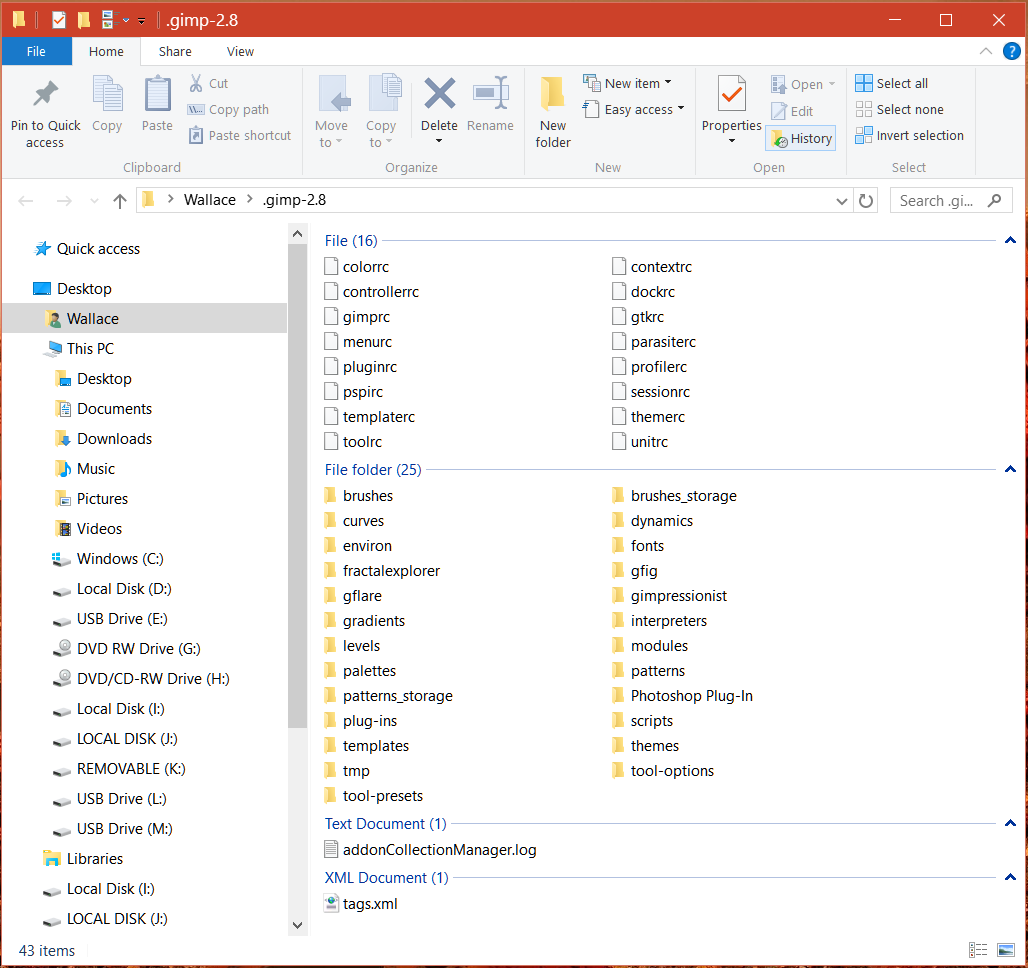
I'm using Windows 10 and my Gimp Uses scripts folder is located at;

C:\Users\Wallace\.gimp-2.8

This is what is inside my Gimp user folder.

Image

_________________
Image
"A wise man learns more from a foolish question than a fool can learn from a wise answer"
Image


Top
 Post subject: Re: Photos - removing granular and blurring
PostPosted: Tue Jul 05, 2016 2:03 pm  (#10) 
Offline
GimpChat Member

Joined: Feb 26, 2014
Posts: 248
Hey Wallace,

Your application does clear up the blurriness quite a bit!

The overall photo is still very grainy.

I wondered if there's anything more I might try to make all the photo less grainy?

Thanks so mcuh for all your help.


Top
 Post subject: Re: Photos - removing granular and blurring
PostPosted: Tue Jul 05, 2016 2:08 pm  (#11) 
Offline
Administrator
User avatar

Joined: Aug 10, 2012
Posts: 14228
Location: Native to NYC living in Arizona, Gimp 2.8 - 3.0, Win 11 PC.
eagertolearn wrote:
Hey Wallace,

Your application does clear up the blurriness quite a bit!

The overall photo is still very grainy.

I wondered if there's anything more I might try to make all the photo less grainy?

Thanks so mcuh for all your help.

As others have suggested.
It might be advantageous for you to post the image or part of it.
To get more accurate suggestions for how you might correct or improve the image.

However,
you could apply a selective blur and the use deblur.
Even so it's hard to say if this would work or not,
without seeing the image.

_________________
Image
"A wise man learns more from a foolish question than a fool can learn from a wise answer"
Image


Top
 Post subject: Re: Photos - removing granular and blurring
PostPosted: Tue Jul 05, 2016 2:23 pm  (#12) 
Offline
GimpChat Member

Joined: Feb 26, 2014
Posts: 248
Here's part of it.

Thanks.


Attachments:
1 Granular Photo to fix in Gimp.png
1 Granular Photo to fix in Gimp.png [ 1.4 MiB | Viewed 2861 times ]
Top
 Post subject: Re: Photos - removing granular and blurring
PostPosted: Tue Jul 05, 2016 2:47 pm  (#13) 
Offline
GimpChat Member

Joined: Mar 04, 2011
Posts: 2616
Maybe

FFT (the regular plugin) followed by some sort of sharpening - used octave sharpening here (g'mic plugin)

Attachment:
granular-01.png
granular-01.png [ 860.83 KiB | Viewed 2852 times ]


Top
 Post subject: Re: Photos - removing granular and blurring
PostPosted: Tue Jul 05, 2016 3:04 pm  (#14) 
Offline
GimpChat Member

Joined: May 12, 2015
Posts: 4693
I used G'MIC repair, Iain's Noise Reduction. Played with all the sliders to get the best I could. Then in Gimp a little unsharp mask. I did not spend a lot of time so you may wish to refine more than I did.
Attachment:
BlurredGrain.png
BlurredGrain.png [ 578.64 KiB | Viewed 2847 times ]


Top
 Post subject: Re: Photos - removing granular and blurring
PostPosted: Tue Jul 05, 2016 3:06 pm  (#15) 
Offline
GimpChat Member

Joined: Feb 26, 2014
Posts: 248
Rich,

Where would I find FFT (the regular plugin) and the octave sharpening (g'mic plugin)?

Thanks.


Top
 Post subject: Re: Photos - removing granular and blurring
PostPosted: Tue Jul 05, 2016 3:18 pm  (#16) 
Offline
GimpChat Member

Joined: Feb 26, 2014
Posts: 248
Hi Pat,

Please forgive my ignorance but where might I find “G'MIC repair, Iain's Noise Reduction”?

Once found, do I simply download it to the scripts folder like Wallace’s deblur file .scm?

Merci!


Top
 Post subject: Re: Photos - removing granular and blurring
PostPosted: Tue Jul 05, 2016 3:25 pm  (#17) 
Offline
GimpChat Member

Joined: Mar 04, 2011
Posts: 2616
Not really beginners stuff, but

Fast Fourier Transform (FFT) plugin http://registry.gimp.org/node/19596
for Windows 2 files an .exe and a .dll both go in your Gimp profile C:\Users\your-name\.gimp-2.8\plug-ins
The plugin appears in the Files -> Generic menu

G'mic
http://www.gmic.eu where there is a link to a windows installer.
Lots of sharpening filters there in the enhance details section.


Last edited by rich2005 on Tue Jul 05, 2016 3:30 pm, edited 1 time in total.

Top
 Post subject: Re: Photos - removing granular and blurring
PostPosted: Tue Jul 05, 2016 3:26 pm  (#18) 
Offline
GimpChat Member
User avatar

Joined: Mar 28, 2016
Posts: 312
Location: Netherlands
I think this is a scan from a home printed picture, not a photo straight out of the camera.

G'MIC is something you can use.
Repair>Smooth [nlmeans],
Smooth [selective gaussian]
Smooth [diffusion],
Smooth [anisotropic].
Play with sliders.
Combine the best of them in layers.
Eventual thereafter: G'MIC Details>Sharpen [richardson-lucy]
Image


Last edited by iarga on Tue Jul 05, 2016 3:46 pm, edited 1 time in total.

Top
 Post subject: Re: Photos - removing granular and blurring
PostPosted: Tue Jul 05, 2016 3:29 pm  (#19) 
Offline
GimpChat Member

Joined: May 12, 2015
Posts: 4693
Go to: http://gmic.eu/gimp.shtml and download the proper G'mic script for your operating system. I have windows and the installer with the script will do the install in the proper place.
G'MIC is found at the bottom of the filters menu in Gimp after installed. Open it and go to Repairs. There are many tools there to fix photos. I started with the Iain's Noise reduction. You may want to try others.


Top
 Post subject: Re: Photos - removing granular and blurring
PostPosted: Tue Jul 05, 2016 4:46 pm  (#20) 
Offline
GimpChat Member

Joined: Feb 26, 2014
Posts: 248
Rich, Iarga, Pat,

Thank you all so very,very much for all your help.

Do I need to install that .exe file to G'mic into C:\Users\your-name\.gimp-2.8\plug-ins or can I just download that installer to my C:\Downloads folder where I download most of my programs?

I'll also be downloading and trying the Fast Fourier Transform (FFT) plugin.

I'll try everything and anything which might help.

I really appreciate you all playing with this photo and kindly sharing your suggestions, links and experience.


Top
Post new topic Reply to topic  [ 62 posts ]  Go to page 1, 2, 3, 4  Next

All times are UTC - 5 hours [ DST ]


* Login  


Powered by phpBB3 © phpBB Group