It is currently Wed Nov 11, 2026 8:35 pm


All times are UTC - 5 hours [ DST ]


Post new topic Reply to topic  [ 3 posts ] 
Author Message
 Post subject: How do you set default minimum work window size?
PostPosted: Sun Sep 11, 2016 8:41 pm  (#1) 
Offline
New Member

Joined: Sep 11, 2016
Posts: 1
GIMP Version: 2.8.10
Operating System: Linux
GIMP Experience: New User


I am using GIMP to write code for computer vision. I use extremely tiny images to debug my code, e.g., 5 px * 5 px images to see if my code works. When I open it in GIMP, they are extremely tiny. I can use the shortcut CTRL + SHIFT + J to fit the image to window size, but the window always starts really small or short and it gets annoying having to drag the window each time to zoom using CTRL + SHIFT + J every time I process a new image. I looked into the preferences and googled, but couldn't find anything on setting a minimum window size. Is there a way to set the minimum window size?


Share on Facebook Share on Twitter Share on Orkut Share on Digg Share on MySpace Share on Delicious Share on Technorati
Top
 Post subject: Re: How do you set default minimum work window size?
PostPosted: Mon Sep 12, 2016 1:48 am  (#2) 
Offline
Administrator
User avatar

Joined: Aug 10, 2012
Posts: 14268
Location: Native to NYC living in Arizona, Gimp 2.8 - 3.0, Win 11 PC.
Dobob wrote:
GIMP Version: 2.8.10
Operating System: Linux
GIMP Experience: New User


I am using GIMP to write code for computer vision. I use extremely tiny images to debug my code, e.g., 5 px * 5 px images to see if my code works. When I open it in GIMP, they are extremely tiny. I can use the shortcut CTRL + SHIFT + J to fit the image to window size, but the window always starts really small or short and it gets annoying having to drag the window each time to zoom using CTRL + SHIFT + J every time I process a new image. I looked into the preferences and googled, but couldn't find anything on setting a minimum window size. Is there a way to set the minimum window size?

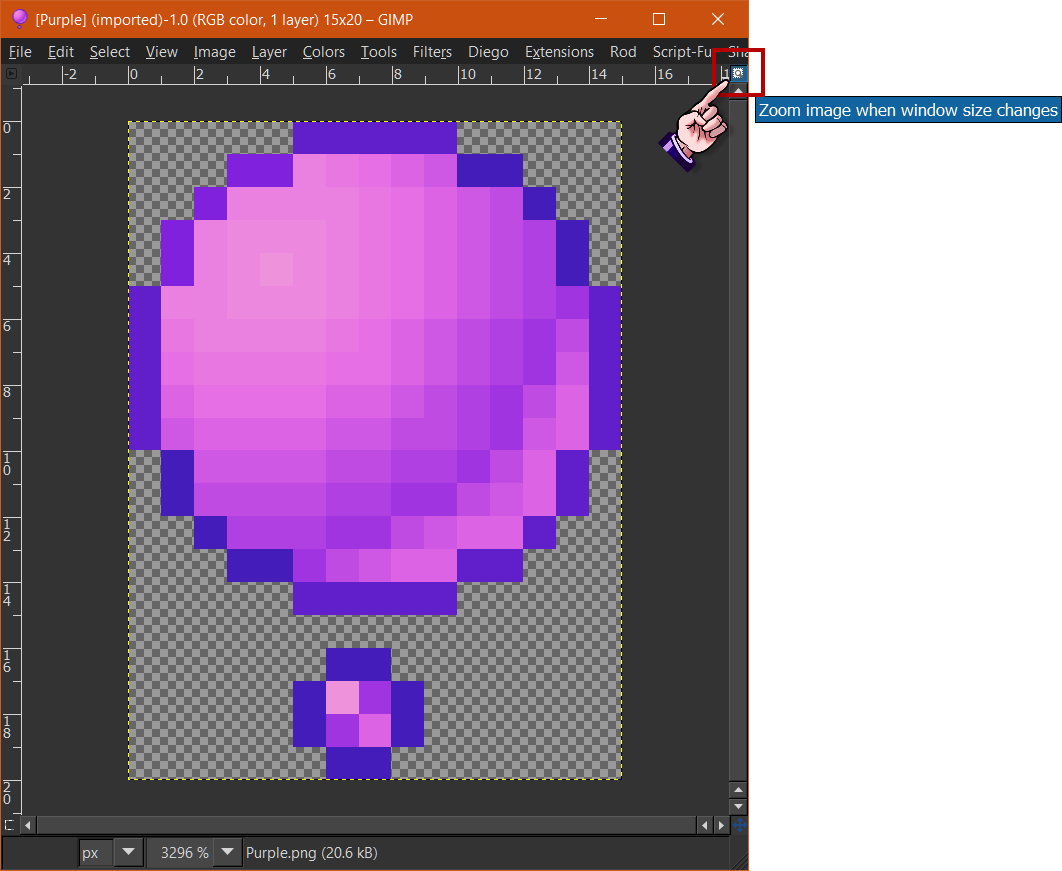
You could try this method and then save it to preferences once it's selected.
Image

_________________
Image
"A wise man learns more from a foolish question than a fool can learn from a wise answer"
Image


Top
 Post subject: Re: How do you set default minimum work window size?
PostPosted: Mon Sep 12, 2016 5:32 am  (#3) 
Offline
GimpChat Member

Joined: Mar 04, 2011
Posts: 2629
Quote:
...but the window always starts really small or short and it gets annoying having to drag the window each time to zoom...

It reads to me like you are using traditional 3 window mode.
Strongly recommend going into single window mode Gimp menu Windows -> Single window mode and using Wallaces suggestion.

Other thing to try
In 3 window mode set Edit -> Preferences Zoom and Resize Behaviour
screenshot: http://imgur.com/PyWubwh
There are preset shortcut keys for zoom, 5 = 1600% and there are a couple of unset options that might get you larger than that screenshot: http://imgur.com/rq4MpIg

A non-gimp, linux option depending on the DE you use ;)
look for forcing a window size when opening an image.
screenshot: http://imgur.com/Qq5WJaQ
then apply a shortcut to zoom.


Top
Post new topic Reply to topic  [ 3 posts ] 

All times are UTC - 5 hours [ DST ]


* Login  


Powered by phpBB3 © phpBB Group