It is currently Tue Sep 22, 2026 1:09 pm


All times are UTC - 5 hours [ DST ]


Post new topic Reply to topic  [ 11 posts ] 
Author Message
 Post subject: Failure to exe some scripts (SOLVED)
PostPosted: Tue Jul 19, 2016 1:53 pm  (#1) 
Offline
GimpChat Member
User avatar

Joined: Apr 09, 2016
Posts: 580
Location: Sheffield UK
GIMP Version: 2.8.14
Operating System: Windows
GIMP Experience: New User


Image
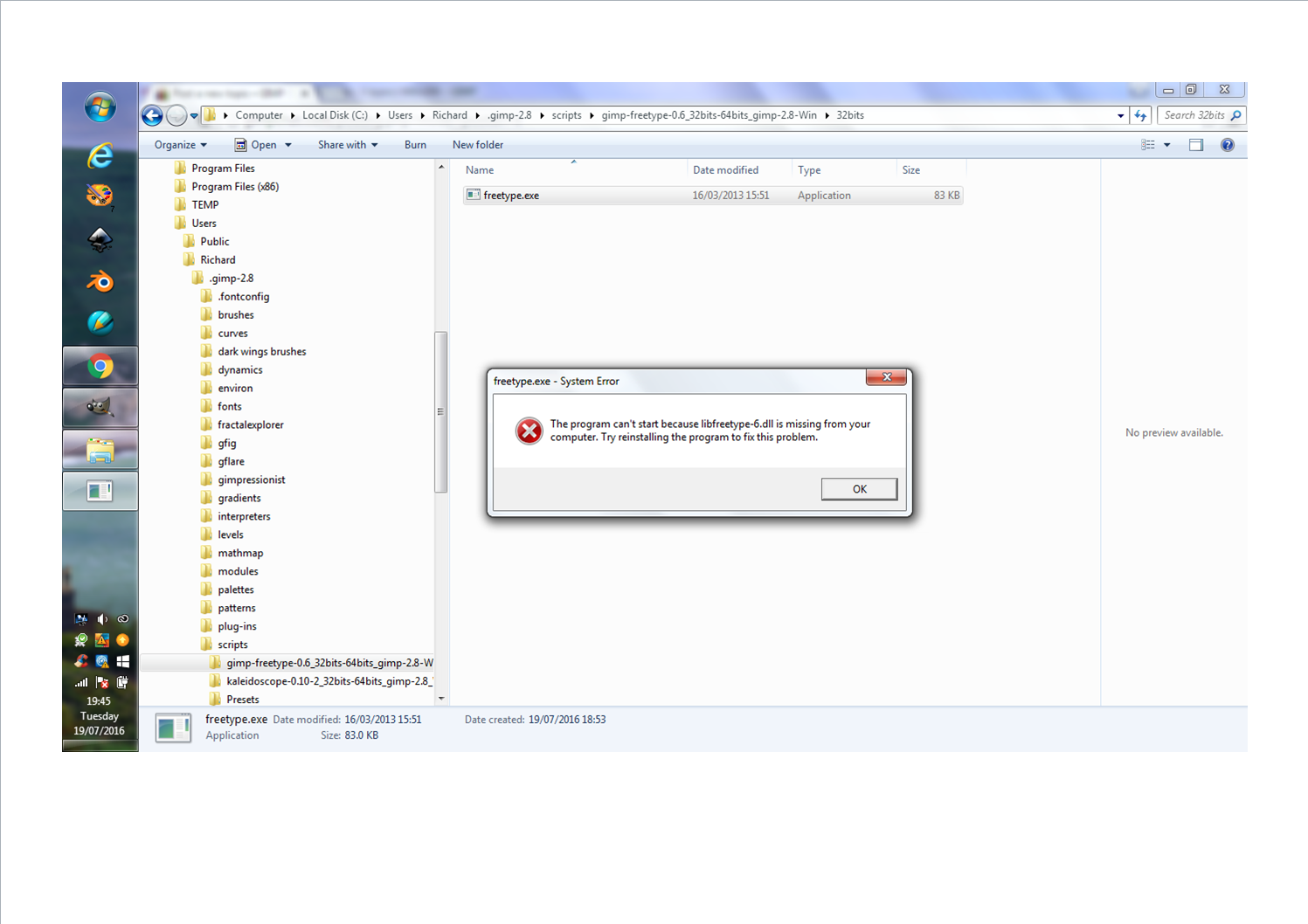
When I download a script that comes in a folder, when I run the exe, I get the message above. I'm not at all tech savvy, would it be best just not to bother and get on with scripts I can use or is there a simple fix for a simple guy please?

_________________
Image


Last edited by RJKD on Thu Sep 15, 2016 12:51 pm, edited 1 time in total.

Share on Facebook Share on Twitter Share on Orkut Share on Digg Share on MySpace Share on Delicious Share on Technorati
Top
 Post subject: Re: Failure to exe some scripts
PostPosted: Tue Jul 19, 2016 3:18 pm  (#2) 
Offline
Administrator
User avatar

Joined: Aug 10, 2012
Posts: 14206
Location: Native to NYC living in Arizona, Gimp 2.8 - 3.0, Win 11 PC.
RJKD wrote:
GIMP Version: 2.8.14
Operating System: Windows
GIMP Experience: New User


[ Image ]
When I download a script that comes in a folder,
when I run the exe,
I get the message above.
I'm not at all tech savvy,
would it be best just not to bother and get on with scripts I can use
or is there a simple fix for a simple guy please?


I do believe that what you're calling a script,
may in fact be a plug-in.
Which does not require it to be run.

If it is indeed a plug-in.
This file would need to be placed into your Gimp User Plug-ins folder.

Once this is done.
It should appear somewhere within Gimp for you to access.

_________________
Image
"A wise man learns more from a foolish question than a fool can learn from a wise answer"
Image


Top
 Post subject: Re: Failure to exe some scripts
PostPosted: Wed Jul 20, 2016 8:35 am  (#3) 
Offline
GimpChat Member
User avatar

Joined: Apr 09, 2016
Posts: 580
Location: Sheffield UK
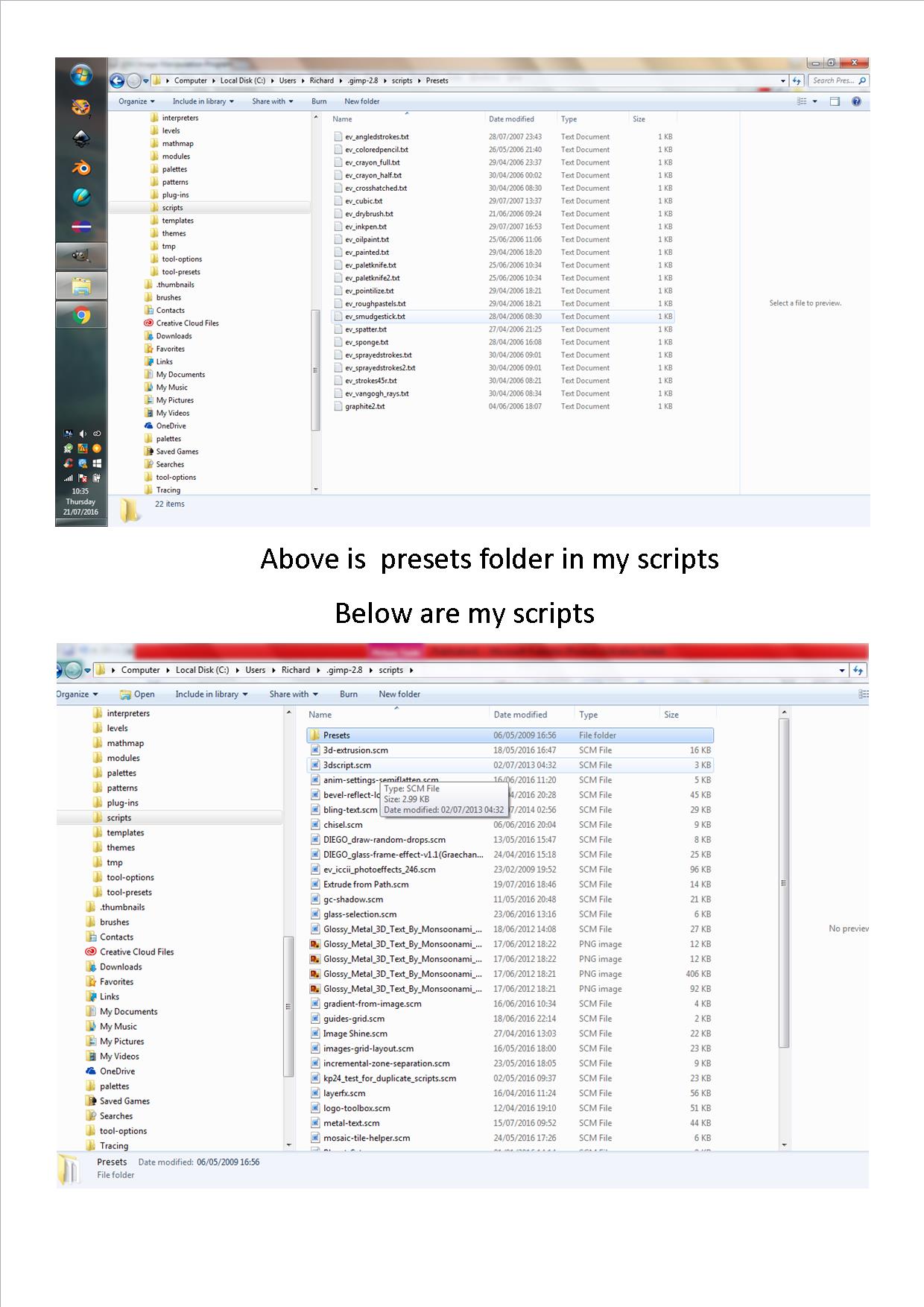
Thank you once again Wallace, I was putting plug-ins into my scripts folder. I have a folder called presets in my scripts folder, does this seem correct to you?

_________________
Image


Top
 Post subject: Re: Failure to exe some scripts
PostPosted: Wed Jul 20, 2016 10:39 am  (#4) 
Offline
GimpChat Member
User avatar

Joined: Nov 16, 2011
Posts: 5127
Location: Metro Vancouver, BC
A 'Presets' folder in 'scripts' is OK if they are related to a script. To know for sure you can post a list of your scripts and presets so we can check.
In 'scripts' the one I'm curious about is kaleidoscope-0-10-2, I believe that's a samj plug-in not a script.

_________________
Image
Gimp 2.8.18, Linux, median user
Gimp Chat Tutorials Index
Spirit Bear (Kermode)


Top
 Post subject: Re: Failure to exe some scripts
PostPosted: Thu Jul 21, 2016 4:44 am  (#5) 
Offline
GimpChat Member
User avatar

Joined: Apr 09, 2016
Posts: 580
Location: Sheffield UK
Image
Thank you for your time - much appreciated.

_________________
Image


Top
 Post subject: Re: Failure to exe some scripts
PostPosted: Thu Jul 21, 2016 4:54 am  (#6) 
Offline
GimpChat Member
User avatar

Joined: Apr 09, 2016
Posts: 580
Location: Sheffield UK
Image

_________________
Image


Top
 Post subject: Re: Failure to exe some scripts
PostPosted: Thu Jul 21, 2016 5:10 am  (#7) 
Offline
Administrator
User avatar

Joined: Aug 10, 2012
Posts: 14206
Location: Native to NYC living in Arizona, Gimp 2.8 - 3.0, Win 11 PC.
RJKD wrote:
[ Image ]
Thank you for your time - much appreciated.

Why do you have all those text file in that preset folder?
Have you opened any of them to read what they say?
There's really no need to have text file in that folder, unless that's where you want to store them.

_________________
Image
"A wise man learns more from a foolish question than a fool can learn from a wise answer"
Image


Top
 Post subject: Re: Failure to exe some scripts
PostPosted: Thu Jul 21, 2016 8:14 am  (#8) 
Offline
GimpChat Member
User avatar

Joined: Nov 16, 2011
Posts: 5127
Location: Metro Vancouver, BC
I think they're for, ev_iccii_photoeffects_246.scm.
I don't have that script now but the presets look familiar and the prefix matches.

_________________
Image
Gimp 2.8.18, Linux, median user
Gimp Chat Tutorials Index
Spirit Bear (Kermode)


Top
 Post subject: Re: Failure to exe some scripts
PostPosted: Thu Jul 21, 2016 3:44 pm  (#9) 
Offline
Administrator
User avatar

Joined: Aug 10, 2012
Posts: 14206
Location: Native to NYC living in Arizona, Gimp 2.8 - 3.0, Win 11 PC.
Odinbc wrote:
I think they're for, ev_iccii_photoeffects_246.scm.
I don't have that script now but the presets look familiar and the prefix matches.

Is that so...
By bad! :oops:
Didn't realize text file were, or could be used as presets.
We never stop learning, do we. :jumpclap

_________________
Image
"A wise man learns more from a foolish question than a fool can learn from a wise answer"
Image


Top
 Post subject: Re: Failure to exe some scripts
PostPosted: Fri Jul 22, 2016 12:21 am  (#10) 
Offline
GimpChat Member
User avatar

Joined: Jan 13, 2011
Posts: 2648
Location: Poland
They "ev_..... .txt" are for the script ev_iccii_photoeffects_246.scm - but presets Gimpressionist...


Attachments:
Bad location.png
Bad location.png [ 475.11 KiB | Viewed 3485 times ]

_________________
Image
Top
 Post subject: Re: Failure to exe some scripts
PostPosted: Sat Jul 23, 2016 3:48 pm  (#11) 
Offline
GimpChat Member
User avatar

Joined: Apr 09, 2016
Posts: 580
Location: Sheffield UK
I am (seriously) going back to school! Meanwhile would it be worth installing GIMP 2.8.18 and from there only tackle things when I know I have the correct knowledge, my plug-ins are crashing so I've screwed up big style? :oops:

_________________
Image


Top
Post new topic Reply to topic  [ 11 posts ] 

All times are UTC - 5 hours [ DST ]


* Login  


Powered by phpBB3 © phpBB Group