It is currently Sun Jul 12, 2026 1:42 am


All times are UTC - 5 hours [ DST ]


Post new topic Reply to topic  [ 3 posts ] 
Author Message
 Post subject: CMYK and Gimp
PostPosted: Sun Sep 18, 2016 2:39 am  (#1) 
Offline
GimpChat Member

Joined: Mar 27, 2014
Posts: 11
GIMP Version: 2.8.14
Operating System: Windows
OS Version: 7
GIMP Experience: New User

List any relevant plug-ins or scripts:
Separate


I am doing several trials with different Cmyk converters and got various results though using the same .Icc color settings.
I was saddened to see that psd got seemingly the least color shift (mainly in the blue color) and would like to know if I can improve on my settings in Gimp to get a little less color shift.
(For info the "online" file has been done with an online Cmyk converter): for that one I got the worst result, specially in the greens.
Any tips? :)


Attachments:
Cmyk_trials.jpg
Cmyk_trials.jpg [ 34.21 KiB | Viewed 3195 times ]
Share on Facebook Share on Twitter Share on Orkut Share on Digg Share on MySpace Share on Delicious Share on Technorati
Top
 Post subject: Re: CMYK and Gimp
PostPosted: Sun Sep 18, 2016 4:04 am  (#2) 
Offline
GimpChat Member

Joined: Mar 04, 2011
Posts: 2606
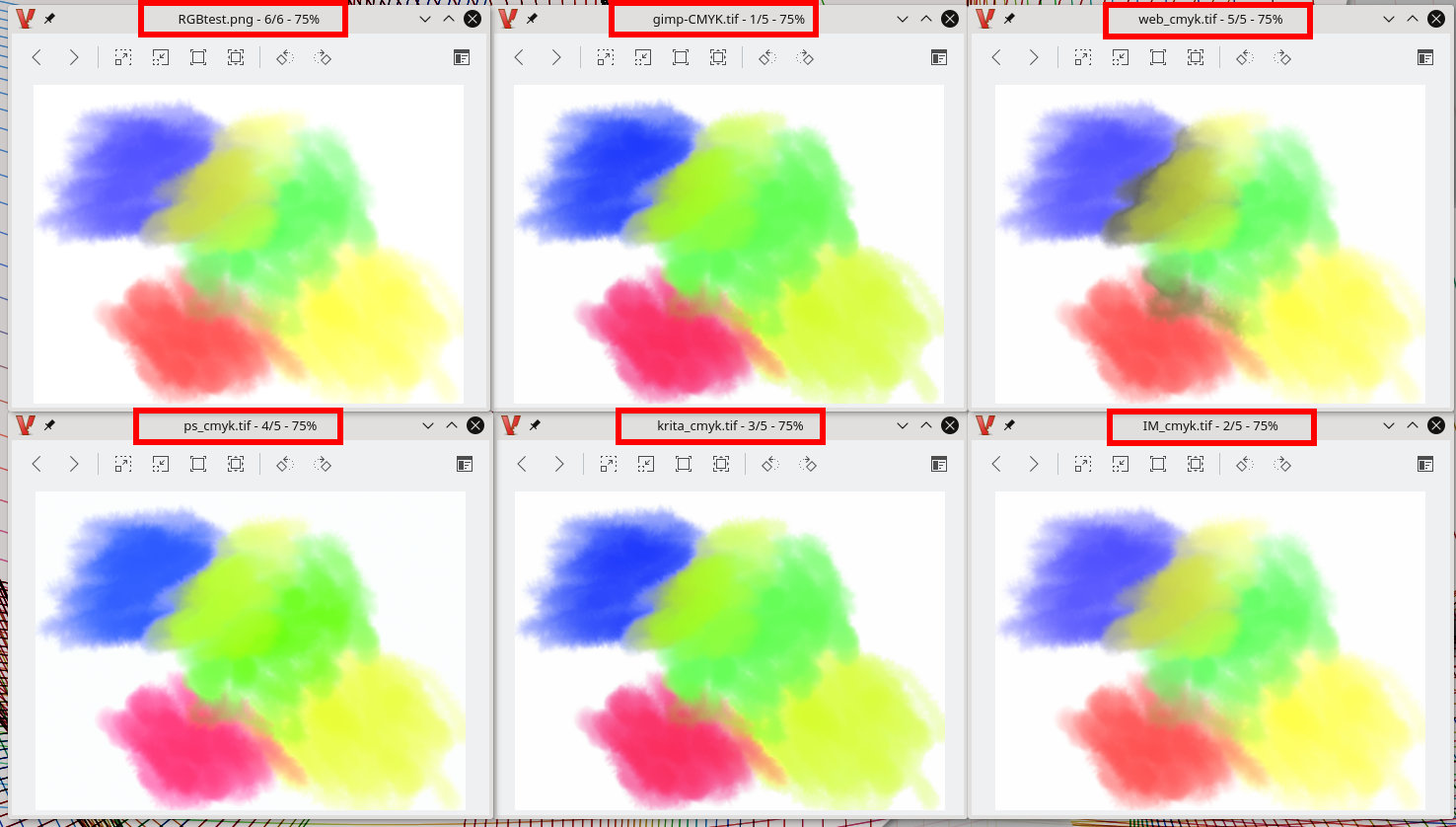
Comparisons, always a bit dubious, you show your comparison and I will show mine ;) Worth trying other applications, especially Krita and Imagemagick.

Attachment:
cmyk-test.jpg
cmyk-test.jpg [ 174.92 KiB | Viewed 3163 times ]


You did not say, (edit: You did say, but worth checking anyway) but are all the parameters the same and what are they? Worth checking using ImageMagick identify -verbose

The above, conversions all from sRGB to ISO coated V2 and perceptual, although PS is little dubious with ISO coated (PS = Euroscale V2???)

Looks ok to me but at the moment using a linux laptop (Kubuntu 16.04) with very little colour management.

For info, the web conversion rgb2cmyk.com uses GraphicksMagick.

Subjectively, I think the ImageMagick conversion is closest to the original RGB.

convert RGBtest.png -profile srgb.icc -colorspace cmyk -profile ISOcoated_v2_eci.icc IM_cmyk.tif


In the end, largely irrelevant, CMYK is for the printing company and they will screw it up anyway.

edit: Looking at your last post, very artistic, Krita might be a good choice since you can start a project in CMYK mode. No need for a conversion.


Top
 Post subject: Re: CMYK and Gimp
PostPosted: Sun Sep 18, 2016 6:41 am  (#3) 
Offline
GimpChat Member

Joined: Mar 27, 2014
Posts: 11
Hi Rich,
Thanks for this post, very clear and informative :)
I will check Krita and IM, sounds interesting!
What do u mean with "In the end, largely irrelevant, CMYK is for the printing company and they will screw it up anyway."?
Did u had bad experience in the past with printing companies (I did I must say ;-)


Top
Post new topic Reply to topic  [ 3 posts ] 

All times are UTC - 5 hours [ DST ]


* Login  


Powered by phpBB3 © phpBB Group