It is currently Mon Sep 21, 2026 9:11 am


All times are UTC - 5 hours [ DST ]


Post new topic Reply to topic  [ 4 posts ] 
Author Message
 Post subject: Help to insert segment - Not merge.
PostPosted: Mon Sep 19, 2016 11:39 pm  (#1) 
Offline
New Member

Joined: Sep 19, 2016
Posts: 1
GIMP Version: 2.8.14
Operating System: Windows
GIMP Experience: New User


Hi All,
I have just started using Gimp and see that it can do almost anything(!?)
However, can someone please tell me how to do the following?
I have a very long horizontal image (single line of music notation). I need to space all the bar lines up at equal distances apart. I am using the grid to guide me.
I therefore need to 'stretch' part of the image by copying a section and pasting it at another point. However, I can only seem to get it to merge the copied section over the top.
I want to 'cut' the main image and insert the piece thus making the width if the entire image longer.
Is this possible?
Or is there a way to select a cross section (from top to bottom) and stretch it sideways- also moving the rest of the image along?

I hope that all makes sense . :roll:
Any advice is appreciated.


Share on Facebook Share on Twitter Share on Orkut Share on Digg Share on MySpace Share on Delicious Share on Technorati
Top
 Post subject: Re: Help to insert segment - Not merge.
PostPosted: Tue Sep 20, 2016 12:34 am  (#2) 
Offline
Administrator
User avatar

Joined: Aug 10, 2012
Posts: 14206
Location: Native to NYC living in Arizona, Gimp 2.8 - 3.0, Win 11 PC.
I think you want to increase the width of the canvas, right?

If so,
you can right click on the image and select,
Layer>Layer Boundary Size.
To adjust the layers dimensions.

Once the layer is adjusted the way you like.
Click Resize.

Then go to,
Image>Fit Canvas to Layers.
See thumbnail below.

Image

_________________
Image
"A wise man learns more from a foolish question than a fool can learn from a wise answer"
Image


Top
 Post subject: Re: Help to insert segment - Not merge.
PostPosted: Tue Sep 20, 2016 1:06 am  (#3) 
Offline
GimpChat Member
User avatar

Joined: Nov 16, 2011
Posts: 5127
Location: Metro Vancouver, BC
CSS WebSprites might work for you.
There are three scripts you will use, hmagalhaes-layers-arrange-hor.scm.
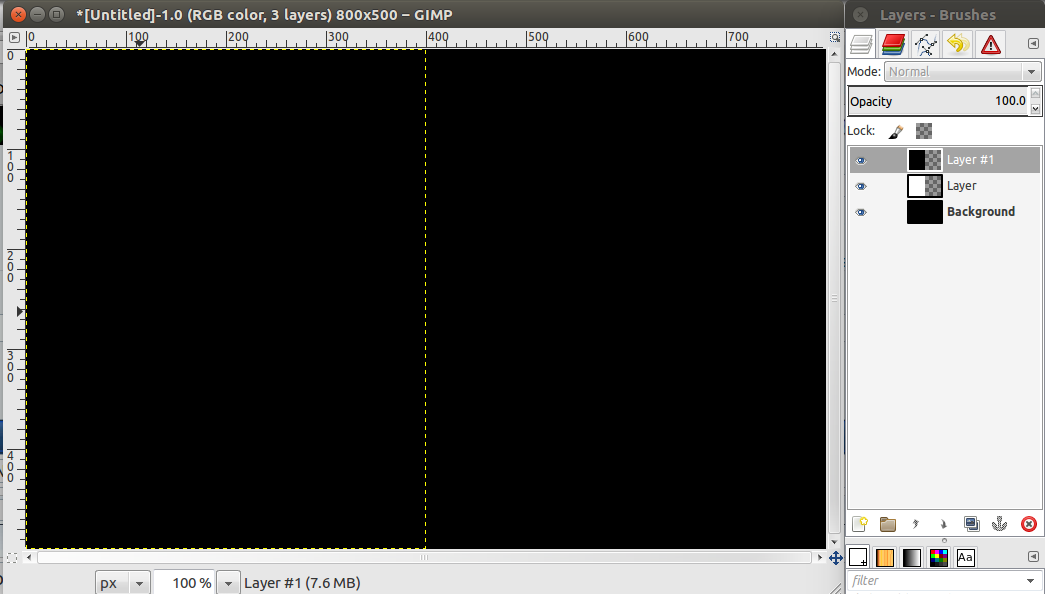
In this example the original canvas image is 800x500px, with two new layers 400x500px.
Notice in the layer dialog how the two new smaller layers are default (aligned left and cover each other). They can be any width you require for your insert.

Image

After CSS WebSprites, Arrange layers horizontally. Notice in the layer dialog (from the top) how the second layer shifts right (400px, width of the top layer) and to position 2 on a canvas expanded to 400+400+800=1600px. The bottom layer appends horizontally.

Image

_________________
Image
Gimp 2.8.18, Linux, median user
Gimp Chat Tutorials Index
Spirit Bear (Kermode)


Top
 Post subject: Re: Help to insert segment - Not merge.
PostPosted: Tue Sep 20, 2016 7:00 am  (#4) 
Offline
Global Moderator
User avatar

Joined: May 16, 2010
Posts: 16173
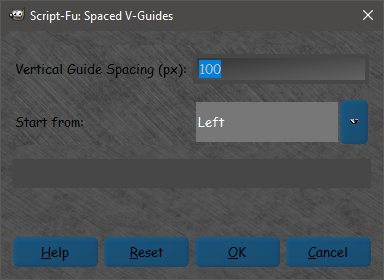
There are other guide filters also. One called JMB Space Vertical Guides is attached
Menu location is Image>Guides>

Image

Create the actual size image (length)
Run this filter and then the Guides to Path.


Attachments:
JMB-SpacedVGuides.zip [981 Bytes]
Downloaded 84 times

_________________
Image
Top
Post new topic Reply to topic  [ 4 posts ] 

All times are UTC - 5 hours [ DST ]


* Login  


Powered by phpBB3 © phpBB Group