It is currently Mon Sep 21, 2026 5:35 pm


All times are UTC - 5 hours [ DST ]


Post new topic Reply to topic  [ 25 posts ]  Go to page 1, 2  Next
Author Message
 Post subject: How to make Bottle look empty?
PostPosted: Fri Sep 25, 2015 1:41 pm  (#1) 
Offline
New Member

Joined: Sep 25, 2015
Posts: 4
GIMP Version: 2.8.14
Operating System: Windows
OS Version: Windows 10
GIMP Experience: New User


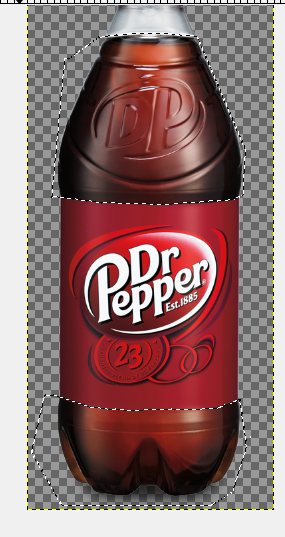
I'm basically just trying to make a Dr. Pepper bottle look like it's empty. Thank you :)


Attachments:
dr pepper logo full.png
dr pepper logo full.png [ 294.73 KiB | Viewed 4333 times ]
Share on Facebook Share on Twitter Share on Orkut Share on Digg Share on MySpace Share on Delicious Share on Technorati
Top
 Post subject: Re: How to make Bottle look empty?
PostPosted: Fri Sep 25, 2015 2:16 pm  (#2) 
Offline
Script Coder
User avatar

Joined: May 07, 2014
Posts: 4554
Location: Canada
this is the best i could do
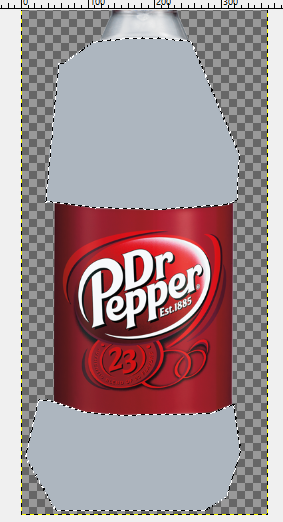
I selected the dr.pepper areas and then apply a layer of color mode over top using the color from the empty part...then adjusted brightness and contrast of dr.pepper area.
Image

_________________
Image
Visualize your and others dreams coming true.


Top
 Post subject: Re: How to make Bottle look empty?
PostPosted: Fri Sep 25, 2015 2:36 pm  (#3) 
Offline
Administrator
User avatar

Joined: Aug 10, 2012
Posts: 14206
Location: Native to NYC living in Arizona, Gimp 2.8 - 3.0, Win 11 PC.
Here's what I came up with.
It involved using a Bump Map and trying to match the color of the empty parts as Trandoductin did.
Attachment:
dr pepper wallace.png
dr pepper wallace.png [ 282.66 KiB | Viewed 4295 times ]

_________________
Image
"A wise man learns more from a foolish question than a fool can learn from a wise answer"
Image


Top
 Post subject: Re: How to make Bottle look empty?
PostPosted: Fri Sep 25, 2015 3:40 pm  (#4) 
Offline
New Member

Joined: Sep 25, 2015
Posts: 4
THANK YOU SO MUCH I LOVE YOU MAN ;D


Top
 Post subject: Re: How to make Bottle look empty?
PostPosted: Fri Sep 25, 2015 4:32 pm  (#5) 
Offline
Administrator
User avatar

Joined: Aug 10, 2012
Posts: 14206
Location: Native to NYC living in Arizona, Gimp 2.8 - 3.0, Win 11 PC.
winningedge wrote:
THANK YOU SO MUCH I LOVE YOU MAN ;D

I'm glad we were able to help you out.

Good luck with this project. If you do try out these examples, let us know how it went.

_________________
Image
"A wise man learns more from a foolish question than a fool can learn from a wise answer"
Image


Top
 Post subject: Re: How to make Bottle look empty?
PostPosted: Fri Sep 25, 2015 9:52 pm  (#6) 
Offline
GimpChat Member

Joined: May 12, 2015
Posts: 4693
Trandoductin: I am unable to reproduce what you did to get the empty bottle effect. I am not familiar with the "layer color mode" and how to use it. Would you list your steps as to how you did this? I would greatly appreciate it.


Top
 Post subject: Re: How to make Bottle look empty?
PostPosted: Fri Sep 25, 2015 10:17 pm  (#7) 
Offline
Script Coder
User avatar

Joined: May 07, 2014
Posts: 4554
Location: Canada
Pat625 wrote:
Trandoductin: I am unable to reproduce what you did to get the empty bottle effect. I am not familiar with the "layer color mode" and how to use it. Would you list your steps as to how you did this? I would greatly appreciate it.

1. use color picker tool to select color of bottle where it's empty
Image
2. create a blank layer on top of original layer
3. make selections where the dr.pepper is
Image
4. click and drag foreground color (color selected in step 1) onto working area
Image
5. set the mode of the top layer to "Color"
Image
6. select the original layer, then play with Colors/Brightness and Constrast
Image

_________________
Image
Visualize your and others dreams coming true.


Top
 Post subject: Re: How to make Bottle look empty?
PostPosted: Sat Sep 26, 2015 12:21 am  (#8) 
Offline
GimpChat Member
User avatar

Joined: Sep 24, 2010
Posts: 12845
Thought I would add some reflections to the plastic using Artshop iridescent plugin. Used bilateral filter set to grain extract and result set to grain merge to make the soda itself disappear (one layer of course set to normal). I then did the sorry job of re-introducing the label and bottle cap. :)


Attachments:
dr pepper logo full.png
dr pepper logo full.png [ 334.43 KiB | Viewed 4204 times ]

_________________
Lyle

Psalm 109:8

Image
Top
 Post subject: Re: How to make Bottle look empty?
PostPosted: Sat Sep 26, 2015 7:03 am  (#9) 
Offline
GimpChat Member
User avatar

Joined: Aug 16, 2012
Posts: 4271
Location: Göteborg, Sweden
trandoductin: that's a real transformation, great job!
wallace: wow, for once i'm impressed with what bump mapping did! great job you too.

_________________


Top
 Post subject: Re: How to make Bottle look empty?
PostPosted: Sat Sep 26, 2015 8:43 am  (#10) 
Offline
Administrator
User avatar

Joined: Aug 10, 2012
Posts: 14206
Location: Native to NYC living in Arizona, Gimp 2.8 - 3.0, Win 11 PC.
AnMal wrote:
trandoductin: that's a real transformation, great job!
wallace: wow, for once i'm impressed with what bump mapping did! great job you too.

:tyspin :jumpclap

_________________
Image
"A wise man learns more from a foolish question than a fool can learn from a wise answer"
Image


Top
 Post subject: Re: How to make Bottle look empty?
PostPosted: Sat Sep 26, 2015 2:08 pm  (#11) 
Offline
GimpChat Member

Joined: May 12, 2015
Posts: 4693
Trandoductin: Thank You!! I see I have some homework now!

Trando, Wallace, Lylejk: You all had different steps but achieved the same goal, amazing!!


Top
 Post subject: Re: How to make Bottle look empty?
PostPosted: Sat Sep 26, 2015 2:36 pm  (#12) 
Offline
Administrator
User avatar

Joined: Aug 10, 2012
Posts: 14206
Location: Native to NYC living in Arizona, Gimp 2.8 - 3.0, Win 11 PC.
Pat625 wrote:
Trando, Wallace, Lylejk: You all had different steps but achieved the same goal, amazing!!

That's often the case with Gimp. The same effects can be achieved using many different methods.
Our results speak for themselves. ;)

_________________
Image
"A wise man learns more from a foolish question than a fool can learn from a wise answer"
Image


Top
 Post subject: Re: How to make Bottle look empty?
PostPosted: Sat Sep 26, 2015 9:50 pm  (#13) 
Offline
GimpChat Member
User avatar

Joined: Sep 24, 2010
Posts: 12845
Thanks Pat; again, there's more than one way to skin a cat. lol

:)

_________________
Lyle

Psalm 109:8

Image


Top
 Post subject: Re: How to make Bottle look empty?
PostPosted: Sun Sep 27, 2015 3:19 pm  (#14) 
Offline
GimpChat Member
User avatar

Joined: Mar 01, 2014
Posts: 14196
Location: Spain, Aragón
Fantastic result! Thanks Trandoductin, Wallace and Lyle for your help to get it done. :bump
I'll give it a try sure as I want to learn "magic" as you make. :tyspin

_________________
Image

Gimp 2.10.36 (samj) portable _ OS Windows 10 Home_ 64bits
Don’t be afraid to start over. It’s a new chance to rebuild what you want.


Top
 Post subject: Re: How to make Bottle look empty?
PostPosted: Sun Sep 27, 2015 3:22 pm  (#15) 
Offline
Administrator
User avatar

Joined: Aug 10, 2012
Posts: 14206
Location: Native to NYC living in Arizona, Gimp 2.8 - 3.0, Win 11 PC.
Issabella wrote:
Fantastic result! Thanks Trandoductin, Wallace and Lyle for your help to get it done. :bump
I'll give it a try sure as I want to learn "magic" as you make. :tyspin

:bigthup

_________________
Image
"A wise man learns more from a foolish question than a fool can learn from a wise answer"
Image


Top
 Post subject: Re: How to make Bottle look empty?
PostPosted: Tue Nov 29, 2016 1:09 am  (#16) 
Offline
GimpChat Member

Joined: Nov 08, 2016
Posts: 45
trandoductin: Did you use the Free Select Tool? My selection around the top of the label looks rough.

It didn't work for me at first either, but that is because I didn't select the bottle layer when doing the Colors > Brightness-Contrast.
Thanks for the details.

I could not drag the FG color to the selection. The cursor turns into the Move symbol and moves the entire Gimp IDE, so I used the Bucket Fill Tool. That is probably a KDE thing that I'll have to check into.

Wallace: Can you tell use more about the Bump Map method. I am guessing you created a Layer filled with the matched color and then applied Filters > Map > Bump Map ?????

Update 1:
If anyone is using Gimp on KDE 4 and dragging the FG to the selection moves the window instead, it might be the "Window drag mode". I found it under:
Settings > Application Appearance > Style, Widget Style: Oxygen > Configure, Windows' drag mode: Drag windows from titlebar only.
There is another move option: Settings > Window Behavior > Window Behavior > Window Actions has Alt+Left mouse button set to Move.
This prevents you from moving a selection in Gimp. I almost want to turn off KDE's shortcuts when using Gimp.
Update 2:
There is a better option (I think):
Right-click the title bar and select More Actions > Special Application Settings. Click the Appearance & Fixes tab. There is an option
Ignore global shortcut keys. Set it to Force and yes. From reading and searching, it sounds like this will help inkscape and blender folks too.


Last edited by vA+6Q-Hv[BX] on Tue Nov 29, 2016 5:16 am, edited 3 times in total.

Top
 Post subject: Re: How to make Bottle look empty?
PostPosted: Tue Nov 29, 2016 3:23 am  (#17) 
Offline
Administrator
User avatar

Joined: Aug 10, 2012
Posts: 14206
Location: Native to NYC living in Arizona, Gimp 2.8 - 3.0, Win 11 PC.
vA+6Q-Hv[BX] wrote:

Wallace: Can you tell use more about the Bump Map method.
I am guessing you created a Layer filled with the matched color and then applied Filters > Map > Bump Map ?????

Your guess is correct vA+6Q-Hv[BX].

The layer used for the Bump Map,
was Desaturated using Colors → Desaturate,
Luminosity setting.
With calculated gray levels as,
(Luminosity = 0.21 × R + 0.72 × G + 0.07 × B).

Image

The image below is my results.
Image

Attachment:
dr pepper logo full_wallace.xcf [2.2 MiB]
Downloaded 141 times

_________________
Image
"A wise man learns more from a foolish question than a fool can learn from a wise answer"
Image


Top
 Post subject: Re: How to make Bottle look empty?
PostPosted: Tue Nov 29, 2016 1:19 pm  (#18) 
Offline
Script Coder
User avatar

Joined: May 07, 2014
Posts: 4554
Location: Canada
free select yeah!.
Just zoom in and do it carefully if you want it to be smooth.

_________________
Image
Visualize your and others dreams coming true.


Top
 Post subject: Re: How to make Bottle look empty?
PostPosted: Wed Nov 30, 2016 5:53 pm  (#19) 
Offline
GimpChat Member

Joined: May 12, 2015
Posts: 4693
When I first saw this thread last year, I was intimidated as I had not been in the forum for very long and had not done this type of photo manipulation. Since you have all "vigorously" tutored me this year, I thought I would give it a try.
Attachment:
Empty Dr. Pepper.jpg
Empty Dr. Pepper.jpg [ 594.6 KiB | Viewed 2306 times ]


Top
 Post subject: Re: How to make Bottle look empty?
PostPosted: Wed Nov 30, 2016 10:34 pm  (#20) 
Offline
GimpChat Member
User avatar

Joined: Mar 16, 2015
Posts: 613
Location: On Earth,specifically Queensland,Australia
That's very good, Pat.

_________________
Image


Top
Post new topic Reply to topic  [ 25 posts ]  Go to page 1, 2  Next

All times are UTC - 5 hours [ DST ]


* Login  


Powered by phpBB3 © phpBB Group