It is currently Mon Sep 21, 2026 4:07 pm


All times are UTC - 5 hours [ DST ]


Post new topic Reply to topic  [ 4 posts ] 
Author Message
 Post subject: Need help creating gih brush [Solved]
PostPosted: Mon Dec 26, 2016 2:06 pm  (#1) 
Offline
GimpChat Member
User avatar

Joined: Sep 27, 2016
Posts: 345
Location: Germany, BW
GIMP Version: 2.8.18
Operating System: Linux
GIMP Experience: Basic Level


Hello,

I've downloaded an abr brush with several snowflake pictures in it. I extracted them as png images, resized them and put them all together in one xcf file as separate layers. I tried to export all that to a gih brush, but the resulting brush doesn't seem to do what I expect. I thought it would go through the containing pictures randomly ... but it only takes one.
Also it doesn't seem to take foreground colour ... just black.
Attached are my files.
Screenshots:

Image

Image

Can anyone help and show me how to do it the right way?
Thank you.
nelo

_________________
Regards
nelo

(Gimp 2.10 on Linux Mint MATE 20.1)


Last edited by nelo on Tue Dec 27, 2016 5:47 am, edited 1 time in total.

Share on Facebook Share on Twitter Share on Orkut Share on Digg Share on MySpace Share on Delicious Share on Technorati
Top
 Post subject: Re: Need help creating gih brush
PostPosted: Mon Dec 26, 2016 2:35 pm  (#2) 
Offline
Administrator
User avatar

Joined: Aug 10, 2012
Posts: 14206
Location: Native to NYC living in Arizona, Gimp 2.8 - 3.0, Win 11 PC.
I put your images together as an animated brush.
Below is an example image.

Image

The image was set to Image Mode: Gray Scale ,
meaning that it will paint in color.

I needed to make each layer the same size.
Then add a white background to each layer,
saving it as a .gih Gimp Brush file.

Also,
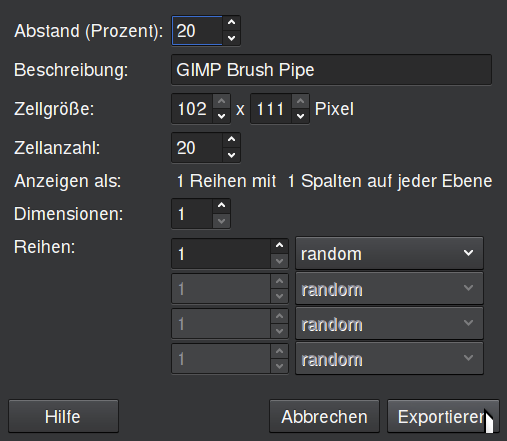
the brush Spacing (Percent) is set to 136 and it's Ranking set to Incremental.

Image

Attachment:
File comment: Animated, Gray Scale, Snow Flake Brush
wallace_snowflakes_.zip [78.67 KiB]
Downloaded 136 times

_________________
Image
"A wise man learns more from a foolish question than a fool can learn from a wise answer"
Image


Top
 Post subject: Re: Need help creating gih brush
PostPosted: Mon Dec 26, 2016 2:49 pm  (#3) 
Offline
GimpChat Member

Joined: Mar 04, 2011
Posts: 2615
ninja'd by wallace again

You could do with some adjustment to canvas/layer size which are different but it works anyway.
Lose the alpha channel, set to grayscale something like this

Attachment:
export.jpg
export.jpg [ 68.73 KiB | Viewed 2543 times ]


And a result

Attachment:
options.jpg
options.jpg [ 79.16 KiB | Viewed 2543 times ]


Top
 Post subject: Re: Need help creating gih brush
PostPosted: Tue Dec 27, 2016 5:46 am  (#4) 
Offline
GimpChat Member
User avatar

Joined: Sep 27, 2016
Posts: 345
Location: Germany, BW
ahhh, finally it works! Thanks to both of you.

Missed the fact that I need a white background. All the tuts I tried had it transparent. Also the Ranks setting wasn't clear to me.
I tried to use greyscale ( without the background) ... but the whole brush was black then.

Great to know how it works, now. Thanks a loz!

nelo

_________________
Regards
nelo

(Gimp 2.10 on Linux Mint MATE 20.1)


Top
Post new topic Reply to topic  [ 4 posts ] 

All times are UTC - 5 hours [ DST ]


* Login  


Powered by phpBB3 © phpBB Group