It is currently Thu Sep 24, 2026 7:12 pm


All times are UTC - 5 hours [ DST ]


Post new topic Reply to topic  [ 15 posts ] 
Author Message
 Post subject: Python executable
PostPosted: Fri Dec 30, 2016 3:33 pm  (#1) 
Offline
GimpChat Member
User avatar

Joined: Oct 07, 2010
Posts: 439
Location: home/Nixnine/.gimp-2.0/scripts/nixnine.scm
GIMP Version: 2.8.14
Operating System: Windows
GIMP Experience: Experienced User


Hey, guys, long time no see.

I, a faithful Linux user, hahaha, am installing Gimp on my son's Windows computer -- shedding tears -- but am having difficulty with my python plugins. The plugins that came with the program are working, but none of my personal ones are. Any advice on this? Do I need to make the scripts executable, and if so, how do you do that in windows?

Thanks,
Nix

_________________
I refuse to be confused, but am often confused at this refusal.


Share on Facebook Share on Twitter Share on Orkut Share on Digg Share on MySpace Share on Delicious Share on Technorati
Top
 Post subject: Re: Python executable
PostPosted: Fri Dec 30, 2016 3:36 pm  (#2) 
Offline
Global Moderator
User avatar

Joined: May 16, 2010
Posts: 16174
nixnine wrote:
GIMP Version: 2.8.14
Operating System: Windows
GIMP Experience: Experienced User


Hey, guys, long time no see.

I, a faithful Linux user, hahaha, am installing Gimp on my son's Windows computer -- shedding tears -- but am having difficulty with my python plugins. The plugins that came with the program are working, but none of my personal ones are. Any advice on this? Do I need to make the scripts executable, and if so, how do you do that in windows?

Thanks,
Nix

Are you installing GIMP-2.8 on your sons computer? Or GIMP-2.9?


Top
 Post subject: Re: Python executable
PostPosted: Fri Dec 30, 2016 3:39 pm  (#3) 
Offline
GimpChat Member
User avatar

Joined: Oct 07, 2010
Posts: 439
Location: home/Nixnine/.gimp-2.0/scripts/nixnine.scm
2.8

_________________
I refuse to be confused, but am often confused at this refusal.


Top
 Post subject: Re: Python executable
PostPosted: Fri Dec 30, 2016 3:51 pm  (#4) 
Offline
GimpChat Member
User avatar

Joined: Oct 07, 2010
Posts: 439
Location: home/Nixnine/.gimp-2.0/scripts/nixnine.scm
I am also having difficulty installing gmic.

_________________
I refuse to be confused, but am often confused at this refusal.


Top
 Post subject: Re: Python executable
PostPosted: Fri Dec 30, 2016 10:43 pm  (#5) 
Offline
GimpChat Member
User avatar

Joined: Sep 24, 2010
Posts: 12846
Make sure you use the double bar for any directory path links (required for windows; don't believe so for linux). Example below. :)
["XNView", "\"C:\\Program Files\\XnView\\xnview.exe\"", "png"],

_________________
Lyle

Psalm 109:8

Image


Top
 Post subject: Re: Python executable
PostPosted: Sat Dec 31, 2016 3:51 am  (#6) 
Offline
GimpChat Member

Joined: Mar 04, 2011
Posts: 2615
Quote:
...Do I need to make the scripts executable...

no

Quote:
...I am also having difficulty installing gmic.


Unlike linux where gmic_gimp is a single file, the windoze version is several files.
The gmic_gimp installer will put the files in the correct place, the Gimp profile. Make sure you have the gimp plugin and not the standalone gmic.

A bit about it here: viewtopic.php?f=8&t=15031#p208252


Top
 Post subject: Re: Python executable
PostPosted: Sat Dec 31, 2016 4:47 am  (#7) 
Offline
GimpChat Member
User avatar

Joined: May 10, 2013
Posts: 1442
Location: Finland
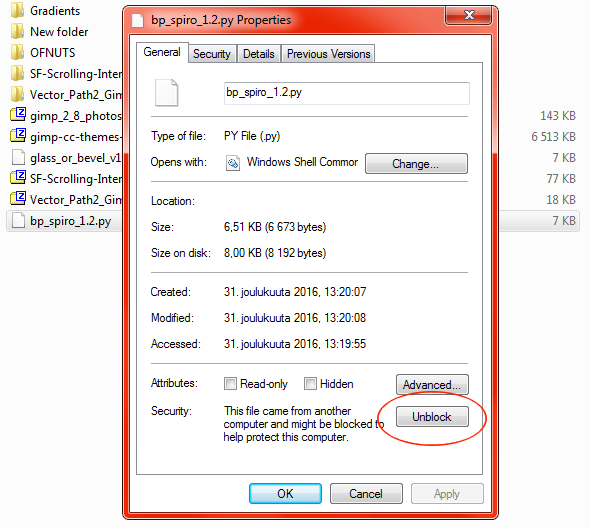
Yes you often need to make .py plugins executable on Windows by right-clicking them, select "unblock" and confirm with ok. Better check it every time you download new plugin.
This is sometimes true for .scm scripts too. I think it depends whether the author has already done it. Permissions might also change if you move files between volumes.
G´mic plugin on Windows, unlike in Linux is a folder of multiple files. If you extract it to .gimp plugins folder, you have to enable the folder inside gimp preferences.
I keep G´mic and similar plugins separate from .gimp/plugins cause it might become a problem later if you want to remove/update plugins and don´t remember the dlls and other files.


Top
 Post subject: Re: Python executable
PostPosted: Sat Dec 31, 2016 4:51 am  (#8) 
Offline
GimpChat Member
User avatar

Joined: Jan 20, 2013
Posts: 14835
Location: roma, italy
in Windows there is no such "executable" flag to set, as rich also stated

_________________
"Where am I ?"


Top
 Post subject: Re: Python executable
PostPosted: Sat Dec 31, 2016 5:06 am  (#9) 
Offline
Global Moderator
User avatar

Joined: May 16, 2010
Posts: 16174
Check the line at the top of your python files and make sure they have the correct path to the python bin folder.
I run Windows 10 64 bit and my location is
#!/usr/bin/env python


Top
 Post subject: Re: Python executable
PostPosted: Sat Dec 31, 2016 5:24 am  (#10) 
Offline
GimpChat Member
User avatar

Joined: May 10, 2013
Posts: 1442
Location: Finland
dinasset wrote:
in Windows there is no such "executable" flag to set, as rich also stated

No but you need to make custom plugins and scripts often visible by unblocking from file properties. Isn´t that basically same thing?
I didn´t have any problem in Win 10 with python.


Top
 Post subject: Re: Python executable
PostPosted: Sat Dec 31, 2016 6:04 am  (#11) 
Offline
GimpChat Member
User avatar

Joined: Jan 20, 2013
Posts: 14835
Location: roma, italy
never had the necessity to change properties in my plug-ins/scripts
I guess nobody else did, otherwise it would be a commonly mentioned requirement.
Maybe this a special case of a user "porting" his filters to another user, I don't know. A problem of user definitions?

_________________
"Where am I ?"


Top
 Post subject: Re: Python executable
PostPosted: Sat Dec 31, 2016 6:26 am  (#12) 
Offline
GimpChat Member
User avatar

Joined: May 10, 2013
Posts: 1442
Location: Finland
Are you sure? I thought this is very well known thing.
Just an example I downloaded from gimpscripts minute ago.
http://gimpscripts.com/2012/09/spirograph/

Properties window:

Image


Top
 Post subject: Re: Python executable
PostPosted: Sat Dec 31, 2016 7:03 am  (#13) 
Offline
GimpChat Member
User avatar

Joined: Jan 20, 2013
Posts: 14835
Location: roma, italy
I'm sure (for myself): I downloaded and installed hundreds of plug-ins and scripts and never had the necessity to enter/modify the property.
Let's now talk some other Windows user here around...if not too busy with the celebrations for Year End!

_________________
"Where am I ?"


Top
 Post subject: Re: Python executable
PostPosted: Sat Dec 31, 2016 12:49 pm  (#14) 
Offline
Global Moderator
User avatar

Joined: May 16, 2010
Posts: 16174
I have never had to unblock any python files/scripts.


Top
 Post subject: Re: Python executable
PostPosted: Sat Dec 31, 2016 3:05 pm  (#15) 
Offline
GimpChat Member
User avatar

Joined: Oct 07, 2010
Posts: 439
Location: home/Nixnine/.gimp-2.0/scripts/nixnine.scm
Uninstalled gimp and reinstalled now everything is working fine.

So much easier in linux.

_________________
I refuse to be confused, but am often confused at this refusal.


Top
Post new topic Reply to topic  [ 15 posts ] 

All times are UTC - 5 hours [ DST ]


* Login  


Powered by phpBB3 © phpBB Group