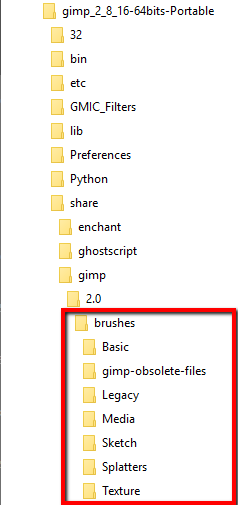
This could be a recipe for disaster..however
Quote:
I havn't seen anything like this before,i have almost no understanding of reading what you wrote, I don't have any idea what a delving or a ~/ is
~ is linux shorthand for your home partition. Gimp 2.9.5 uses a hidden folder ./config/GIMP/2.9 for your settings and folders for your personal brushes / scripts / plug-ins / patterns ..and all the rest
Quote:
i was hoping there would be a straight-forward method like right-clicking and adding to favorites ,drag drop or something similar in that manner.I wonder why gimp doesn't have this yet .
Nothing that very simple but not difficult once you understand how Gimp works.
Quote:
But I realized that i only use and need like maybe 9-10 brushes , most of which are mypaint brushes,atcually thats where my clutter problems are , is there a way to delete all but 9 or so brushes ? or will gimp re-spawn them ?
Best not to delete anything.
What you need to do, is make a new folder in your Gimp profile. Copy the mypaint pairs of files - the preview png and the myb file to the folder. Then set up the new folder in Edit -> Preferences -> Folders -> MyPaint Brushes
Here is a quick video on one way to do this
mins
and if you have problems locating the mypaint brushes on your system a zip of the standard set
Quote:
im glad i found out from you that there is a gimp appimage ,the appimage is more stable and doesnt crash when i rotate/transform image like the gimp i have installed , and its same version too ,i dont get it
The appimage is one way of having both Gimp 2.8.18 and Gimp 2.9.5 installed at the same time. It is the same source as you use in Mint, the ubuntu ppa.
I would not worry about it, use what you have.
neato, this makes it perfectly clear! now i can get what i want , it actually workswith mypaint brushes, and i think i can do something similar with gimp 2.6, and cool english accent, , good day to you sir !
 Login
Login Register
 Tweets
 FAQ
FAQ Advanced Search







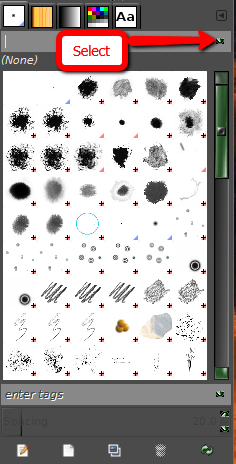




 and nothing looks different