It is currently Tue Sep 22, 2026 11:59 am


All times are UTC - 5 hours [ DST ]


Post new topic Reply to topic  [ 12 posts ] 
Author Message
 Post subject: Exporting Type on a Path
PostPosted: Thu Feb 09, 2017 8:38 am  (#1) 
Offline
GimpChat Member

Joined: Feb 08, 2017
Posts: 6
GIMP Version: 2.8.14
Operating System: Windows
GIMP Experience: New User


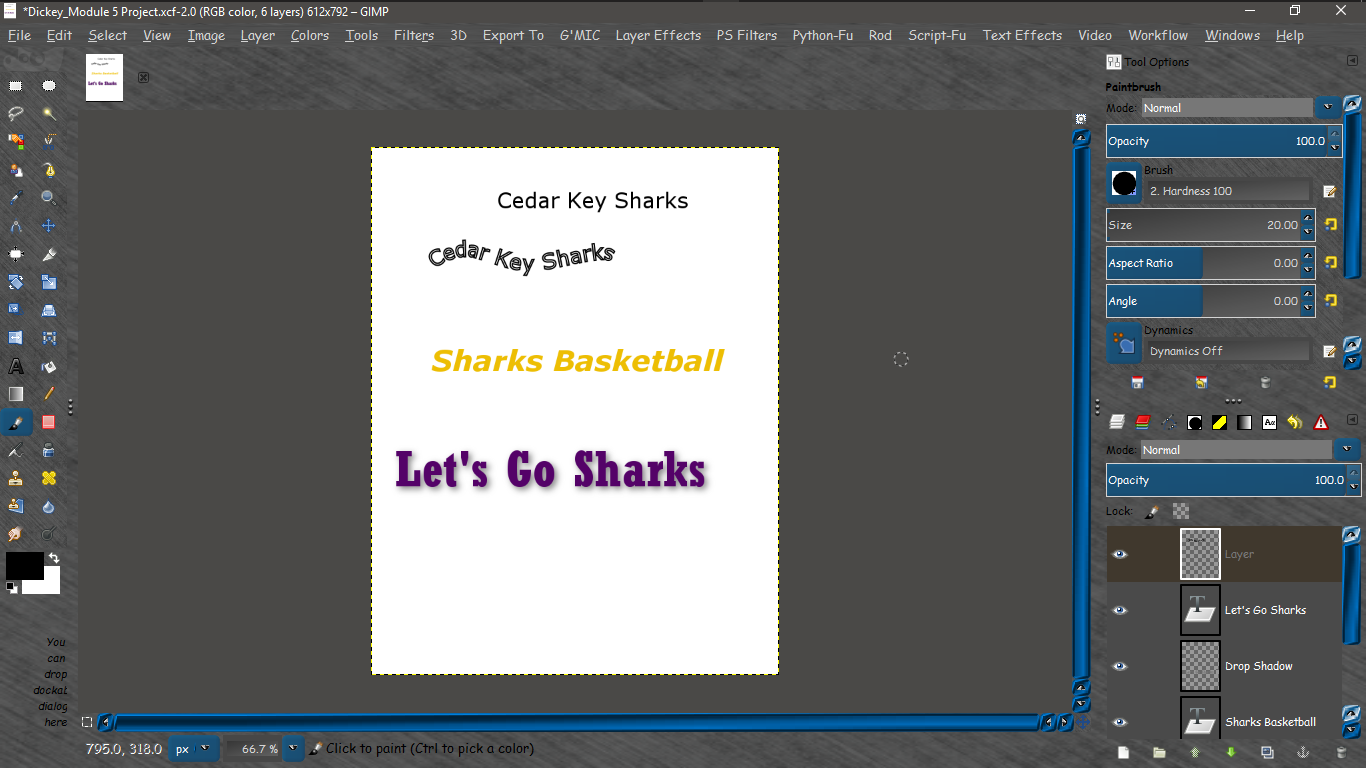
Hello! I am new to GIMP. I was doing a project with the "Type on a Path" function. I can save the project and the Type on a Path wording will be there, however, when I export it as a jpg or a png, the Type on a Path wording does not show up. Is there something that I need to do in GIMP before I export it to allow it to show?

:tyspin


Attachments:
File comment: This is the jpg I exported. The part that says Cedar Key Sharks, should also appear on a Path.
Dickey_Module 5 Project.jpg
Dickey_Module 5 Project.jpg [ 35.11 KiB | Viewed 3478 times ]
Share on Facebook Share on Twitter Share on Orkut Share on Digg Share on MySpace Share on Delicious Share on Technorati
Top
 Post subject: Re: Exporting Type on a Path
PostPosted: Thu Feb 09, 2017 8:51 am  (#2) 
Offline
Global Moderator
User avatar

Joined: May 16, 2010
Posts: 16173
adickey wrote:
GIMP Version: 2.8.14
Operating System: Windows
GIMP Experience: New User


Hello! I am new to GIMP. I was doing a project with the "Type on a Path" function. I can save the project and the Type on a Path wording will be there, however, when I export it as a jpg or a png, the Type on a Path wording does not show up. Is there something that I need to do in GIMP before I export it to allow it to show?

:tyspin

If you place the text along path it will also be a path (the text) and will only show up if you stroke the text path.

_________________
Image


Last edited by Rod on Thu Feb 09, 2017 9:04 am, edited 1 time in total.

Top
 Post subject: Re: Exporting Type on a Path
PostPosted: Thu Feb 09, 2017 8:56 am  (#3) 
Offline
GimpChat Member

Joined: Feb 08, 2017
Posts: 6
Ok, I stroked the text path, but it is still not working. Is there something in the options that I have to click on to make it work? Do you have to Export the Path on its own or can it be part of the jpg or png?


Top
 Post subject: Re: Exporting Type on a Path
PostPosted: Thu Feb 09, 2017 9:06 am  (#4) 
Offline
Global Moderator
User avatar

Joined: May 16, 2010
Posts: 16173
adickey wrote:
Ok, I stroked the text path, but it is still not working. Is there something in the options that I have to click on to make it work? Do you have to Export the Path on its own or can it be part of the jpg or png?

Paths will only show in the xcf file. You have to stroke a path to see it in a saved image file.
Can you upload the xcf file here so i can take a look at it?

_________________
Image


Top
 Post subject: Re: Exporting Type on a Path
PostPosted: Thu Feb 09, 2017 9:10 am  (#5) 
Offline
GimpChat Member

Joined: Feb 08, 2017
Posts: 6
Here you go!


Attachments:
Dickey_Module 5 Project.xcf [196.99 KiB]
Downloaded 128 times
Top
 Post subject: Re: Exporting Type on a Path
PostPosted: Thu Feb 09, 2017 9:19 am  (#6) 
Offline
Global Moderator
User avatar

Joined: May 16, 2010
Posts: 16173
Okay.
Create a new layer (top of layer stack) and go to the paths layers and select the top path layer.
Right click the top path layer and select stroke path. just stroke with a line at 2 pixels.
Make all the paths invisible and you should see the curved text. Your problem i believe was you were stroking the path but had the top text layer selected. :)

_________________
Image


Top
 Post subject: Re: Exporting Type on a Path
PostPosted: Thu Feb 09, 2017 9:21 am  (#7) 
Offline
Global Moderator
User avatar

Joined: May 16, 2010
Posts: 16173
Image

_________________
Image


Top
 Post subject: Re: Exporting Type on a Path
PostPosted: Thu Feb 09, 2017 9:42 am  (#8) 
Offline
GimpChat Member

Joined: Feb 08, 2017
Posts: 6
Ok, I got it to work. I am not exactly sure if I understand it, but I will continue to play with it. If I have any other questions, I will be back on here. Thanks so much for the help!!
:tyspin :tyspin :tyspin


Top
 Post subject: Re: Exporting Type on a Path
PostPosted: Thu Feb 09, 2017 12:40 pm  (#9) 
Offline
GimpChat Member

Joined: Feb 08, 2017
Posts: 6
One more question about the Type on a Path. Can you change the Color of the text on the path before you export it? If so, can you explain that for me?

Thanks!


Top
 Post subject: Re: Exporting Type on a Path
PostPosted: Thu Feb 09, 2017 1:11 pm  (#10) 
Offline
Script Coder
User avatar

Joined: Oct 25, 2010
Posts: 4812
The path is stroked with the current foreground color, so just change the foreground color before stroking the path.

_________________
Image


Top
 Post subject: Re: Exporting Type on a Path
PostPosted: Thu Feb 09, 2017 1:16 pm  (#11) 
Offline
GimpChat Member

Joined: Feb 08, 2017
Posts: 6
Thank you for all your help!


Top
 Post subject: Re: Exporting Type on a Path
PostPosted: Sat Feb 11, 2017 12:33 pm  (#12) 
Offline
Global Moderator
User avatar

Joined: May 16, 2010
Posts: 16173
adickey wrote:
Thank you for all your help!

You are welcome. :)

_________________
Image


Top
Post new topic Reply to topic  [ 12 posts ] 

All times are UTC - 5 hours [ DST ]


* Login  


Powered by phpBB3 © phpBB Group