It is currently Mon Sep 21, 2026 10:17 am


All times are UTC - 5 hours [ DST ]


Post new topic Reply to topic  [ 9 posts ] 
Author Message
 Post subject: Advice for new computer build.
PostPosted: Tue Mar 14, 2017 6:51 am  (#1) 
Offline
GimpChat Member
User avatar

Joined: Nov 15, 2014
Posts: 875
GIMP Version: 2.8.14
Operating System: Linux
GIMP Experience: Basic Level


I am thinking of building a new computer to use Linux Ubuntu 64 bit.
I will probably use an AMD processor (maximum number of cores for the money) and a small SSD as I have a lot of external storage.
My query is what minimum specification should I consider for a graphics card to be useful for GIMP and Hugin etc?
Also is 8GB RAM sufficient or should I go for 16GB?

As I wish to keep the cost reasonable it is time to ask the experts!

david.


Share on Facebook Share on Twitter Share on Orkut Share on Digg Share on MySpace Share on Delicious Share on Technorati
Top
 Post subject: Re: Advice for new computer build.
PostPosted: Tue Mar 14, 2017 9:41 am  (#2) 
Offline
Administrator
User avatar

Joined: Aug 10, 2012
Posts: 14206
Location: Native to NYC living in Arizona, Gimp 2.8 - 3.0, Win 11 PC.
david wrote:
GIMP Version: 2.8.14
Operating System: Linux
GIMP Experience: Basic Level


I am thinking of building a new computer to use Linux Ubuntu 64 bit.
I will probably use an AMD processor (maximum number of cores for the money) and a small SSD as I have a lot of external storage.
My query is what minimum specification should I consider for a graphics card to be useful for GIMP and Hugin etc?
Also is 8GB RAM sufficient or should I go for 16GB?

As I wish to keep the cost reasonable it is time to ask the experts!

david.


I'm not a big fan of AMD,
I'm also not an "expert" by any means.
However,
look into the new eight-core AMD Ryzen 7 processors and add as much ran that you can pack into the system.
I'm hearing that this AMD line of processors,
can be very good for a productivity setup/build.
The more ram you have,
the less files/data swapping will occur.
As for GPU,
if you're not going to be gaming,
it's not that important.
With that said,
I would get the best GPU you can afford.

As a side note:
"Most" open source photo editing software,
doesn't support GPU acceleration.
Unless you're talking about video rendering software.
I feel that,
it's more important to get a fast CPU and lots of ram.

As an example.
I have 16GB of installed ram,
my motherboard supports up to 64GB of ram.
This gives me an upgrade option for the ram in the future.
Upgradeability of your system in the future,
would also be another aspect to consider.


I know that I'm not being very specific,
but there are so many variables to consider and for me to say...
"get this or that"
would not be very helpful.

Also,
if you haven't checked out PCPartPicker yet.
I highly suggest that you do.

_________________
Image
"A wise man learns more from a foolish question than a fool can learn from a wise answer"
Image


Top
 Post subject: Re: Advice for new computer build.
PostPosted: Tue Mar 14, 2017 5:43 pm  (#3) 
Offline
GimpChat Member
User avatar

Joined: Nov 15, 2014
Posts: 875
@Wallace,
Thanks for your reply.
I understood that both GIMP and Hugin offered GPU support(?), in addition to multicore support.
The new Ryzen processor looks attractive, but probably beyond my budget. An AMD Fx processor can offer 8 cores and no onboard GPU at a very reasonable price and the only down-side appears to be higher heat dissipation.
I shall have to think further as to my build specification!

david.


Top
 Post subject: Re: Advice for new computer build.
PostPosted: Fri Mar 24, 2017 2:21 pm  (#4) 
Offline
GimpChat Member
User avatar

Joined: Nov 15, 2014
Posts: 875
I took the plunge!

An AMD Fx 8 core processor running at 4GHz. 16GB of RAM. A small 128 GB SSD and a NVideo card with 2GB.
First impressions are that it is very fast!

david.


Top
 Post subject: Re: Advice for new computer build.
PostPosted: Fri Mar 24, 2017 3:50 pm  (#5) 
Offline
Administrator
User avatar

Joined: Aug 10, 2012
Posts: 14206
Location: Native to NYC living in Arizona, Gimp 2.8 - 3.0, Win 11 PC.
david wrote:
I took the plunge!

An AMD Fx 8 core processor running at 4GHz. 16GB of RAM. A small 128 GB SSD and a NVideo card with 2GB.
First impressions are that it is very fast!

david.

Image

What form factor did you go with?

_________________
Image
"A wise man learns more from a foolish question than a fool can learn from a wise answer"
Image


Top
 Post subject: Re: Advice for new computer build.
PostPosted: Fri Mar 24, 2017 4:40 pm  (#6) 
Offline
GimpChat Member
User avatar

Joined: Nov 15, 2014
Posts: 875
Wallace,

Thanks for the reply.

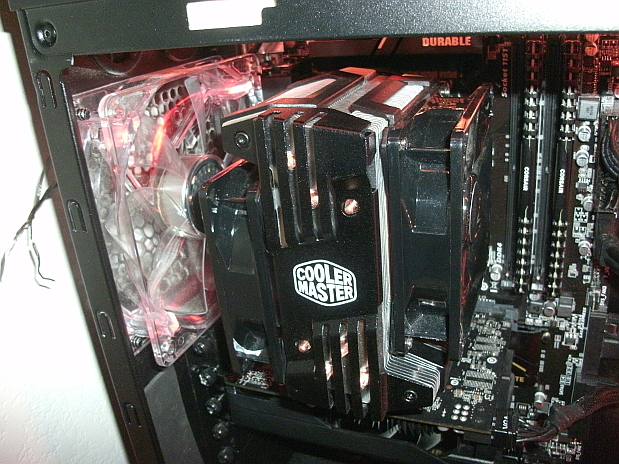
The motherboard is a micro ATX, but I went for a cube-type case which puts the power supply and the drives on one side and the motherboard on the other. It makes for a clean layout with the cables out of the way. Because of the compact form I was advised to use a higher rated cooler for the processor.

It runs very quietly, but we will see what happens when I ask it to stitch a large panorama using Hugin!

david.


Top
 Post subject: Re: Advice for new computer build.
PostPosted: Fri Mar 24, 2017 5:51 pm  (#7) 
Offline
Administrator
User avatar

Joined: Aug 10, 2012
Posts: 14206
Location: Native to NYC living in Arizona, Gimp 2.8 - 3.0, Win 11 PC.
david wrote:
Wallace,

Thanks for the reply.

The motherboard is a micro ATX, but I went for a cube-type case which puts the power supply and the drives on one side and the motherboard on the other. It makes for a clean layout with the cables out of the way. Because of the compact form I was advised to use a higher rated cooler for the processor.

It runs very quietly, but we will see what happens when I ask it to stitch a large panorama using Hugin!

david.

Good to hear. :bigthup

With that form factor,
not many options for CPU coolers,
unless you go with an AIO CPU Cooler.

I went full ATX and installed the Cooler Master Hyper D92 CPU Cooler.

Image

Image

_________________
Image
"A wise man learns more from a foolish question than a fool can learn from a wise answer"
Image


Top
 Post subject: Re: Advice for new computer build.
PostPosted: Sat Mar 25, 2017 3:05 am  (#8) 
Offline
GimpChat Member
User avatar

Joined: Nov 15, 2014
Posts: 875
Cooler Master Hyper TX3 EVO fitted with just sufficient clearance from the ventilated side cover.
PC Customiser suggested this and they built the machine in three days for the same (very reasonable) cost as they charge for the individual components!
That saved me a job and all I had to do was install the operating system (Ubuntu 64 bit) and my software.
The motherboard gives me the option to add another 16GB of RAM should I ever need it.

Hopefully it has been £600.00 well spent.

david.


Top
 Post subject: Re: Advice for new computer build.
PostPosted: Sat Mar 25, 2017 9:50 am  (#9) 
Offline
Administrator
User avatar

Joined: Aug 10, 2012
Posts: 14206
Location: Native to NYC living in Arizona, Gimp 2.8 - 3.0, Win 11 PC.
david wrote:
Cooler Master Hyper TX3 EVO fitted with just sufficient clearance from the ventilated side cover.
PC Customiser suggested this and they built the machine in three days for the same (very reasonable) cost as they charge for the individual components!
That saved me a job and all I had to do was install the operating system (Ubuntu 64 bit) and my software.
The motherboard gives me the option to add another 16GB of RAM should I ever need it.

Hopefully it has been £600.00 well spent.

david.

I think you'll be happy you spent the money.

Cooler Master makes some nice products.
I have a keyboard, heatsink and my case is from them.
All are very nicely constructed items.

It's good that you have more RAM options.

Good luck and enjoy your new machine.
:bigthup

_________________
Image
"A wise man learns more from a foolish question than a fool can learn from a wise answer"
Image


Top
Post new topic Reply to topic  [ 9 posts ] 

All times are UTC - 5 hours [ DST ]


* Login  


Powered by phpBB3 © phpBB Group