It is currently Mon Jul 06, 2026 6:02 am


All times are UTC - 5 hours [ DST ]


Post new topic Reply to topic  [ 17 posts ] 
Author Message
 Post subject: Gimp for old PC windows 7 (32bits)
PostPosted: Wed Apr 24, 2019 7:32 am  (#1) 
Offline
GimpChat Member

Joined: Apr 09, 2018
Posts: 1888
Location: France
GIMP Version: 2.10.10sam
Operating System: Windows
GIMP Experience: New User


:wvy
I wanted to put a portable version of Gimp on an old Windows 7 PC (32 bits) but I found only that of the site:
https://portableapps.com/apps/office
but it did not recognize the xcf files. So I installed the Gimp 2.10.10 version but there is no G'Mic and I could not find the link for 32 bits.

_________________
Les parfums, les couleurs et les sons se répondent.Baudelaire (Les fleurs du mal)
2.10.36/(Samj) Gimp 2.10.38 OS Windows 10 Home 64 bits


Share on Facebook Share on Twitter Share on Orkut Share on Digg Share on MySpace Share on Delicious Share on Technorati
Top
 Post subject: Re: Gimp for old PC windows 7 (32bits)
PostPosted: Wed Apr 24, 2019 8:58 am  (#2) 
Offline
GimpChat Member
User avatar

Joined: Mar 13, 2016
Posts: 83
@level_0

Depending on what you prefer, File 7 is exe and file 8 is the zip file.

G'MIC Windows Index

_________________
Image


Top
 Post subject: Re: Gimp for old PC windows 7 (32bits)
PostPosted: Wed Apr 24, 2019 9:10 am  (#3) 
Offline
GimpChat Member

Joined: Apr 09, 2018
Posts: 1888
Location: France
thanks RMDesign :wvy

I had seen the links but not read precision for a 32-bit OS, so I would like to be sure that I can install it without problems.

_________________
Les parfums, les couleurs et les sons se répondent.Baudelaire (Les fleurs du mal)
2.10.36/(Samj) Gimp 2.10.38 OS Windows 10 Home 64 bits


Top
 Post subject: Re: Gimp for old PC windows 7 (32bits)
PostPosted: Mon Apr 29, 2019 6:32 am  (#4) 
Offline
GimpChat Member

Joined: Apr 09, 2018
Posts: 1888
Location: France
On this 32-bit old PC I downloaded this gmic:
Image
but during the installation I had this:
unable to start because it is missing libfftw3-3.dll on your computer
Image

_________________
Les parfums, les couleurs et les sons se répondent.Baudelaire (Les fleurs du mal)
2.10.36/(Samj) Gimp 2.10.38 OS Windows 10 Home 64 bits


Top
 Post subject: Re: Gimp for old PC windows 7 (32bits)
PostPosted: Mon Apr 29, 2019 8:00 am  (#5) 
Offline
GimpChat Member

Joined: Apr 09, 2018
Posts: 1888
Location: France
I tried again with the other 32bits file that contained the dll but now I have this:

Image

the procedure entry point divmoddi4 was not found in the libgcc_s_dw2-1.dll dynamic-link library ...

_________________
Les parfums, les couleurs et les sons se répondent.Baudelaire (Les fleurs du mal)
2.10.36/(Samj) Gimp 2.10.38 OS Windows 10 Home 64 bits


Top
 Post subject: Re: Gimp for old PC windows 7 (32bits)
PostPosted: Mon Apr 29, 2019 8:44 am  (#6) 
Offline
GimpChat Member

Joined: Mar 06, 2015
Posts: 308
Hello Gimp user

Gimp 2.8.22 will work fine on windows 7.0
The Link to download :

Gimp 2.8.22 Download Page

Doron.


Top
 Post subject: Re: Gimp for old PC windows 7 (32bits)
PostPosted: Mon Apr 29, 2019 8:52 am  (#7) 
Offline
GimpChat Member

Joined: Mar 04, 2011
Posts: 2604
This in a Win10 32 bit VM and Gimp 2.10.6

You need the zip file

https://gmic.eu/files/windows/gmic_gimp ... _win32.zip

The explanation is: The installer puts files in the wrong place. I did post a bug report about this some time ago, Nothing done.

The difference is: All the files are in the platforms folder. Not easy to sort them out. Easiest way is uninstall or delete the gmic_gimp_qt folder

Attachment:
gmic242.jpg
gmic242.jpg [ 55.81 KiB | Viewed 10617 times ]


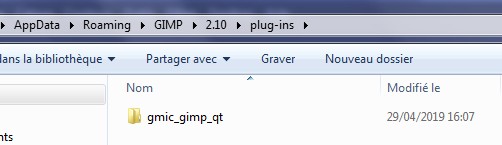
Unzip the download, put the whole folder in C:\Users\"yourname"\AppData\Roaming\GIMP\2.10\plug-ins


Top
 Post subject: Re: Gimp for old PC windows 7 (32bits)
PostPosted: Mon Apr 29, 2019 8:57 am  (#8) 
Offline
GimpChat Member

Joined: Mar 06, 2015
Posts: 308
Hello Gimp user

I also have a very very old portable Ver of gimp.

If you need this old portable Ver - I can send you a link to the file in my DropBox .

Doron.


Attachments:
Old gimp 2.6.12.jpg
Old gimp 2.6.12.jpg [ 1011.44 KiB | Viewed 10616 times ]
Top
 Post subject: Re: Gimp for old PC windows 7 (32bits)
PostPosted: Mon Apr 29, 2019 9:50 am  (#9) 
Offline
GimpChat Member

Joined: Apr 09, 2018
Posts: 1888
Location: France
thanks to you both.
I started with the rich2005 file and now I have this:
Image

Image

Then I restart Gimp but G'mic does not appear in the filters. Since this is the first time I'm using an installable version of Gimp, maybe there is something else to do that I did not do?

_________________
Les parfums, les couleurs et les sons se répondent.Baudelaire (Les fleurs du mal)
2.10.36/(Samj) Gimp 2.10.38 OS Windows 10 Home 64 bits


Top
 Post subject: Re: Gimp for old PC windows 7 (32bits)
PostPosted: Mon Apr 29, 2019 11:12 am  (#10) 
Offline
GimpChat Member

Joined: Apr 09, 2018
Posts: 1888
Location: France
finally it works ... :) :tyspin rich2005
thanks also to doronf2 :)

_________________
Les parfums, les couleurs et les sons se répondent.Baudelaire (Les fleurs du mal)
2.10.36/(Samj) Gimp 2.10.38 OS Windows 10 Home 64 bits


Top
 Post subject: Re: Gimp for old PC windows 7 (32bits)
PostPosted: Mon Apr 29, 2019 1:07 pm  (#11) 
Offline
GimpChat Member

Joined: Mar 04, 2011
Posts: 2604
level_0 wrote:
finally it works ... :)


I am pleased about that. Sometimes downloading the update file is slow and gmic does not show until complete.

I am up-to-my-eyeballs updating my laptop from Kubuntu 16.04 to Kubuntu 18.04 and of course some of the old applications I use are for-ever a problem. ;)


Top
 Post subject: Re: Gimp for old PC windows 7 (32bits)
PostPosted: Mon Apr 29, 2019 1:29 pm  (#12) 
Offline
GimpChat Member

Joined: Apr 09, 2018
Posts: 1888
Location: France
rich2005 wrote:
level_0 wrote:
finally it works ... :)


I am pleased about that. Sometimes downloading the update file is slow and gmic does not show until complete.

I am up-to-my-eyeballs updating my laptop from Kubuntu 16.04 to Kubuntu 18.04 and of course some of the old applications I use are for-ever a problem. ;)

rich2005
the problem is not quite solved ....
I had a little break because since this morning on this problem ... and I just opened Gimp and G'mic filters, first very very long to open, I clicked to have filter updates (397 filters), I got this:
Image

_________________
Les parfums, les couleurs et les sons se répondent.Baudelaire (Les fleurs du mal)
2.10.36/(Samj) Gimp 2.10.38 OS Windows 10 Home 64 bits


Top
 Post subject: Re: Gimp for old PC windows 7 (32bits)
PostPosted: Mon Apr 29, 2019 1:48 pm  (#13) 
Offline
GimpChat Member

Joined: Mar 04, 2011
Posts: 2604
It often is a problem downloading from the gmic site. Others have the same issue.

Attached the update242.gmic file I got earlier. Had to zip it to attach.

Under the GIMP folder in C:\Users\"yourname"\AppData\Roaming\.. is the gmic folder.

Un-zip the file. Put update242.gmic file in the gmic folder.

Attachment:
gmic-2.jpg
gmic-2.jpg [ 63.43 KiB | Viewed 8688 times ]


Start Gimp up, open a canvas, start gmic up and there should be 500 - ish filters. Remember this is the last of the 32 bit versions (from end of 2018) so some of the latest filters are missing.

Might be a good idea to untick the internet option under the filters list.


Attachments:
update242.gmic.zip [821.33 KiB]
Downloaded 138 times
Top
 Post subject: Re: Gimp for old PC windows 7 (32bits)
PostPosted: Tue Apr 30, 2019 3:10 am  (#14) 
Offline
GimpChat Member

Joined: Apr 09, 2018
Posts: 1888
Location: France
Thank you rich2005, I will download it and do according to your instructions. :)

_________________
Les parfums, les couleurs et les sons se répondent.Baudelaire (Les fleurs du mal)
2.10.36/(Samj) Gimp 2.10.38 OS Windows 10 Home 64 bits


Top
 Post subject: Re: Gimp for old PC windows 7 (32bits)
PostPosted: Tue Apr 30, 2019 3:34 am  (#15) 
Offline
GimpChat Member

Joined: Apr 09, 2018
Posts: 1888
Location: France
I replaced the file "update260" by your file "update 242":
ImageImage
and I have 537 filters:
Image
faves is not present but it does not matter, I will ask a little more my memory. :)
:tyspin :tyspin :tyspin :tyspin :tyspin

_________________
Les parfums, les couleurs et les sons se répondent.Baudelaire (Les fleurs du mal)
2.10.36/(Samj) Gimp 2.10.38 OS Windows 10 Home 64 bits


Top
 Post subject: Re: Gimp for old PC windows 7 (32bits)
PostPosted: Tue Apr 30, 2019 3:50 am  (#16) 
Offline
GimpChat Member
User avatar

Joined: May 10, 2013
Posts: 1430
Location: FInland
level_0 wrote:
faves is not present but it does not matter, I will ask a little more my memory. :)
:tyspin :tyspin :tyspin :tyspin :tyspin

You can copy the gmic faves (JavaScript Object Notation File) from system to another.
When I have added new presets, I copy the new updated file to my 2nd Linux and Windows machines.
On Windows browse to C:\Users\"Yourusername"\AppData\Roaming\gmic
Copy the gmic_qt_faves.json file and place in same folder on another Windows machine.

I wouldn't like to lose mine, considering all time and effort put into creating and finetuning the custom settings.


Top
 Post subject: Re: Gimp for old PC windows 7 (32bits)
PostPosted: Tue Apr 30, 2019 3:05 pm  (#17) 
Offline
GimpChat Member

Joined: Apr 09, 2018
Posts: 1888
Location: France
Nidhogg wrote:
You can copy the gmic faves (JavaScript Object Notation File) from system to another.
When I have added new presets, I copy the new updated file to my 2nd Linux and Windows machines.
On Windows browse to C:\Users\"Yourusername"\AppData\Roaming\gmic
Copy the gmic_qt_faves.json file and place in same folder on another Windows machine.

I wouldn't like to lose mine, considering all time and effort put into creating and finetuning the custom settings.


Nidhogg :wvy
:tyspin Good information :)

_________________
Les parfums, les couleurs et les sons se répondent.Baudelaire (Les fleurs du mal)
2.10.36/(Samj) Gimp 2.10.38 OS Windows 10 Home 64 bits


Top
Post new topic Reply to topic  [ 17 posts ] 

All times are UTC - 5 hours [ DST ]


* Login  


Powered by phpBB3 © phpBB Group