lindyloo wrote:
https://imgur.com/a/mvIqW?
Thanks for that, its nice to know it might not be my problem
I've posted my screenshot now, its quite a useful site
Lynne
giving the forum storage a try

Attachment:
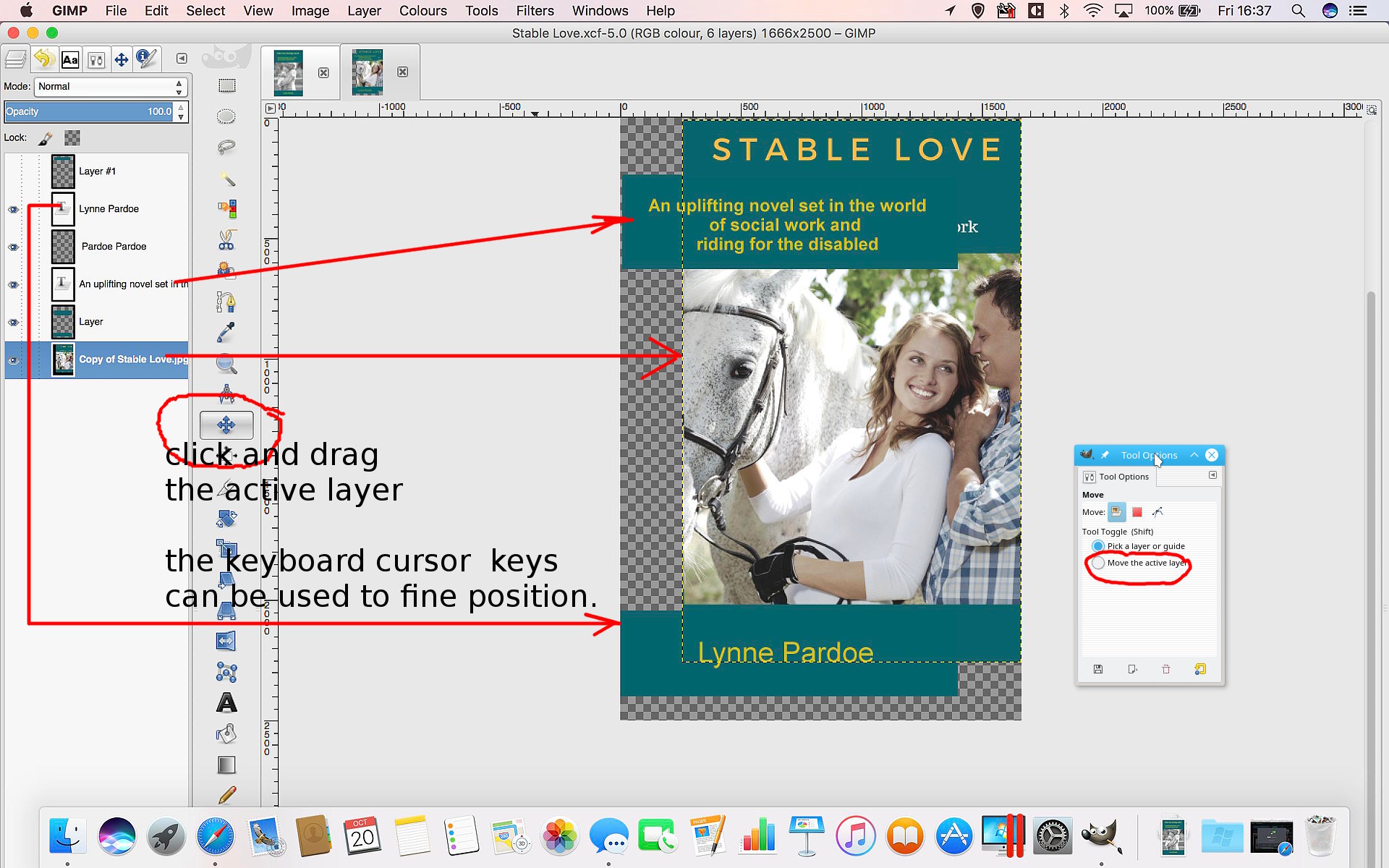 CejUkSB.jpg [ 335.56 KiB | Viewed 2766 times ]
Maybe your files were just too large, Looking at what you have.
screenshot 2880x1800 - that is a nice computer you have there.
The active layer is your main image. The dotted lines around the perimeter only show when the layer is active and as mentioned before only in Gimp. Just accept them, they do not appear in your exported image.
You have a choice, move that active layer or move the other layers (link text and background to move together) to hide the existing text. Either way will work.
You are on the move tool, so you can click-n-drag to move that layer under the other layers.
You can also use the keyboard cursor keys to 'nudge' the layer around for fine positioning.
A more general issue is your Gimp layout. in particular there are no tool options showing? (I put one in)
edit: ok, I forgive you, it is there as a tab.
When you get everything in the correct place, an Image -> Autocrop Image will remove the (not needed?) empty borders to tidy it up.
 Login
Login Register
 Tweets
 FAQ
FAQ Advanced Search


 I'll get to it after supper