It is currently Fri Sep 25, 2026 9:32 am


All times are UTC - 5 hours [ DST ]


Post new topic Reply to topic  [ 16 posts ] 
Author Message
 Post subject: Gimp not exporting transparency
PostPosted: Sun Oct 22, 2017 10:06 am  (#1) 
Offline
New Member

Joined: Oct 22, 2017
Posts: 4
GIMP Version: 2.8.20
Operating System: Mac OS
OS Version: 10.13
GIMP Experience: Intermediate Level


Hi,

I'm trying to export this to .png but whatever I do, it comes out like this. I removed the background with colour to alpha, and gimp shows it how I want it. However whenever I export the image, gimp replaces the background as if I had never made it transparent. Colour mode is RGB. When I add a white layer behind the image, the original background also returns.

Any help would be appreciated.


Thanks,
M.


Attachments:
File comment: Export settings
Screen Shot 2017-10-22 at 23.03.38.png
Screen Shot 2017-10-22 at 23.03.38.png [ 55.65 KiB | Viewed 10717 times ]
File comment: What gimp shows:
Screen Shot 2017-10-22 at 22.47.04.png
Screen Shot 2017-10-22 at 22.47.04.png [ 634.02 KiB | Viewed 10717 times ]
File comment: What is exported:
tree.png
tree.png [ 5.62 MiB | Viewed 10717 times ]
Share on Facebook Share on Twitter Share on Orkut Share on Digg Share on MySpace Share on Delicious Share on Technorati
Top
 Post subject: Re: Gimp not exporting transparency
PostPosted: Sun Oct 22, 2017 10:16 am  (#2) 
Offline
GimpChat Member
User avatar

Joined: Jan 20, 2013
Posts: 14835
Location: roma, italy
I loaded your exported tree.png and it has the transparency, so it's OK.

_________________
"Where am I ?"


Top
 Post subject: Re: Gimp not exporting transparency
PostPosted: Sun Oct 22, 2017 10:25 am  (#3) 
Offline
New Member

Joined: Oct 22, 2017
Posts: 4
dinasset wrote:
I loaded your exported tree.png and it has the transparency, so it's OK.


Loaded with what?


Top
 Post subject: Re: Gimp not exporting transparency
PostPosted: Sun Oct 22, 2017 10:29 am  (#4) 
Offline
GimpChat Member
User avatar

Joined: Jan 20, 2013
Posts: 14835
Location: roma, italy
Right click on your image and "save".

_________________
"Where am I ?"


Top
 Post subject: Re: Gimp not exporting transparency
PostPosted: Sun Oct 22, 2017 10:35 am  (#5) 
Offline
New Member

Joined: Oct 22, 2017
Posts: 4
dinasset wrote:
Right click on your image and "save".


It's still not working


Top
 Post subject: Re: Gimp not exporting transparency
PostPosted: Sun Oct 22, 2017 10:38 am  (#6) 
Offline
GimpChat Member
User avatar

Joined: Jan 20, 2013
Posts: 14835
Location: roma, italy
What do you mean?
Did you right click on your posted png and saved somewhere as a new image (don't overlay an existing one), and not got the transparency when opened in Gimp?

_________________
"Where am I ?"


Top
 Post subject: Re: Gimp not exporting transparency
PostPosted: Sun Oct 22, 2017 10:42 am  (#7) 
Offline
New Member

Joined: Oct 22, 2017
Posts: 4
dinasset wrote:
What do you mean?
Did you right click on your posted png and saved somewhere as a new image (don't overlay an existing one), and not got the transparency when opened in Gimp?


I have the transparency in gimp but in preview, on gimpchat, & on google slides (where it needs to end up) there is no transparency.


Top
 Post subject: Re: Gimp not exporting transparency
PostPosted: Sun Oct 22, 2017 10:44 am  (#8) 
Offline
Administrator
User avatar

Joined: Aug 10, 2012
Posts: 14209
Location: Native to NYC living in Arizona, Gimp 2.8 - 3.0, Win 11 PC.
MHowling wrote:
GIMP Version: 2.8.20
Operating System: Mac OS
OS Version: 10.13
GIMP Experience: Intermediate Level


Hi,

I'm trying to export this to .png but whatever I do, it comes out like this. I removed the background with colour to alpha, and gimp shows it how I want it. However whenever I export the image, gimp replaces the background as if I had never made it transparent. Colour mode is RGB. When I add a white layer behind the image, the original background also returns.

Any help would be appreciated.


Thanks,
M.

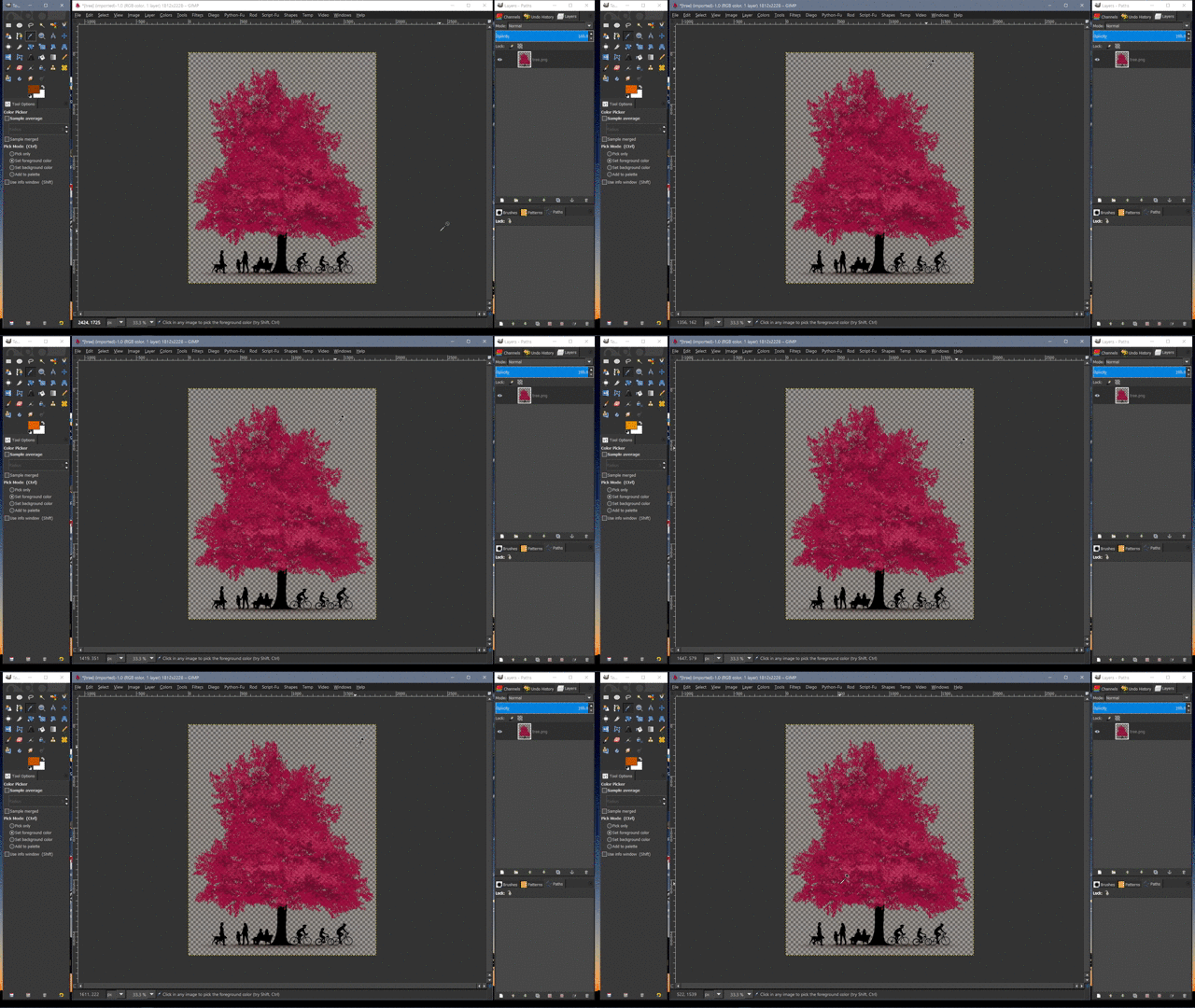
Using Color to Alpha only removes one color.
Although the background my appear to be one solid color.
In actuality it could be made of numerous colors.

As you can see in the GIF image below.
As I move the Color Picker across,
what appears to be a trasparent background.
You'll notice by watching the color swatch in the tool options dialog,
that there are still other colors which were left behind.


Image

_________________
Image
"A wise man learns more from a foolish question than a fool can learn from a wise answer"
Image


Top
 Post subject: Re: Gimp not exporting transparency
PostPosted: Sun Oct 22, 2017 10:49 am  (#9) 
Offline
GimpChat Member
User avatar

Joined: Jan 20, 2013
Posts: 14835
Location: roma, italy
I was able to use your tree as a layer on top of another image and produce this.
I don't know about Google images. (In G'MIC it opens with transparency as well).
Attachment:
combo-using-your-tree .jpg
combo-using-your-tree .jpg [ 3.08 MiB | Viewed 10701 times ]

_________________
"Where am I ?"


Top
 Post subject: Re: Gimp not exporting transparency
PostPosted: Sun Oct 22, 2017 10:51 am  (#10) 
Offline
GimpChat Member
User avatar

Joined: Jan 20, 2013
Posts: 14835
Location: roma, italy
(in Gimp-chat every image with transparent areas shows a white BG, don't worry about that).

_________________
"Where am I ?"


Top
 Post subject: Re: Gimp not exporting transparency
PostPosted: Sun Oct 22, 2017 10:52 am  (#11) 
Offline
GimpChat Member
User avatar

Joined: Jan 20, 2013
Posts: 14835
Location: roma, italy
(as Wallace said, your BG is not really fully transparent)

_________________
"Where am I ?"


Top
 Post subject: Re: Gimp not exporting transparency
PostPosted: Sun Oct 22, 2017 10:54 am  (#12) 
Offline
Administrator
User avatar

Joined: Aug 10, 2012
Posts: 14209
Location: Native to NYC living in Arizona, Gimp 2.8 - 3.0, Win 11 PC.
dinasset wrote:
I was able to use your tree as a layer on top of another image and produce this.
I don't know about Google images. (In G'MIC it opens with transparency as well).
Attachment:
combo-using-your-tree .jpg

The image has other colors left behind by the Color to Alpha.
Using Color to Alpha,
isn't the best way to remove the background.

_________________
Image
"A wise man learns more from a foolish question than a fool can learn from a wise answer"
Image


Top
 Post subject: Re: Gimp not exporting transparency
PostPosted: Sun Oct 22, 2017 11:43 am  (#13) 
Offline
GimpChat Member

Joined: Sep 23, 2016
Posts: 317
MHowling wrote:
I'm trying to export this to .png but whatever I do, it comes out like this. I removed the background with colour to alpha,


As Wallace said, Colour to Alpha only makes one single colour fully transparent. Similar colours are not fully transparent, but have partial transparency which is what has happened in your case.

I restored your image to original to have a look at it (scaled down version attached). The background is very multi-coloured. It is not easy to make an image like that have a fully transparent background. Made even more difficult because some colours in the tree are the same as the some colours in the background. So the tree also gets some partial transparency when using colour to alpha

Options are:
1. Select the background using the Colour Select tool in Addition mode. Will require lots of patience. Use Delete, not Colour to Alpha.

2. Similar to 1. but select the foregound and then Select > Invert to get the background selected.

3. Accept that you will not get a fully transparent background with an image like that. Use what you have now.


Attachments:
Tree01.jpg
Tree01.jpg [ 235.68 KiB | Viewed 4292 times ]
Top
 Post subject: Re: Gimp not exporting transparency
PostPosted: Sun Oct 22, 2017 1:44 pm  (#14) 
Offline
Administrator
User avatar

Joined: Aug 10, 2012
Posts: 14209
Location: Native to NYC living in Arizona, Gimp 2.8 - 3.0, Win 11 PC.
I put this image together rather quickly.
Perhaps you can us it,
or some of it's elements in your work.


Attachment:
pink-tree-image.png
pink-tree-image.png [ 3.12 MiB | Viewed 4283 times ]


Attachment:
pink-tree-image.xcf [5.25 MiB]
Downloaded 110 times

_________________
Image
"A wise man learns more from a foolish question than a fool can learn from a wise answer"
Image


Top
 Post subject: Re: Gimp not exporting transparency
PostPosted: Sun Oct 22, 2017 8:35 pm  (#15) 
Offline
GimpChat Member
User avatar

Joined: Apr 08, 2010
Posts: 5420
Location: Northwest Ohio
When you exported to .png, did you remember to untick the 'save background color' box?


Top
 Post subject: Re: Gimp not exporting transparency
PostPosted: Mon Oct 23, 2017 3:45 am  (#16) 
Offline
GimpChat Member
User avatar

Joined: Mar 23, 2012
Posts: 7388
Location: Göteborg at last!
How does Google Slides usually display transparency? It seems to me that the transparency is there but you are confused by how it is displayed in different viewers. Windows viewer for example displays transparency as white.


Top
Post new topic Reply to topic  [ 16 posts ] 

All times are UTC - 5 hours [ DST ]


* Login  


Powered by phpBB3 © phpBB Group