It is currently Tue Sep 22, 2026 5:34 pm


All times are UTC - 5 hours [ DST ]


Post new topic Reply to topic  [ 10 posts ] 
Author Message
 Post subject: Errors that seem innocuous.. [SOLVED]
PostPosted: Wed Oct 25, 2017 3:50 pm  (#1) 
Offline
GimpChat Member
User avatar

Joined: Jan 06, 2017
Posts: 204
GIMP Version: 2.8.22
Operating System: Windows
OS Version: 10 Pro 64 bit
GIMP Experience: Intermediate Level

List any ERROR messages you received:
see images..


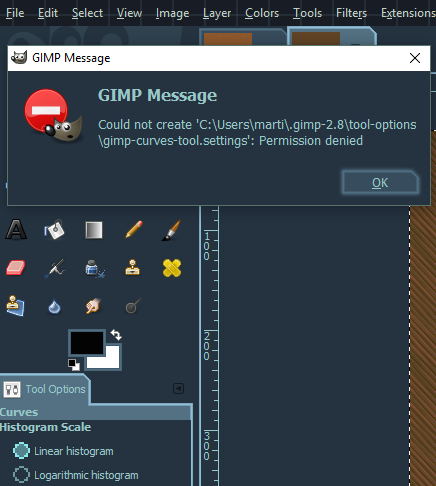
Does anyone know why I'm suddenly getting these errors appearing (although nothing seems adversely affected)?

This one after I click OK after changing stuff in Preferences

Image

and

After applying 'curves' to a layer

Image

Something up with the program ..or could it be Windows? Seem to have weird stuff happening since a recent update...


Last edited by Zero01 on Thu Oct 26, 2017 1:09 am, edited 1 time in total.

Share on Facebook Share on Twitter Share on Orkut Share on Digg Share on MySpace Share on Delicious Share on Technorati
Top
 Post subject: Re: Errors that seem innocuous..
PostPosted: Wed Oct 25, 2017 6:47 pm  (#2) 
Offline
GimpChat Member
User avatar

Joined: Jul 04, 2010
Posts: 2253
Location: Retired Moderator Slowly Returning to the Living.
Try running it as administrator.

_________________
Artists aren't crazy! We're eccentric! ~G.M. Ross

Image

My Sigs = My Photos
Check out my work at http://www.flickr.com/photos/photomastergreg.


Top
 Post subject: Re: Errors that seem innocuous..
PostPosted: Wed Oct 25, 2017 6:49 pm  (#3) 
Offline
Script Coder
User avatar

Joined: Oct 25, 2010
Posts: 4812
Your Gimp profile seems to have turned read-only.

This can be innocuous, or the symptom of coming trouble with the operating system or disk.

_________________
Image


Top
 Post subject: Re: Errors that seem innocuous..
PostPosted: Wed Oct 25, 2017 10:27 pm  (#4) 
Offline
GimpChat Member
User avatar

Joined: Sep 24, 2010
Posts: 12845
I was getting a weird start up delay until I ran GIMP as administrator. I then closed GIMP and ran GIMP regularly and GIMP loaded fast like it use to do. My bet is when you launch GIMP, it's not able to update gimprc. Also, just now read previous replies and Wallace has already mentioned to run GIMP as administrator. I noticed this when I updated GIMP to 2.8.22. After I ran (only once) GIMP as administrator, I no longer see any of the weird issues with startup delays. Funny that I didn't get an error console like you did. :)

_________________
Lyle

Psalm 109:8

Image


Top
 Post subject: Re: Errors that seem innocuous..
PostPosted: Thu Oct 26, 2017 12:52 am  (#5) 
Offline
GimpChat Member
User avatar

Joined: Jan 06, 2017
Posts: 204
Thanks for the replies, it's the curse of Windows for sure... I tried running as admin at first noticed no difference (and the start-up was taking a long time, 1 minute or so) but after that it's starting up quite quickly (i.e. about 15 seconds, which is still 3 times longer than in my Vista VM lol) - saying that though I still get the errors :(

EDIT: Then, I re-read ofnut's reply, checked.. and my Profile WAS Read-only (for some reason..) unticked the box and now it seems fine.. just wondering how that happened, Thanks guys :)


Top
 Post subject: Re: Errors that seem innocuous.. [SOLVED]
PostPosted: Thu Oct 26, 2017 1:57 am  (#6) 
Offline
Script Coder
User avatar

Joined: Feb 18, 2011
Posts: 4826
Location: Bendigo Vic. Australia
I was not getting errors but gimp was slow to start and my Profile WAS Read-only (for some reason..) changed the boxes and now it seems fine.. just wondering how that happened,as well Thanks ofnuts for the tip about profile :coolthup

_________________
Image
No matter how much you push the envelope, it'll still be stationery.


Top
 Post subject: Re: Errors that seem innocuous.. [SOLVED]
PostPosted: Sun Nov 05, 2017 5:49 pm  (#7) 
Offline
GimpChat Member
User avatar

Joined: Jun 22, 2015
Posts: 234
Could you guys be more specific for idiots like me?

User profile??

I havent added or done anything to Gimp and all of the sudden I started getting errors whenever I tried opening png files. Gimp keeps kicking out error messages in the right side box in gimp and doesnt stop

My PC is ran as Administrator, So I dont get what you mean by that

Where specifically do I go to check to see if the box is clicked? Is it in Gimp? or Windows 10???


Top
 Post subject: Re: Errors that seem innocuous.. [SOLVED]
PostPosted: Sun Nov 05, 2017 6:18 pm  (#8) 
Offline
GimpChat Member
User avatar

Joined: Jan 06, 2017
Posts: 204
In Windows the Gimp profile is in your 'C:/Users/..' folder (The folder name is '.gimp-2.8')


Top
 Post subject: Re: Errors that seem innocuous.. [SOLVED]
PostPosted: Sun Nov 05, 2017 7:10 pm  (#9) 
Offline
GimpChat Member
User avatar

Joined: Jun 22, 2015
Posts: 234
Alright,
I checked unchecked the box that said read only

Still getting the errors No difference


Top
 Post subject: Re: Errors that seem innocuous.. [SOLVED]
PostPosted: Sun Nov 05, 2017 8:17 pm  (#10) 
Offline
Administrator
User avatar

Joined: Aug 10, 2012
Posts: 14207
Location: Native to NYC living in Arizona, Gimp 2.8 - 3.0, Win 11 PC.
Norseman143 wrote:
Alright,
I checked unchecked the box that said read only

Still getting the errors No difference

This might be a good time to create a new gimp profile.
To see if this corrects these errors.

I would also check to see,
if any of your preferences have changed.

_________________
Image
"A wise man learns more from a foolish question than a fool can learn from a wise answer"
Image


Top
Post new topic Reply to topic  [ 10 posts ] 

All times are UTC - 5 hours [ DST ]


* Login  


Powered by phpBB3 © phpBB Group