Yeah with that image You could finish at least that image with selection tools alone I believe.
But I wrote a weird mini tut using only levels and brush, so why not post it.
I think the planets are in mystical position, and it's also Friday the 13th!
You can keep and restore original texture by using layer mask.
To have smooth edge, image must be either in RGB or greyscale mode.
Your cutout is 1-bit, that's why you can't use color to alpha.
Image: mode RGB or grayscale revives the possibility, but I see it isn't very good.
Using Colors: Threshold, the default setting gives better result.
No detailed pics because I'm slacking in Summer vacation.
And the planets are still in mystical position hahaha.
1. Duplicate layer, original will remain unedited.
2. Colors: levels. Use the input levels black pipette and click the darkest pixel in the image. Should switch to about 40-45
3. Use the white pipette (zoom in) and click the lightest spot. I got it around 200.
4. I repeated same thing again, but you need to be careful.
You should end up with pretty good contrast, keeping the edge accurate.
Then a procedure I did lot in past with .tga format....
You don't see it used much anymore.
5. Choose black round brush (the one that has 050 hardness, size 15-20) to color over the grey areas.
6. Invert colors. You may use white brush doing the same thing.
I find it easier this way, to ensure not brushing too close edges.
7. Select all, copy.
8. Switch to your original layer, right-click, add layer mask (white full opacity)
9. Activate the layer mask of the original by clicking it, hit ctrl+v. The modified layer turns into floating selection.
Right click it, anchor layer. Hide other layers.
Export to .png if you need transparent .png.
To restore original background, right-click layer mask and tick "disable layer mask"
And same again to enable it. Do not delete layer mask!
Used magenta bg so you can see the final result easier.
So that's it for this image. The approach could be entirely different with another, more complicated image.
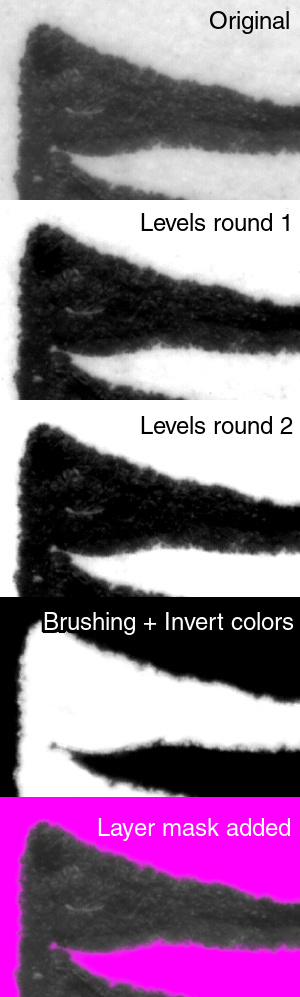
PS. Perfect cut is a myth.
 Login
Login Register
 Tweets
 FAQ
FAQ Advanced Search




 WOW! I am a skeptic so planetary alignment, Friday 13, and Gimp responses are, probabilistically speaking, surely a correlation. That being said, it is a most propitious set of events.
 the chat