It is currently Fri Jul 17, 2026 2:04 pm


All times are UTC - 5 hours [ DST ]


Post new topic Reply to topic  [ 5 posts ] 
Author Message
 Post subject: Editing Text - Mac
PostPosted: Fri Oct 05, 2018 12:06 pm  (#1) 
Offline
New Member

Joined: Oct 05, 2018
Posts: 2
GIMP Version: 2.8.14
Operating System: Mac OS
OS Version: 10.13.6
GIMP Experience: New User


Hello!

I am a new GIMP (Mac) user and I did search the forums to try multiple methods to try to solve a seemingly basic issue.

I imported a PSD file and it was fine: has all the layers and GIMP sees them all.

In trying to edit the text within a layer, I am having a lot of trouble. I can resize the layer, etc. But I cannot edit the text.

I was using another program before GIMP and it saw the layer as text, and I assume GIMP does too.

I have attached the file. I am trying to edit the text that appears in the blue right below the top text (Text I'm trying to edit is: "Individuals."

I would welcome step-by-step instructions. Interestingly, in searching the forums, there are instructions but they seem not to be working. Or I likely am not understanding the steps.

Thank you!

Patrick


Attachments:
File comment: File I'm trying to edit.
Website_Main_Header_GimpFile.xcf [1.78 MiB]
Downloaded 234 times
Share on Facebook Share on Twitter Share on Orkut Share on Digg Share on MySpace Share on Delicious Share on Technorati
Top
 Post subject: Re: Editing Text - Mac
PostPosted: Fri Oct 05, 2018 12:51 pm  (#2) 
Offline
Administrator
User avatar

Joined: Aug 10, 2012
Posts: 14121
Location: Native to NYC living in Arizona, Gimp 2.8 - 3.0, Win 11 PC.
patrick22 wrote:
GIMP Version: 2.8.14
Operating System: Mac OS
OS Version: 10.13.6
GIMP Experience: New User


Hello!

I am a new GIMP (Mac) user and I did search the forums to try multiple methods to try to solve a seemingly basic issue.

I imported a PSD file and it was fine: has all the layers and GIMP sees them all.

In trying to edit the text within a layer, I am having a lot of trouble. I can resize the layer, etc. But I cannot edit the text.

I was using another program before GIMP and it saw the layer as text, and I assume GIMP does too.

I have attached the file. I am trying to edit the text that appears in the blue right below the top text (Text I'm trying to edit is: "Individuals."

I would welcome step-by-step instructions. Interestingly, in searching the forums, there are instructions but they seem not to be working. Or I likely am not understanding the steps.

Thank you!

Patrick

I downloaded the xcf file you made available and opened it with Gimp 2.10 Portable.
It appears that the text data/information,
has been removed for the text layers within the image.

I'm not aware of any way to restore the text information,
once it's been removed and then saved.

You would need to create new text layers.
In order to have text that can be edited,
using the text tools.

_________________
Image
"A wise man learns more from a foolish question than a fool can learn from a wise answer"
Image


Top
 Post subject: Re: Editing Text - Mac
PostPosted: Fri Oct 05, 2018 1:05 pm  (#3) 
Offline
New Member

Joined: Oct 05, 2018
Posts: 2
Oh! Thank you! Interesting. So, the image still shows up but the text simply can't be edited because of the removed layers?


Top
 Post subject: Re: Editing Text - Mac
PostPosted: Fri Oct 05, 2018 1:27 pm  (#4) 
Offline
GimpChat Member

Joined: Mar 04, 2011
Posts: 2607
patrick22 wrote:
Oh! Thank you! Interesting. So, the image still shows up but the text simply can't be edited because of the removed layers?


No. Gimp converts psd text layers to bitmap layers, same as any other graphic layer.

You will need to recreate them as a new Gimp text layer using the Gimp text tool. Not always easy if you do not know the font that was used by PS.


Top
 Post subject: Re: Editing Text - Mac
PostPosted: Fri Oct 05, 2018 1:31 pm  (#5) 
Offline
Administrator
User avatar

Joined: Aug 10, 2012
Posts: 14121
Location: Native to NYC living in Arizona, Gimp 2.8 - 3.0, Win 11 PC.
patrick22 wrote:
Oh! Thank you! Interesting. So, the image still shows up but the text simply can't be edited because of the removed layers?

rich2005 is correct.
About the PS text conversion within GIMP.

The text information.
Needed my GIMP to be able to use the text tool to edit the text.
Has been removed by the conversion.

This means,
that the text as was originally produced using the text tool.
Is no longer editable by GIMP's text tool,
because the data,
used by the text tool is no longer present.

You would need to create a new editable text layer,
using the text tool.
In order for the text to be editable with the text tool.

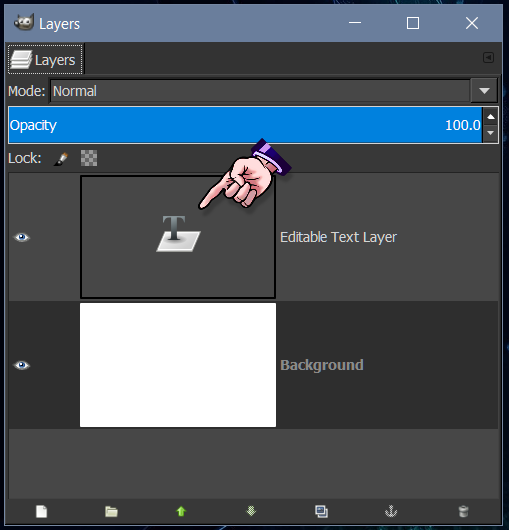
An editable text layer,
within GIMP looks like this.

Image

_________________
Image
"A wise man learns more from a foolish question than a fool can learn from a wise answer"
Image


Top
Post new topic Reply to topic  [ 5 posts ] 

All times are UTC - 5 hours [ DST ]


* Login  


Powered by phpBB3 © phpBB Group