It is currently Fri Sep 25, 2026 1:49 pm


All times are UTC - 5 hours [ DST ]


Post new topic Reply to topic  [ 15 posts ] 
Author Message
 Post subject: How to achieve this style?
PostPosted: Thu Aug 30, 2018 2:33 pm  (#1) 
Offline
GimpChat Member

Joined: Aug 30, 2018
Posts: 7
GIMP Version:
Operating System: Mac OS
GIMP Experience: Experienced User


I've watched several good tutorials on creating dimensional text with shine, but I'm wondering if there's a way to achieve 3D text in perspective, kind of like the photo attached?

Thanks for clues or links

-foo

Also, does this style or look have a name?


Attachments:
File comment: Does this style have a name?
61luLKR07wL._SY355_.jpg
61luLKR07wL._SY355_.jpg [ 43.95 KiB | Viewed 3301 times ]
File comment: another example
coolcoink.PNG
coolcoink.PNG [ 320.95 KiB | Viewed 3301 times ]
Share on Facebook Share on Twitter Share on Orkut Share on Digg Share on MySpace Share on Delicious Share on Technorati
Top
 Post subject: Re: How to achieve this style?
PostPosted: Thu Aug 30, 2018 2:39 pm  (#2) 
Offline
GimpChat Member

Joined: Aug 30, 2018
Posts: 7
I struggled for a while, then switched over to Sketchup 8 to create a 3D model like this:

Maybe I could import this to Gimp and make it glossy


Attachments:
File comment: another version
wtfwhat402.PNG
wtfwhat402.PNG [ 53.5 KiB | Viewed 3296 times ]
File comment: one version
wtfwhat40.PNG
wtfwhat40.PNG [ 41.65 KiB | Viewed 3296 times ]
Top
 Post subject: Re: How to achieve this style?
PostPosted: Thu Aug 30, 2018 5:08 pm  (#3) 
Offline
GimpChat Member
User avatar

Joined: Apr 15, 2017
Posts: 1837
Among other things, you can use Long Shadows for that......

Attachment:
shadows.jpg
shadows.jpg [ 302.59 KiB | Viewed 3265 times ]


Top
 Post subject: Re: How to achieve this style?
PostPosted: Tue Sep 04, 2018 12:22 pm  (#4) 
Offline
GimpChat Member

Joined: Aug 30, 2018
Posts: 7
Well, I got this far

I added a radial gradient background
Then I selected the foreground text and added a plasticizing script-fu filter I found
called 2628_Plastic_or_Glass.scm by Graechan

Now I just need to smooth out all that aliasing around the edges of things somehow

Is there such a thing as a finger smudge filter with edge-detection? Something to save me the trouble of going all around all the jaggies with the finger smudger tool?

Thanks!
-foo


Attachments:
File comment: what I have now
wtf404.png
wtf404.png [ 435.83 KiB | Viewed 2986 times ]
Top
 Post subject: Re: How to achieve this style?
PostPosted: Tue Sep 04, 2018 1:19 pm  (#5) 
Offline
GimpChat Member
User avatar

Joined: Sep 24, 2010
Posts: 12846
How did you get plastic or glass to work; it's been broken for me since 2.10x. If you have a fix or source for the update, please share; would like the fix. :)

_________________
Lyle

Psalm 109:8

Image


Top
 Post subject: Re: How to achieve this style?
PostPosted: Tue Sep 04, 2018 1:42 pm  (#6) 
Offline
GimpChat Member
User avatar

Joined: May 10, 2013
Posts: 1442
Location: Finland
It's jaggy because the Sketchup screen/export is jaggy.
Cleaning jaggies is bad idea, the outcome can never beat a good original.
So save yourself from headache, type your logo text again (takes a half minute) in GIMP, and use one of the 3D scripts.

I recommend playing with this:

viewtopic.php?f=9&t=9273


Top
 Post subject: Re: How to achieve this style?
PostPosted: Tue Sep 04, 2018 2:05 pm  (#7) 
Offline
GimpChat Member
User avatar

Joined: May 10, 2013
Posts: 1442
Location: Finland
lylejk wrote:
How did you get plastic or glass to work; it's been broken for me since 2.10x. If you have a fix or source for the update, please share; would like the fix. :)


I believe he's using 2.8
Fixed it for 2.10, posted in scripts section.

ah, sorry for the double post.


Top
 Post subject: Re: How to achieve this style?
PostPosted: Wed Sep 05, 2018 7:06 pm  (#8) 
Offline
GimpChat Member
User avatar

Joined: Apr 15, 2017
Posts: 1837
Here ya go, all Gimp.

Attachment:
wtf.jpg
wtf.jpg [ 265.69 KiB | Viewed 2919 times ]


Top
 Post subject: Re: How to achieve this style?
PostPosted: Sun Sep 16, 2018 7:52 pm  (#9) 
Offline
GimpChat Member

Joined: Aug 30, 2018
Posts: 7
lylejk wrote:
How did you get plastic or glass to work; it's been broken for me since 2.10x. If you have a fix or source for the update, please share; would like the fix. :)


I used the select by color to select the front panel of the text.
Then using the selection, I called Script-Fu/AlphaToLogo/Plastic-or-Glass

Just worked!


Top
 Post subject: Re: How to achieve this style?
PostPosted: Sun Sep 16, 2018 7:56 pm  (#10) 
Offline
GimpChat Member

Joined: Aug 30, 2018
Posts: 7
Nidhogg wrote:
It's jaggy because the Sketchup screen/export is jaggy.
Cleaning jaggies is bad idea, the outcome can never beat a good original.
So save yourself from headache, type your logo text again (takes a half minute) in GIMP, and use one of the 3D scripts.

I recommend playing with this:

http://gimpchat.com/viewtopic.php?f=9&t=9273


Well, before reading this, I went around with select and gaussian blur.

Wound up with this finally...


Attachments:
wtf409.png
wtf409.png [ 1.34 MiB | Viewed 2768 times ]
Top
 Post subject: Re: How to achieve this style?
PostPosted: Sun Sep 16, 2018 7:59 pm  (#11) 
Offline
GimpChat Member

Joined: Aug 30, 2018
Posts: 7
racer-x wrote:
Here ya go, all Gimp.

Attachment:
wtf.jpg


This is beautiful. But I wanted a way to achieve 3d perspective that had a kind of 3 point perspective.


Top
 Post subject: Re: How to achieve this style?
PostPosted: Mon Sep 17, 2018 2:56 am  (#12) 
Offline
GimpChat Member
User avatar

Joined: May 10, 2013
Posts: 1442
Location: Finland
foo wrote:
racer-x wrote:
This is beautiful. But I wanted a way to achieve 3d perspective that had a kind of 3 point perspective.


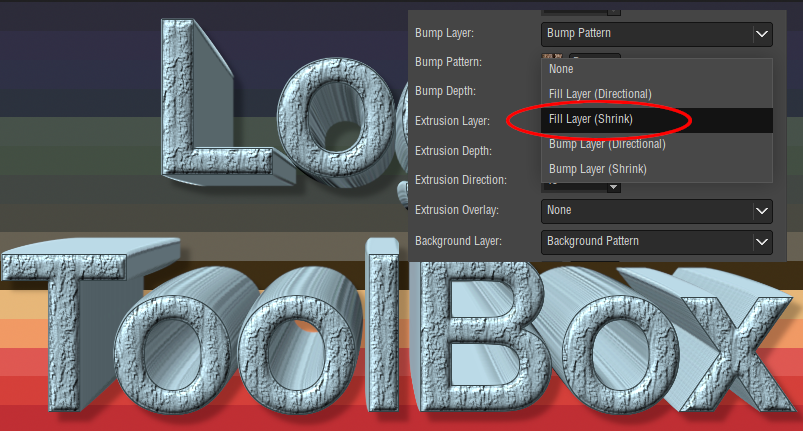
Then use Logo Toolbox. Great logo script, and it has 3 point perspective.
Thought to attach, but my version is for 2.10 and gimpscripts is dead.
Will upload later from 2.8, unless someone else helps you out earlier.
You could find it somewhere else, latest version is 2.3.

viewtopic.php?f=23&t=9472

Image


Top
 Post subject: Re: How to achieve this style?
PostPosted: Mon Sep 17, 2018 3:44 am  (#13) 
Offline
GimpChat Member
User avatar

Joined: Apr 15, 2017
Posts: 1837
You can do 3-D perspective with 3D-Extrude script.

Attachment:
3D.png
3D.png [ 381.08 KiB | Viewed 1459 times ]


Top
 Post subject: Re: How to achieve this style?
PostPosted: Mon Sep 17, 2018 4:30 am  (#14) 
Offline
GimpChat Member
User avatar

Joined: May 10, 2013
Posts: 1442
Location: Finland
That's true, extrusion type: shrink. I had it linked in my first reply.
Added stepped chisel on original layer, and played with hue-saturation.

Image

Logo Toolbox has some additional settings.
Gotta luv em both scripts.


Top
 Post subject: Re: How to achieve this style?
PostPosted: Sun Sep 23, 2018 11:17 pm  (#15) 
Offline
GimpChat Member

Joined: Aug 30, 2018
Posts: 7
Thanks nidhogg and racer-x. I will grab those scripts for future reference.


Top
Post new topic Reply to topic  [ 15 posts ] 

All times are UTC - 5 hours [ DST ]


* Login  


Powered by phpBB3 © phpBB Group