It is currently Sun Sep 20, 2026 4:57 pm


All times are UTC - 5 hours [ DST ]


Post new topic Reply to topic  [ 4 posts ] 
Author Message
 Post subject: New brush error message -RESOLVED
PostPosted: Wed Oct 03, 2018 11:36 pm  (#1) 
Offline
Global Moderator
User avatar

Joined: Oct 02, 2014
Posts: 5050
Location: Sydney Australia
GIMP Version: 2.10.6
Operating System: Windows
GIMP Experience: Intermediate Level


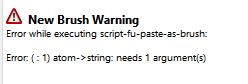
Anybody else getting errors creating brushes. Have not yet been able to create one in 2.10.6, just using normal 'copy' then 'past as new brush'.


Attachments:
new brush error.PNG
new brush error.PNG [ 2.9 KiB | Viewed 2188 times ]

_________________
Image

Respect should be offered freely but hard earned


Last edited by oldmangrumpy on Thu Oct 04, 2018 5:44 pm, edited 1 time in total.
Share on Facebook Share on Twitter Share on Orkut Share on Digg Share on MySpace Share on Delicious Share on Technorati
Top
 Post subject: Re: New brush error message
PostPosted: Thu Oct 04, 2018 12:28 am  (#2) 
Offline
GimpChat Member

Joined: Oct 03, 2018
Posts: 12
Hmmmm, so I tried it with Gimp 2.10 Std (default) as Portable Version (Win) and it works fine.
I think you know what you're doing, but maybe describe your work steps.

Best regards


Top
 Post subject: Re: New brush error message
PostPosted: Thu Oct 04, 2018 3:00 am  (#3) 
Offline
GimpChat Member
User avatar

Joined: Sep 27, 2016
Posts: 345
Location: Germany, BW
Looks like you have that scrolling script-fu thing somewhere in your folders.
It doesn't work anymore for GIMP 2.10.
If you remove that the message will go away.

_________________
Regards
nelo

(Gimp 2.10 on Linux Mint MATE 20.1)


Top
 Post subject: Re: New brush error message -RESOLVED
PostPosted: Thu Oct 04, 2018 5:50 pm  (#4) 
Offline
Global Moderator
User avatar

Joined: Oct 02, 2014
Posts: 5050
Location: Sydney Australia
Nelo - I had a look for the 'sf-scrolling-interface' but found nothing. For some reason I also checked the plug-ins folder, where I did find the 'sf application' and 'sf interface' files from 2014, when I first installed GIMP ???. So I removed them and now I can create new brushes.

Nelo - thank you.

_________________
Image

Respect should be offered freely but hard earned


Top
Post new topic Reply to topic  [ 4 posts ] 

All times are UTC - 5 hours [ DST ]


* Login  


Powered by phpBB3 © phpBB Group