It is currently Sun Nov 08, 2026 7:04 am


All times are UTC - 5 hours [ DST ]


Post new topic Reply to topic  [ 5 posts ] 
Author Message
 Post subject: Tab docking issue
PostPosted: Fri Dec 21, 2018 6:50 am  (#1) 
Offline
GimpChat Member

Joined: Sep 06, 2018
Posts: 13
GIMP Version: 2.8.14
Operating System: Windows
GIMP Experience: Intermediate Level


Okay, I accidentally moved the path tab out from the side I had it in, and I am having issues re-docking it to the side.

Basically, I had the layer tab open on the right tab dock, and underneth it I had the path tab so it was split making it convenient as I could do what I needed with the layers while also being able to do the thing with the paths without changing tabs.

In other words, I had the layers on the top half of the dock, and the paths on the bottom half of the dock, but now I just can't fit the path tab back under the layer tab to make it a split tab. I can re-dock the paths, but it appears in it's own tab instead of the split tab I had.

Can someone explain how I can split the tabs again in a single dock?


Share on Facebook Share on Twitter Share on Orkut Share on Digg Share on MySpace Share on Delicious Share on Technorati
Top
 Post subject: Re: Tab docking issue
PostPosted: Fri Dec 21, 2018 7:05 am  (#2) 
Offline
GimpChat Member

Joined: Mar 04, 2011
Posts: 2629
The easiest way is go back to default settings:
Edit -> Preferences -> Window Management -> Reset Saved Window Positions to Default Values.

Attachment:
reset.jpg
reset.jpg [ 57.51 KiB | Viewed 4057 times ]


However: as a video https://youtu.be/01PeLL1F8Kg all about moving Docks.


Top
 Post subject: Re: Tab docking issue
PostPosted: Fri Dec 21, 2018 7:41 am  (#3) 
Offline
GimpChat Member

Joined: Sep 06, 2018
Posts: 13
Yay it worked ^^ Lifesaver, thanks for the help, it's all back to how I had it.

It's amazing how simple things are when you know how.


Top
 Post subject: Re: Tab docking issue
PostPosted: Fri Dec 21, 2018 9:07 am  (#4) 
Iridescent wrote:
Yay it worked ^^ Lifesaver, thanks for the help, it's all back to how I had it.

It's amazing how simple things are when you know how.


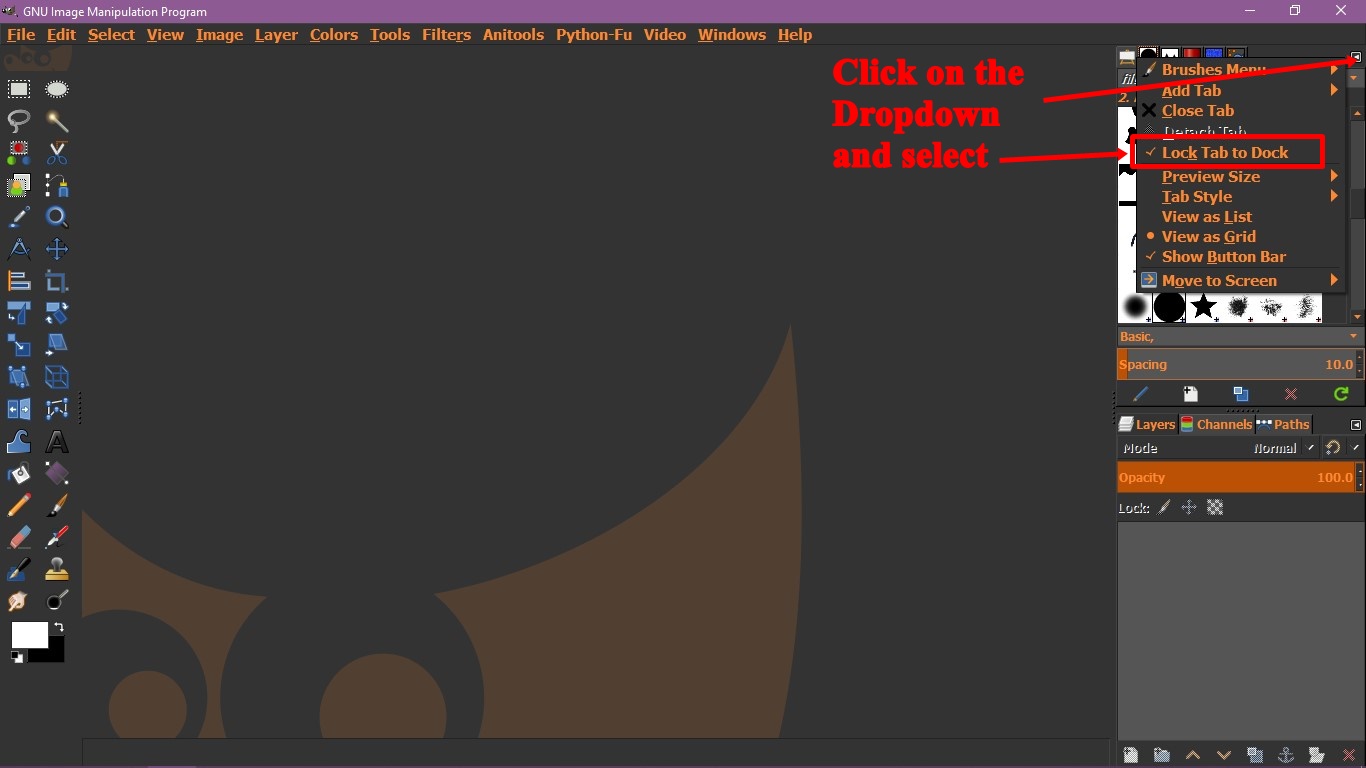
To avoid accident from detaching the tabs, Click on the little arrow dropdown that bring on dialogs on the corner, and choose the Lock.

Image


Top
 Post subject: Re: Tab docking issue
PostPosted: Mon Dec 24, 2018 1:10 am  (#5) 
Offline
GimpChat Member

Joined: Sep 06, 2018
Posts: 13
Thanks for the tip. That will help keep things in order.


Top
Post new topic Reply to topic  [ 5 posts ] 

All times are UTC - 5 hours [ DST ]


* Login  


Powered by phpBB3 © phpBB Group