It is currently Sun Sep 20, 2026 5:15 pm


All times are UTC - 5 hours [ DST ]


Post new topic Reply to topic  [ 5 posts ] 
Author Message
 Post subject: Gradient help please
PostPosted: Wed Jan 02, 2019 7:11 am  (#1) 
Offline
Global Moderator
User avatar

Joined: Apr 01, 2012
Posts: 8471
Location: On the other side of your screen
GIMP Version: 2.10.8
Operating System: Windows
OS Version: 10 Home 64bit
GIMP Experience: New User

List any relevant plug-ins or scripts:
GMIC render line to gradient

List any ERROR messages you received:
None


I'm sure I have made them before using this. I am getting a 'picture' of the gradient in gimp but it is turning out black in the gradient list (Huh)

Is there another way apart from 'making a pallette out of the colours and turning the pallette to a gradient' or am I doing something wrong?
I tried a couple of times to make sure I didn't miss any settings but there isn't many anyhow

_________________
Image
Free Fun Photo Editing & resources
Poems from the Lord
Gimp Newby
Gimp version 3.2.4 and GMIC-Qt 4.0.2 OS :- Windows 10 Home 64


Share on Facebook Share on Twitter Share on Orkut Share on Digg Share on MySpace Share on Delicious Share on Technorati
Top
 Post subject: Re: Gradient help please
PostPosted: Wed Jan 02, 2019 7:53 am  (#2) 
Offline
GimpChat Member
User avatar

Joined: May 10, 2013
Posts: 1442
Location: Finland
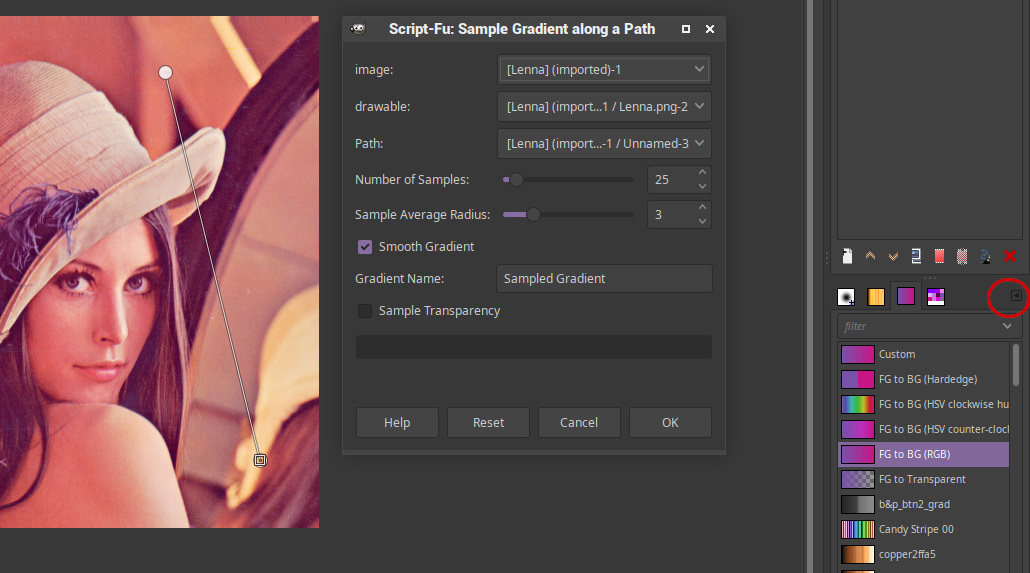
There is "Sample gradient along path" by RobA, that I use often.
You create a path over the image and it will, like the name suggests create a custom gradient from the colors the path crosses.
If I'm right render line to gradient in G'mic can only make use of straight lines?

Attached version that works in 2.10

Create path.
In gradients toolbox, click the triangle. Gradients menu/Sample gradient along path.
The name of the new gradient is "Sampled gradient".

Image


Attachments:
sample-gradient-along-path.scm [5.85 KiB]
Downloaded 203 times
Top
 Post subject: Re: Gradient help please
PostPosted: Wed Jan 02, 2019 9:34 am  (#3) 
Offline
GimpChat Member

Joined: Mar 04, 2011
Posts: 2615
I somtimes use RobA's script as well, as far as I know, works out-of-the-box.

Quote:
...I am getting a 'picture' of the gradient in gimp but it is turning out black in the gradient list


I wonder what is going on there?

Worth understanding the Gimp 2.10 gradient tool and on-canvas settings. There is the odd pitfall ;)

A video demo https://youtu.be/42Bn3dR6ZAM duration 4 minutes


Top
 Post subject: Re: Gradient help please
PostPosted: Wed Jan 02, 2019 6:40 pm  (#4) 
Offline
GimpChat Member

Joined: May 12, 2015
Posts: 4693
Does that work with the Gimp tool if you want to get the colors from an image. I have used RobA's for that.


Top
 Post subject: Re: Gradient help please
PostPosted: Thu Jan 03, 2019 12:09 am  (#5) 
Offline
Global Moderator
User avatar

Joined: Apr 01, 2012
Posts: 8471
Location: On the other side of your screen
Thank you all for your replies. I tried the way you showed rich but I forgot to click 'fixed' so of course it didn't work. So I went the long way around and made pallettes then turned them into gradients.

_________________
Image
Free Fun Photo Editing & resources
Poems from the Lord
Gimp Newby
Gimp version 3.2.4 and GMIC-Qt 4.0.2 OS :- Windows 10 Home 64


Top
Post new topic Reply to topic  [ 5 posts ] 

All times are UTC - 5 hours [ DST ]


* Login  


Powered by phpBB3 © phpBB Group