It is currently Tue Sep 22, 2026 1:56 am


All times are UTC - 5 hours [ DST ]


Post new topic Reply to topic  [ 7 posts ] 
Author Message
 Post subject: jpg folder not listed [SOLVED]
PostPosted: Sat Jan 26, 2019 11:20 am  (#1) 
Offline
New Member

Joined: Jan 26, 2019
Posts: 1
GIMP Version: 2.8.14
Operating System: Windows
OS Version: 10 64bit Home
GIMP Experience: New User

List any relevant plug-ins or scripts:
no idea

List any ERROR messages you received:
none


Why doesn't GIMP recognise my Photos folder - D:\Photos\sub-folders...
All other folders on D are listed (some of which have random .jpg's).
If I copy a jpg to the Desktop and edit it from there and then Export it back to 'Photos' I have no problem but it seems unnecessary.
Being something of a newbie, any help would be much appreciated.
Thank you kindly.


Last edited by Ron on Mon Jan 28, 2019 12:13 pm, edited 1 time in total.

Share on Facebook Share on Twitter Share on Orkut Share on Digg Share on MySpace Share on Delicious Share on Technorati
Top
 Post subject: Re: jpg folder not listed
PostPosted: Sat Jan 26, 2019 11:35 am  (#2) 
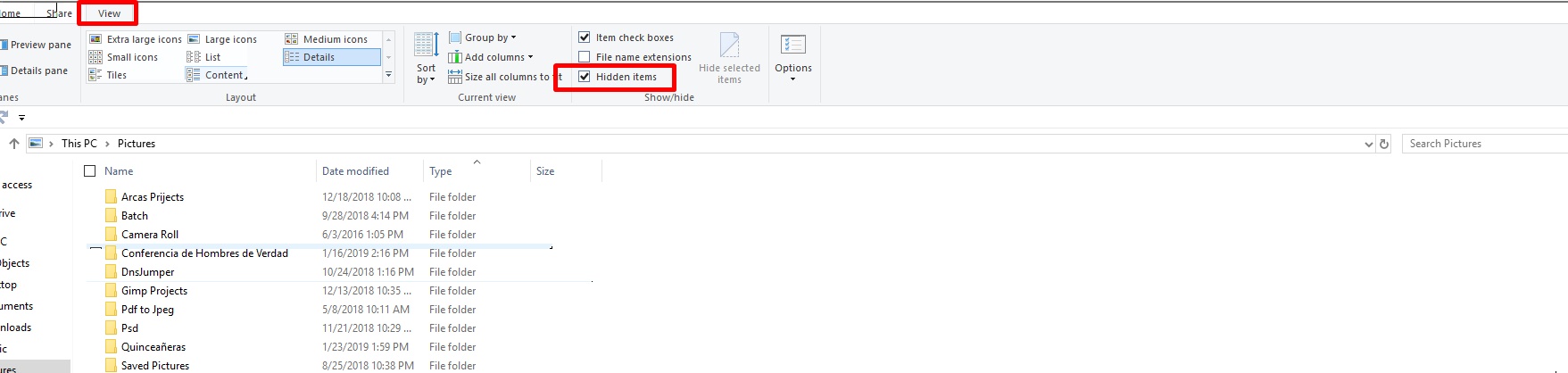
Make sure you is not hidden. Open Window Explorer with any file and click on the tab "View" on top and make sure you have this option checked.

Image


Top
 Post subject: Re: jpg folder not listed
PostPosted: Sat Jan 26, 2019 11:37 am  (#3) 
Offline
Administrator
User avatar

Joined: Aug 10, 2012
Posts: 14206
Location: Native to NYC living in Arizona, Gimp 2.8 - 3.0, Win 11 PC.
Ron wrote:
GIMP Version: 2.8.14
Operating System: Windows
OS Version: 10 64bit Home
GIMP Experience: New User

List any relevant plug-ins or scripts:
no idea

List any ERROR messages you received:
none


Why doesn't GIMP recognise my Photos folder - D:\Photos\sub-folders...
All other folders on D are listed (some of which have random .jpg's).
If I copy a jpg to the Desktop and edit it from there and then Export it back to 'Photos' I have no problem but it seems unnecessary.
Being something of a newbie, any help would be much appreciated.
Thank you kindly.

Are you able to open files from this folder manually with another programs?
Are you able to open up the folder and are the files showing?
If so,
try the right-click menu and go to "Open with...".
Then select Gimp and see if this works.
Another way,
is starting Gimp,
then dragging/dropping the images into the main window.

_________________
Image
"A wise man learns more from a foolish question than a fool can learn from a wise answer"
Image


Top
 Post subject: Re: jpg folder not listed
PostPosted: Sat Jan 26, 2019 12:26 pm  (#4) 
Another way to see hidden files in Gimp : Having Gimp open, Go to File> Open image and when the Window popup, go to the bottom and check the Option "Show all files"

Image


Top
 Post subject: Re: jpg folder not listed
PostPosted: Sat Jan 26, 2019 12:40 pm  (#5) 
Offline
Administrator
User avatar

Joined: Aug 10, 2012
Posts: 14206
Location: Native to NYC living in Arizona, Gimp 2.8 - 3.0, Win 11 PC.
Pocholo wrote:
Another way to see hidden files in Gimp : Having Gimp open, Go to File> Open image and when the Window popup, go to the bottom and check the Option "Show all files"

[ Image ]

I don't believe that the "Show all files" option is available in Gimp 2.8 open image dialog.
I use 2.8.18 and this options isn't present.

Image

_________________
Image
"A wise man learns more from a foolish question than a fool can learn from a wise answer"
Image


Top
 Post subject: Re: jpg folder not listed
PostPosted: Sat Jan 26, 2019 12:53 pm  (#6) 
Look to the right Wallace. On 2.8 it gives you a different way I think. It's the dropdown to choose "All image" or other individual files.


Top
 Post subject: Re: jpg folder not listed
PostPosted: Sat Jan 26, 2019 1:14 pm  (#7) 
Offline
Administrator
User avatar

Joined: Aug 10, 2012
Posts: 14206
Location: Native to NYC living in Arizona, Gimp 2.8 - 3.0, Win 11 PC.
Pocholo wrote:
Look to the right Wallace. On 2.8 it gives you a different way I think. It's the dropdown to choose "All image" or other individual files.

Exactly.
This is the default setup in Gimp 2.8 open image dialog.
However,
there is no check box (Show all files) present within Gimp 2.8 open image dialog.


Image

_________________
Image
"A wise man learns more from a foolish question than a fool can learn from a wise answer"
Image


Top
Post new topic Reply to topic  [ 7 posts ] 

All times are UTC - 5 hours [ DST ]


* Login  


Powered by phpBB3 © phpBB Group