It is currently Sun Sep 20, 2026 6:44 pm


All times are UTC - 5 hours [ DST ]


Post new topic Reply to topic  [ 13 posts ] 
Author Message
 Post subject: Saving Private Messages
PostPosted: Mon Feb 04, 2019 4:17 pm  (#1) 
Offline
GimpChat Member

Joined: Feb 26, 2014
Posts: 248
GIMP Version: 2.8.14
Operating System: Windows
OS Version: 7
GIMP Experience: Basic Level


Hi,

Apparently I have unread PMs but I don't want to lose any of the PMs I have still stored in my GIMP PM folder.

Is there a quick/easy way to export or save them besides opening each one and copying/pasting into Libre Writer?

Thank you!


Share on Facebook Share on Twitter Share on Orkut Share on Digg Share on MySpace Share on Delicious Share on Technorati
Top
 Post subject: Re: Saving Private Messages
PostPosted: Mon Feb 04, 2019 5:29 pm  (#2) 
Offline
Administrator
User avatar

Joined: Aug 10, 2012
Posts: 14206
Location: Native to NYC living in Arizona, Gimp 2.8 - 3.0, Win 11 PC.
eagertolearn wrote:
GIMP Version: 2.8.14
Operating System: Windows
OS Version: 7
GIMP Experience: Basic Level


Hi,

Apparently I have unread PMs but I don't want to lose any of the PMs I have still stored in my GIMP PM folder.

Is there a quick/easy way to export or save them besides opening each one and copying/pasting into Libre Writer?

Thank you!


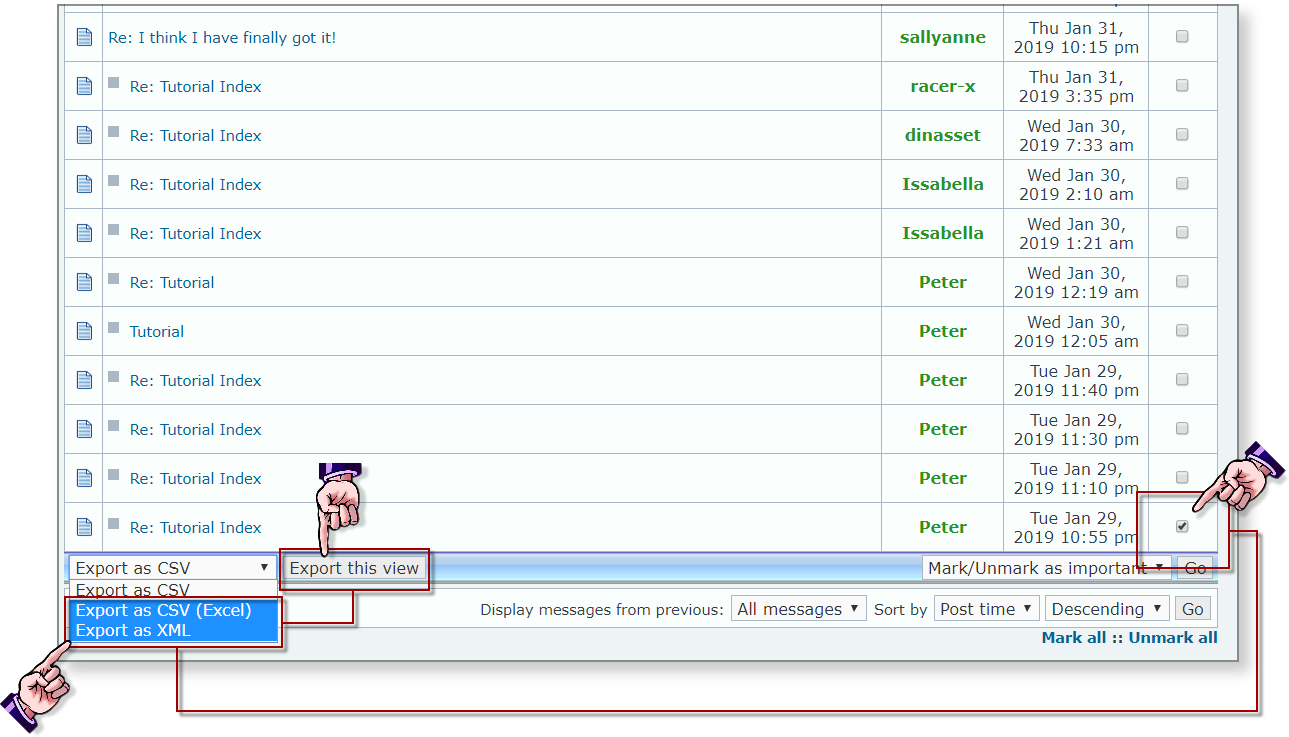
If you scroll down to the bottom,
while viewing your PM's.

You should see an Export option.

Place a check mark into the message(s) you wish to export.
Select either Export as CVS(Excel) or Export as XML.
Image

FYI... I find that XML gives a better breakdown of messages than CVS.
I haven't had the need to save any of my PM's,
and I also found while trying this out,
that if you select Export as CVS(Excel) or Export as XML.
It doesn't matter if you place a check mark or not.
It will export every message.

It's not the best system,
but that's what we have to work with.
Until such time,
that a change or update is made to phpBB.

;)

_________________
Image
"A wise man learns more from a foolish question than a fool can learn from a wise answer"
Image


Top
 Post subject: Re: Saving Private Messages
PostPosted: Mon Feb 11, 2019 3:54 pm  (#3) 
Offline
GimpChat Member

Joined: Feb 26, 2014
Posts: 248
I manually checked every single PM on page 1 (can I also go to page 2 and check them all (automatically somehow?) and then export all the messages?

I then checked Export as CSV Excel and it seems to do something but never prompted me to save anywhere like a flash drive.

How do I choose my flash drive?

I'm trying to read unread PMs which I guess I have to delete the old ones first.

Thank you!
>>>>>>>>>>>>>>>>>>>>>>

Apparently I have unread PMs but I don't want to lose any of the PMs I have still stored in my GIMP PM folder.

Is there a quick/easy way to export or save them besides opening each one and copying/pasting into Libre Writer?

Thank you![/quote]

If you scroll down to the bottom,
while viewing your PM's.

You should see an Export option.

Place a check mark into the message(s) you wish to export.
Select either Export as CVS(Excel) or Export as XML.

Image

FYI... I find that XML gives a better breakdown of messages than CVS.
I haven't had the need to save any of my PM's,
and I also found while trying this out,
that if you select Export as CVS(Excel) or Export as XML.
It doesn't matter if you place a check mark or not.
It will export every message.

It's not the best system,
but that's what we have to work with.
Until such time,
that a change or update is made to phpBB.

;)[/align][/quote]


Top
 Post subject: Re: Saving Private Messages
PostPosted: Mon Feb 11, 2019 4:02 pm  (#4) 
Offline
Administrator
User avatar

Joined: Aug 10, 2012
Posts: 14206
Location: Native to NYC living in Arizona, Gimp 2.8 - 3.0, Win 11 PC.
The interface for exporting messages,
is limited.
The file will save to where your browse saves downloaded files.
If you want to save to a different location.
You would need to change this in your browser setting.
I would than suggest,
once you've exported your messages.
To changing the download location,
back to what it was originally.

_________________
Image
"A wise man learns more from a foolish question than a fool can learn from a wise answer"
Image


Top
 Post subject: Re: Saving Private Messages
PostPosted: Mon Feb 11, 2019 4:14 pm  (#5) 
Offline
GimpChat Member

Joined: Feb 26, 2014
Posts: 248
The PC I'm on only has IE 11 (not updated) and an old Chrome version.

Neither allow you to choose where to save a file.

I'll have to access this forum with FF some day where I could choose the destination.

Also, is there a way to place a check-mark next to every PM on 2 pages and then export as CSV Excel?

Does that create one large Excel fiel with all the messages in it?

Thank you.


Top
 Post subject: Re: Saving Private Messages
PostPosted: Mon Feb 11, 2019 4:20 pm  (#6) 
Offline
Administrator
User avatar

Joined: Aug 10, 2012
Posts: 14206
Location: Native to NYC living in Arizona, Gimp 2.8 - 3.0, Win 11 PC.
eagertolearn wrote:
The PC I'm on only has IE 11 (not updated) and an old Chrome version.

Neither allow you to choose where to save a file.

I'll have to access this forum with FF some day where I could choose the destination.


You should be able to change the download location within both browsers.
Unless this is restricted by the network your using.

* * *

Below is a link,
on how to change the default download location in Internet Explorer.


Internet Explorer - Change Default Download Location

_________________
Image
"A wise man learns more from a foolish question than a fool can learn from a wise answer"
Image


Top
 Post subject: Re: Saving Private Messages
PostPosted: Mon Feb 11, 2019 4:27 pm  (#7) 
Offline
Administrator
User avatar

Joined: Aug 10, 2012
Posts: 14206
Location: Native to NYC living in Arizona, Gimp 2.8 - 3.0, Win 11 PC.
eagertolearn wrote:
Also, is there a way to place a check-mark next to every PM on 2 pages and then export as CSV Excel?

Does that create one large Excel fiel with all the messages in it?

Thank you.

The file that will be created is a .csv file,
if Export as CSV (Excel) is selected.
If Export As XML is selected.
This will create a .xml file.

You will need to save each page,
as a separate file.

_________________
Image
"A wise man learns more from a foolish question than a fool can learn from a wise answer"
Image


Top
 Post subject: Re: Saving Private Messages
PostPosted: Mon Feb 11, 2019 4:54 pm  (#8) 
Offline
GimpChat Member

Joined: Feb 26, 2014
Posts: 248
Thank you so much for those IE directions which seem to work.

But, when I place a check-mark next to one PM or all, I get them all listed in the data file saved as CSV Excel to my flash drive - so I can't read the info in the message - just the subject.


Top
 Post subject: Re: Saving Private Messages
PostPosted: Mon Feb 11, 2019 5:05 pm  (#9) 
Offline
Administrator
User avatar

Joined: Aug 10, 2012
Posts: 14206
Location: Native to NYC living in Arizona, Gimp 2.8 - 3.0, Win 11 PC.
eagertolearn wrote:
Thank you so much for those IE directions which seem to work.

But, when I place a check-mark next to one PM or all, I get them all listed in the data file saved as CSV Excel to my flash drive - so I can't read the info in the message - just the subject.

It should save the message body as well.
I've done this and it indeed has the entire message.
I open the file with Note Pad,
and can read all the messages,
that were exported on the .csv file.

_________________
Image
"A wise man learns more from a foolish question than a fool can learn from a wise answer"
Image


Top
 Post subject: Re: Saving Private Messages
PostPosted: Mon Feb 11, 2019 5:18 pm  (#10) 
Offline
GimpChat Member

Joined: Feb 26, 2014
Posts: 248
Is it possible for me to see what's the largest PM to save and then delete?

I've saved 2 messages and deleted them but I'm still using 92% so I still can't read my unread message.

Thank you.


Top
 Post subject: Re: Saving Private Messages
PostPosted: Mon Feb 11, 2019 5:22 pm  (#11) 
Offline
Administrator
User avatar

Joined: Aug 10, 2012
Posts: 14206
Location: Native to NYC living in Arizona, Gimp 2.8 - 3.0, Win 11 PC.
eagertolearn wrote:
Is it possible for me to see what's the largest PM to save and then delete?

I've saved 2 messages and deleted them but I'm still using 92% so I still can't read my unread message.

Thank you.

Sorry, but no.
You'll have to go through them and figure out what you feel can be delete.
The system isn't great,
but that's all we have.

_________________
Image
"A wise man learns more from a foolish question than a fool can learn from a wise answer"
Image


Top
 Post subject: Re: Saving Private Messages
PostPosted: Thu Feb 14, 2019 11:36 am  (#12) 
Offline
GimpChat Member

Joined: Feb 26, 2014
Posts: 248
Is it possible to forward my PMs to a gmail or yahoo email account?

Otherwise, I'd have to save and delete each message one-by-one which is super time-consuming.

Other solutions?

Thank you.


Top
 Post subject: Re: Saving Private Messages
PostPosted: Thu Feb 14, 2019 1:43 pm  (#13) 
Offline
Administrator
User avatar

Joined: Aug 10, 2012
Posts: 14206
Location: Native to NYC living in Arizona, Gimp 2.8 - 3.0, Win 11 PC.
eagertolearn wrote:
Is it possible to forward my PMs to a gmail or yahoo email account?

Otherwise, I'd have to save and delete each message one-by-one which is super time-consuming.

Other solutions?

Thank you.

There is no way,
that I'm aware of.
To forward Privet Messages to your email.

The only method to save massages in mass.
Is to export them,
as I have already outlined.

If you Mark All messages,
Than unmark the messages,
which you feel are most important to you and delete the marked ones.

* * *

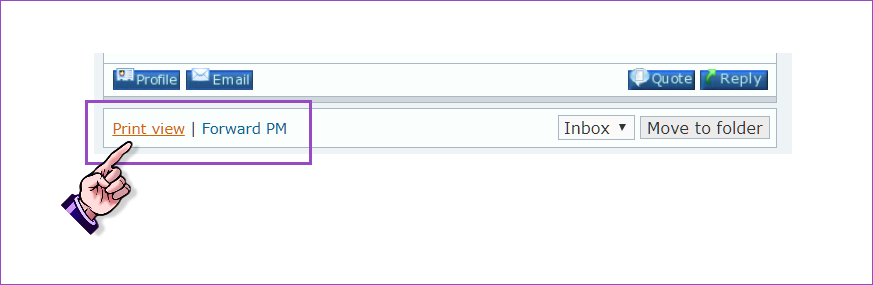
There's also an option to Print view.
Which can be found at the bottom of every individual PM.

Image

From this page view of a privet massage,
you can use the browser's right-click menu.
To print the PM,
or save it as a pdf file or other file type,
depending on what file save options are available to your system.


Next to Print view,
is a Forward PM option.
This option,
allows users to forward a privet message,
to the Gimp Chat Administration.

* * *

If you would like further detailed information,
on the bulletin board system,
employed by Gimp Chat,
or other general info about the system.
You can visit the link below:

phpBB.com,The Open Source Bulletin Board System

_________________
Image
"A wise man learns more from a foolish question than a fool can learn from a wise answer"
Image


Top
Post new topic Reply to topic  [ 13 posts ] 

All times are UTC - 5 hours [ DST ]


* Login  


Powered by phpBB3 © phpBB Group