It is currently Mon Sep 21, 2026 5:17 pm


All times are UTC - 5 hours [ DST ]


Post new topic Reply to topic  [ 7 posts ] 
Author Message
 Post subject: import of paths
PostPosted: Tue Feb 19, 2019 6:38 am  (#1) 
Offline
GimpChat Member

Joined: Apr 09, 2018
Posts: 1888
Location: France
GIMP Version: 2.8.9
Operating System: Windows
GIMP Experience: New User


:wvy
I wanted to test the export and import of paths for the first time.
But when I want to import a path, it does not appear in the folder where I saved it, and yet in the bottom right, it appears "svg files". So I have to write the path name in the "Location" area.
If at the bottom right, I replace "svg files" by "all files", the names of the paths appear but without the extension. (And the extension does not appear either when I open the folder with the 'Windows explorer).
What should I do in my Gimp?

_________________
Les parfums, les couleurs et les sons se répondent.Baudelaire (Les fleurs du mal)
2.10.36/(Samj) Gimp 2.10.38 OS Windows 10 Home 64 bits


Share on Facebook Share on Twitter Share on Orkut Share on Digg Share on MySpace Share on Delicious Share on Technorati
Top
 Post subject: Re: import of paths
PostPosted: Tue Feb 19, 2019 7:21 am  (#2) 
Offline
Script Coder
User avatar

Joined: Oct 25, 2010
Posts: 4812
Has it really been saved as ".svg", or was a further extension added (".svg.txt" or similar, typically if you download something with IE)? Is your file explorer configured to always show file extensions?

_________________
Image


Top
 Post subject: Re: import of paths
PostPosted: Tue Feb 19, 2019 7:26 am  (#3) 
Offline
GimpChat Member

Joined: Sep 23, 2016
Posts: 317
level_0 wrote:
(And the extension does not appear either when I open the folder with the 'Windows explorer).


In Windows Explorer, there is a tab File in the top left hand corner.

Navigate as follows:
File
Change folder and search options
View
Hide extensions for known file types

Uncheck that.


Top
 Post subject: Re: import of paths
PostPosted: Tue Feb 19, 2019 8:19 am  (#4) 
Offline
GimpChat Member

Joined: Apr 09, 2018
Posts: 1888
Location: France
ofnuts wrote:
Has it really been saved as ".svg",

Yes and I use Firefox for 15 years ... :)
ofnuts wrote:
Is your file explorer configured to always show file extensions?

yes for years and I display even the hidden files :)
the 2 exported paths are called "voit" and "voiture_bleue" and are as follows in gimp:
Image
In Windows explorer:
Image

_________________
Les parfums, les couleurs et les sons se répondent.Baudelaire (Les fleurs du mal)
2.10.36/(Samj) Gimp 2.10.38 OS Windows 10 Home 64 bits


Top
 Post subject: Re: import of paths
PostPosted: Tue Feb 19, 2019 8:44 am  (#5) 
Offline
GimpChat Member

Joined: Apr 09, 2018
Posts: 1888
Location: France
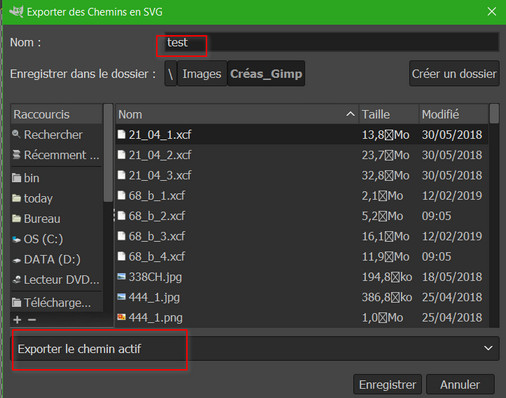
I just started exporting a path to show what's going on.
I export a path named "test" and as you see, there is no extension proposed:
Image
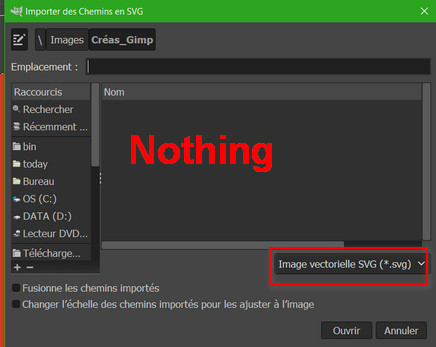
then I import::
Image
and if I choose "all files" instead of "svg files", my "test" path appears:
Image

_________________
Les parfums, les couleurs et les sons se répondent.Baudelaire (Les fleurs du mal)
2.10.36/(Samj) Gimp 2.10.38 OS Windows 10 Home 64 bits


Top
 Post subject: Re: import of paths
PostPosted: Tue Feb 19, 2019 9:31 am  (#6) 
Offline
GimpChat Member

Joined: Mar 04, 2011
Posts: 2615
You got it.
Do not rely on Gimp adding the correct suffix (or even any suffix) when exporting a file. The slight improvement that Gimp 2.10 brings is not certain.

Image

Importing: Into an existing canvas just as a path, use the right click context import as above, or a regular open an svg file, the path(s) will be rendered but there is that option to import paths as well.

Image


Top
 Post subject: Re: import of paths
PostPosted: Tue Feb 19, 2019 2:43 pm  (#7) 
Offline
GimpChat Member

Joined: Apr 09, 2018
Posts: 1888
Location: France
rich2005 wrote:
Do not rely on Gimp adding the correct suffix (or even any suffix) when exporting a file

rich2005Image
I hate myself for being so silly and not thinking about adding the svg extension myself!Image Image ImageNo problem now! :)

Quote:
Importing: Into an existing canvas just as a path, use the right click context import as above, or a regular open an svg file, the path(s) will be rendered but there is that option to import paths as well.

:tyspin
Problem solved.

_________________
Les parfums, les couleurs et les sons se répondent.Baudelaire (Les fleurs du mal)
2.10.36/(Samj) Gimp 2.10.38 OS Windows 10 Home 64 bits


Top
Post new topic Reply to topic  [ 7 posts ] 

All times are UTC - 5 hours [ DST ]


* Login  


Powered by phpBB3 © phpBB Group