It is currently Sun Sep 20, 2026 4:57 pm


All times are UTC - 5 hours [ DST ]


Post new topic Reply to topic  [ 8 posts ] 
Author Message
 Post subject: How to customize menubar
PostPosted: Sat Feb 23, 2019 8:57 am  (#1) 
Offline
GimpChat Member

Joined: Feb 23, 2019
Posts: 6
GIMP Version: 2.10.8
Operating System: Windows
GIMP Experience: New User
URL or Image link: https://imgur.com/a/Ud35j1b


Hi, I want add and customize new menu in menubar like image.


Share on Facebook Share on Twitter Share on Orkut Share on Digg Share on MySpace Share on Delicious Share on Technorati
Top
 Post subject: Re: How to customize menubar
PostPosted: Sat Feb 23, 2019 9:35 am  (#2) 
Offline
GimpChat Member
User avatar

Joined: May 10, 2013
Posts: 1442
Location: Finland
That depends whether they are scripts/plugins you have added afterwards or not.
Did you download them from somewhere?
Editing menu location of added scripts (.scm) and python (.py) plugins are done by text editing.
You can use Notepad++ on Windows or Geany on Linux to change the menu location.
If it's an .exe plugin, you will have to edit pluginrc file, that can be found in the Gimp user folder.

There are multiple blur filters, under Filters/Blur. I wouldn't add another one.
Never heard of grass, and there are several bump filters as far as I know.
Need more details to help.
You would probably want to name the new menu entry to something like "favorites" instead of hot filters. ;)


Top
 Post subject: Re: How to customize menubar
PostPosted: Sat Feb 23, 2019 9:56 am  (#3) 
Offline
Global Moderator
User avatar

Joined: May 16, 2010
Posts: 16173
MAX-RAY wrote:
GIMP Version: 2.10.8
Operating System: Windows
GIMP Experience: New User
URL or Image link: https://imgur.com/a/Ud35j1b


Hi, I want add and customize new menu in menubar like image.

Yes if you look for a line in the code similar to this using Notepad ++
"<Image>/Rod/Alpha to Logo/Reptile Skin Effect"


Just change the text to reflect where you want the menu item to be. Then save the filter. You will need to refresh scripts to see the changes in the menu. Or simply restart GIMP.
For instance you would change <Image>/Rod to <Image>hot filters

In your pluginrc file (for executable plugins), it looks something like this
(menu-path "<Image>/Python-Fu/Diego/Quantize")

_________________
Image


Top
 Post subject: Re: How to customize menubar
PostPosted: Sat Feb 23, 2019 1:42 pm  (#4) 
Offline
GimpChat Member

Joined: Feb 23, 2019
Posts: 6
That depends whether they are scripts/plugins you have added afterwards or not.
Did you download them from somewhere?
Editing menu location of added scripts (.scm) and python (.py) plugins are done by text editing.
You can use Notepad++ on Windows or Geany on Linux to change the menu location.
If it's an .exe plugin, you will have to edit pluginrc file, that can be found in the Gimp user folder.
[/quote]
In this moment no but I download some scripts in future.
Ok I do some edit in "pluginrc" And that's work fine :gaah
Howover I can't found Filters/Blur in "pluginrc" file :( .


-->There are multiple blur filters, under Filters/Blur. I wouldn't add another one.
Never heard of grass, and there are several bump filters as far as I know.
Need more details to help.

Ok I like theses filters :"gauissian blur", "bump map", "drop shadow"

-->"Never heard of grass, and there are several bump filters as far as I know."

Sorry man that's because I was lazy :mrgreen:, For "bump mab" you can find it in Fillers>Map>bump map

-->You would probably want to name the new menu entry to something like "favorites" instead of hot filters.;)


lol NP dude :hehe


Top
 Post subject: Re: How to customize menubar
PostPosted: Sat Feb 23, 2019 1:46 pm  (#5) 
Offline
GimpChat Member

Joined: Feb 23, 2019
Posts: 6
Rod wrote:
Yes if you look for a line in the code similar to this using Notepad ++
"<Image>/Rod/Alpha to Logo/Reptile Skin Effect"


Can you tell me where I can find this file ?


Top
 Post subject: Re: How to customize menubar
PostPosted: Sat Feb 23, 2019 2:55 pm  (#6) 
Offline
GimpChat Member
User avatar

Joined: May 10, 2013
Posts: 1442
Location: Finland
MAX-RAY wrote:
Howover I can't found Filters/Blur in "pluginrc" file :( .

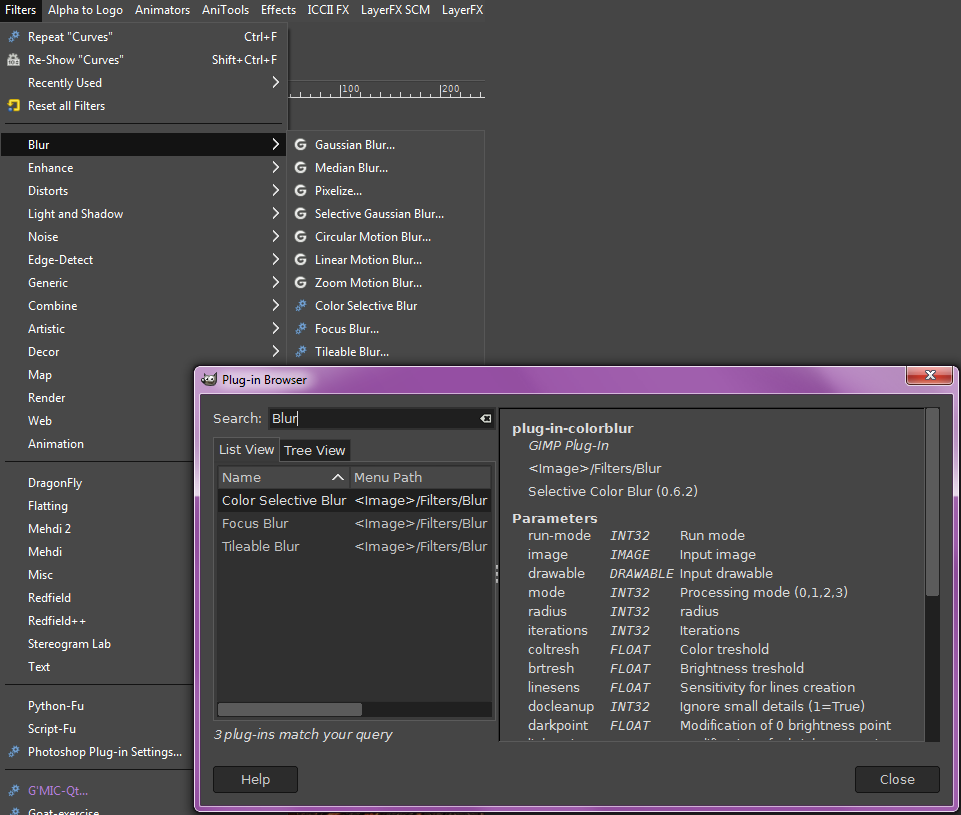
I think that's because it is built-in effect. They don't show up even in the plug-in browser.

Image

Pluginrc includes only the plug-ins that are added in the user plug-ins folder if I'm correct.
There might be a way to overcome this, but messing with the files in Program Files/GIMP 2.10/lib/gimp/2.0/plug-ins,
isn't probably a good idea.

I've always organized just the additional effects, and color coded them to know which ones I like.


Top
 Post subject: Re: How to customize menubar
PostPosted: Tue Feb 26, 2019 5:12 am  (#7) 
Offline
Global Moderator
User avatar

Joined: May 16, 2010
Posts: 16173
MAX-RAY wrote:
Rod wrote:
Yes if you look for a line in the code similar to this using Notepad ++
"<Image>/Rod/Alpha to Logo/Reptile Skin Effect"


Can you tell me where I can find this
file ?

You can download it right from gimp chats website. Just search reptile text effect.I would have attached it to this post but I am posting from my phone.

viewtopic.php?f=9&t=13384&p=181471&hilit=reptile+text+effect#p181471

_________________
Image


Top
 Post subject: Re: How to customize menubar
PostPosted: Tue Feb 26, 2019 10:00 am  (#8) 
Offline
GimpChat Member

Joined: Feb 23, 2019
Posts: 6
Ok guys thanks for help :D


Top
Post new topic Reply to topic  [ 8 posts ] 

All times are UTC - 5 hours [ DST ]


* Login  


Powered by phpBB3 © phpBB Group